|

|
Processed through Paypal No account required. |








Buy our over-priced crap to help pay the bills.



|
|
Processed through Paypal No account required. |
| File - Download optimizerDuck v1.3.4 | ||||||||
| Description | ||||||||
|
Always scroll to the bottom of the page for the main download link. We don't believe in fake/misleading download buttons and tricks. The link is always in the same place. optimizerDuck v1.3.4 Free, open-source Windows optimization tool for performance, privacy, and simplicity. 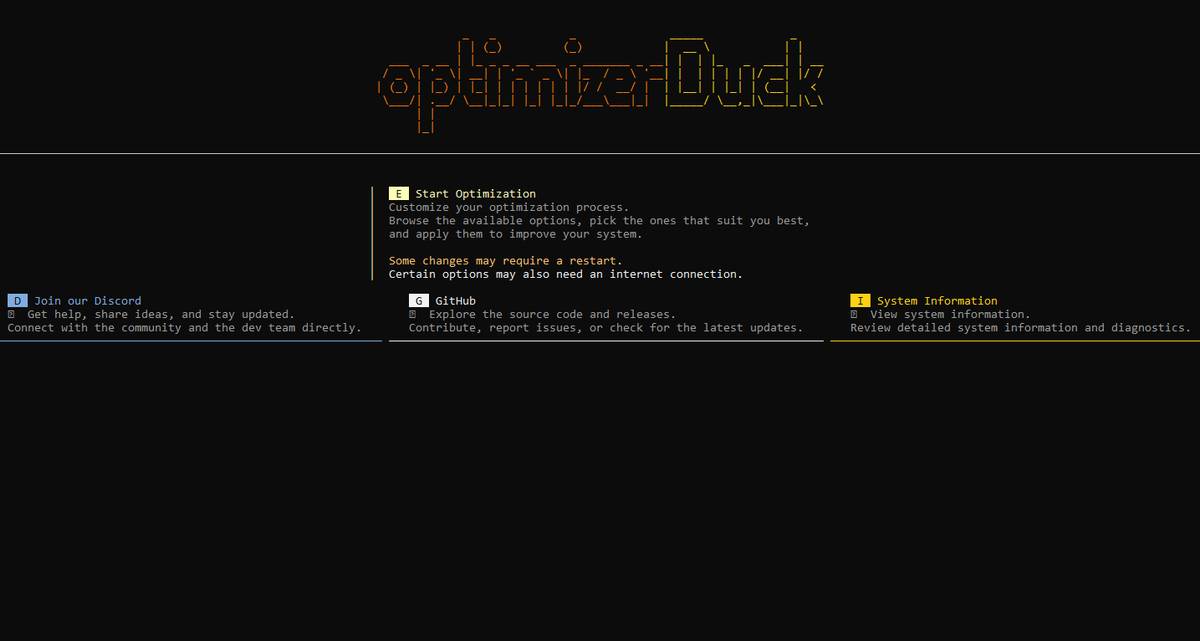 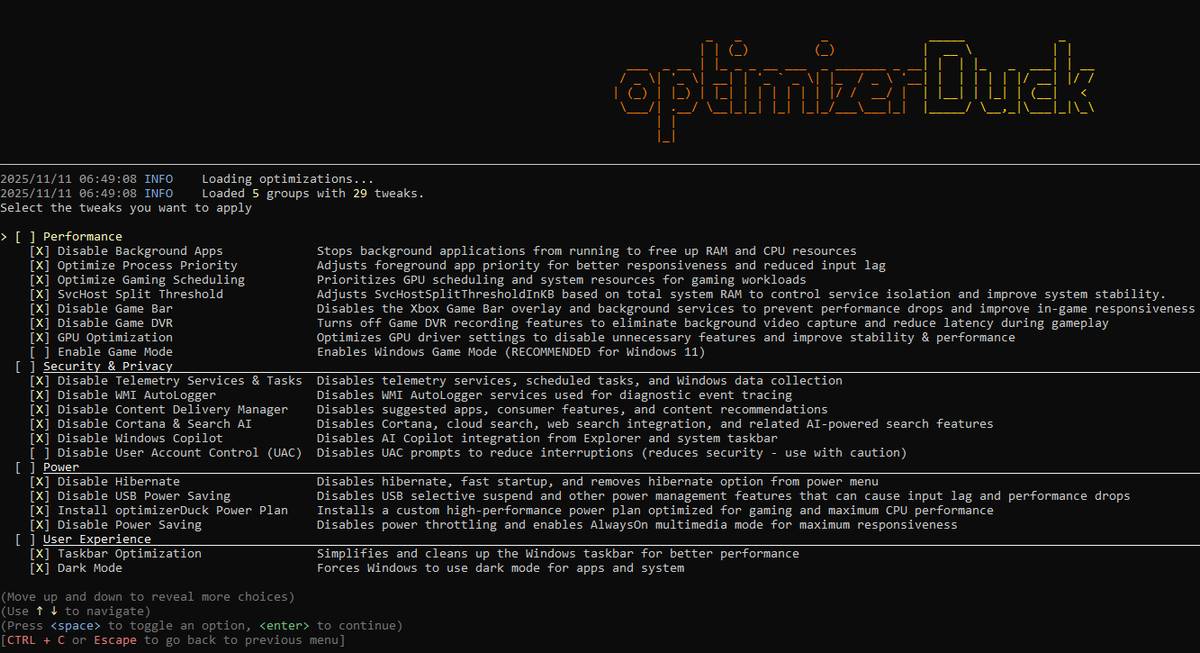 Features: • Performance Disable Background Apps: Stops background apps from running to free up RAM and CPU. Optimize Process Priority: Adjusts foreground app priority for better responsiveness and reduced input lag. Optimize Gaming Scheduling: Prioritizes GPU and system resources for gaming. SvcHost Split Threshold: Optimizes service isolation based on system RAM to improve stability. Disable Game Bar: Disables the Xbox Game Bar overlay and background services to improve in-game performance. Enable Game Mode: Enables Windows Game Mode for a better gaming experience (Recommended on Windows 11). Disable Game DVR: Turns off background video recording to reduce latency. GPU Optimization: Optimizes AMD, NVIDIA, and Intel GPU driver settings for better stability and performance. • Bloatware & Services Remove Bloatware Apps: Removes pre-installed bloatware to free up storage and system resources. Debloat Microsoft Edge: Reduces Edge's system integration and disables unnecessary features. Configure Services: Disables unnecessary background services to reduce resource consumption. • Power Disable Hibernate: Disables hibernation and Fast Startup to save disk space and prevent issues. Disable USB Power Saving: Prevents USB selective suspend to reduce input lag on peripherals. Install optimizerDuck Power Plan: Installs a custom high-performance power plan for maximum CPU performance. Disable Power Saving: Disables system-wide power throttling for maximum responsiveness. • Security & Privacy Disable User Account Control (UAC): Disables UAC prompts for fewer interruptions (use with caution). Disable Telemetry: Disables Windows data collection services, scheduled tasks, and error reporting. Disable WMI AutoLogger: Disables diagnostic event tracing services. Disable Content Delivery Manager: Disables ads, suggested apps, and content recommendations. Disable Cortana & Search AI: Disables Cortana, cloud search, and web search integration. Disable Windows Copilot: Disables AI Copilot integration in the taskbar and Explorer. • User Experience Taskbar Optimization: Cleans up the taskbar by hiding the search bar, Task View, and other clutter. Enable Dark Mode: Forces dark mode for both applications and the system UI. Explorer Optimization: Restores the classic context menu, improves folder navigation, and enhances usability. Optimize Visual Performance: Adjusts visual effects for best performance over appearance. Disable Notifications: Disables all notifications to minimize distractions. Optimize Mouse & Keyboard: Disables mouse acceleration and improves keyboard responsiveness. Install ZwTimerResolution: Installs a service to reduce input lag and improve system responsiveness. Safety First: • Ask for restore points before making changes • Modular design - apply only what you want • Extensive testing on various hardware configurations • Open source - you can check every line of code • Manual testing - All tweaks have been manually tested across multiple hardware configurations • Logging - Detailed logging file can be found in %APPDATA%/optimizerDuck/ directory Supported operating systems: Windows 10/11 Changes: v1.3.4 11-13-25 Redesigned Impact labels to be more user‑friendly Sorted optimizations by Enabled By Default and alphabetically by Impact Fixed minor spelling mistakes Note: This file has two hits on VirusTotal. We have confirmed these to be false positives. The file is safe. Important: After downloading, right-click on the file and choose to Run as Administrator. Click here to visit the author's website. Continue below for the main download link. |
||||||||
| Downloads | Views | Developer | Last Update | Version | Size | Type | Rank | |
| 781 | 4,249 | fatDuck | Nov 14, 2025 - 11:53 | 1.3.4 | 90.91MB | EXE |  , out of 17 Votes. , out of 17 Votes. |
|
| File Tags | ||||||||
| v1.3.4 optimizerDuck | ||||||||
Click to Rate File Share it on Twitter → Tweet
|


