|

|
Processed through Paypal No account required. |








Buy our over-priced crap to help pay the bills.



|
|
Processed through Paypal No account required. |
| File - Download gImageReader v3.4.3 | ||||||||
| Description | ||||||||
|
Always scroll to the bottom of the page for the main download link. We don't believe in fake/misleading download buttons and tricks. The link is always in the same place. gImageReader v3.4.3 A graphical user interface for the Tesseract open source Optical Character Recognition (OCR) engine. (OCR - The electronic conversion of images of text into machine-readable text) 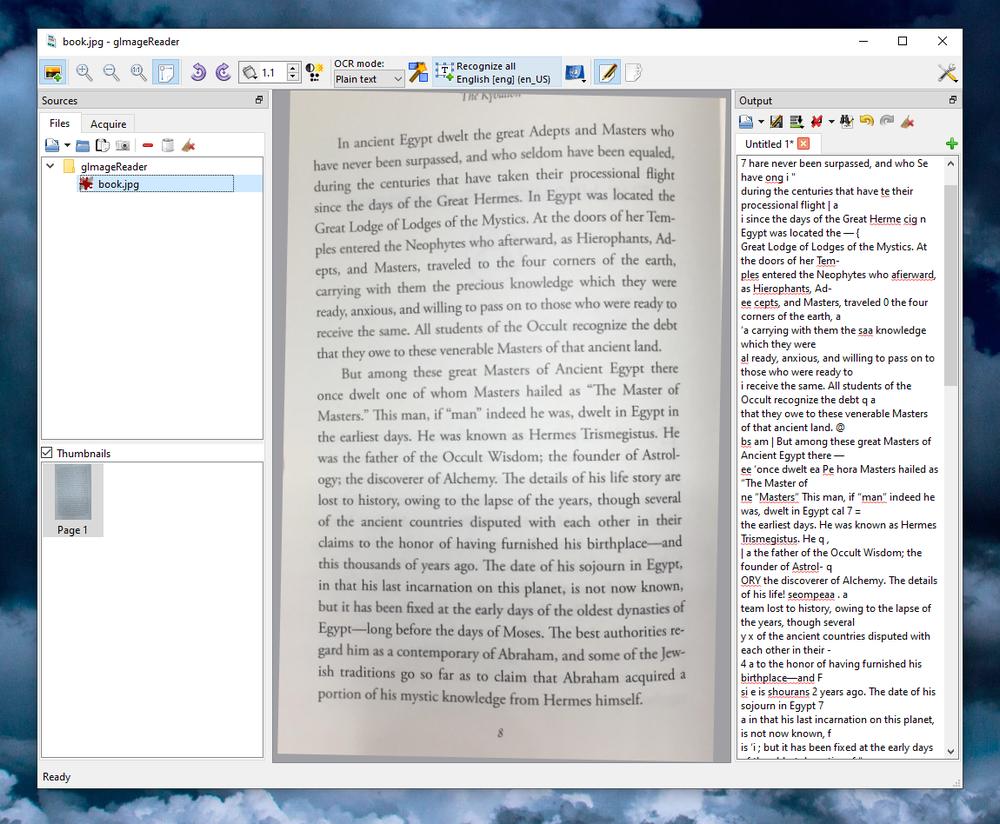 gImageReader Features: • Import PDF documents and images from disk, scanning devices, clipboard and screenshots • Process multiple images and documents in one go • Manual or automatic recognition area definition • Recognize to plain text or to hOCR documents • Recognized text displayed directly next to the image • Post-process the recognized text, including spellchecking • Generate PDF documents from hOCR documents • International language support: Weblate, Desktop entry About Tesseract: • Tesseract 4 adds a new neural net (LSTM) based OCR engine which is focused on line recognition, but also still supports the legacy Tesseract OCR engine of Tesseract 3 which works by recognizing character patterns. Compatibility with Tesseract 3 is enabled by using the Legacy OCR Engine mode (--oem 0). It also needs traineddata files which support the legacy engine, for example those from the tessdata repository. • Tesseract has unicode (UTF-8) support, and can recognize more than 100 languages "out of the box". • Tesseract supports various image formats including PNG, JPEG and TIFF. • Tesseract supports various output formats: plain text, hOCR (HTML), PDF, invisible-text-only PDF, TSV, ALTO and PAGE. • You should note that in many cases, in order to get better OCR results, you'll need to improve the quality of the image you are giving Tesseract. This download is for the Windows 64bit portable version (very bottom of page). If you need the Windows 32bit portable version, download here. Click here to visit the author's website. Continue below for the main download link. |
||||||||
| Downloads | Views | Developer | Last Update | Version | Size | Type | Rank | |
| 963 | 7,343 | Sandro Mani/Stefan Weil | Aug 15, 2025 - 11:25 | 3.4.3 | 84.09MB | ZIP |  , out of 21 Votes. , out of 21 Votes. |
|
| File Tags | ||||||||
| gImageReader v3.4.3 | ||||||||
Click to Rate File Share it on Twitter → Tweet
|


