|

|
Processed through Paypal No account required. |








Buy our over-priced crap to help pay the bills.



|
|
Processed through Paypal No account required. |
| File - Download ScenalyzerLIVE v4.0 | ||||||||
| Description | ||||||||
|
Always scroll to the bottom of the page for the main download link. We don't believe in fake/misleading download buttons and tricks. The link is always in the same place. ScenalyzerLIVE v4.0 A (now free) Windows program to capture and edit video from your DV-tapes. This download is provided by OlderGeeks.com with special permission from the author. ScenalyzerLIVE is the "missing link" between the Camera and your editing-program. 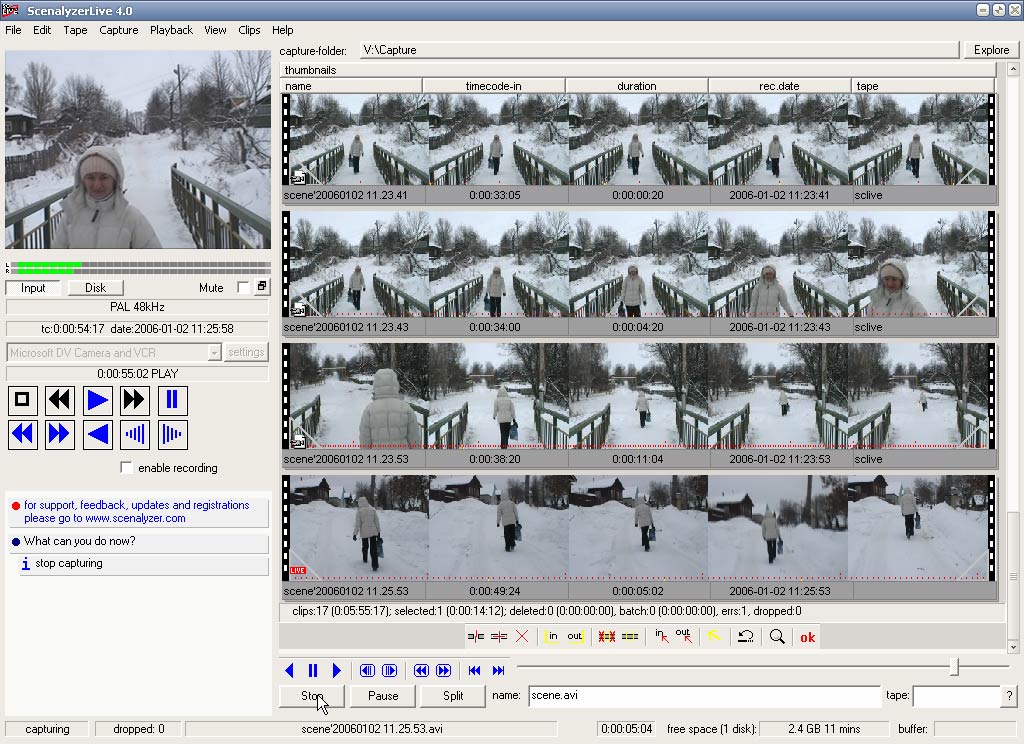 Features: • CAPTURING with REAL TIME SCENE DETECTION ScenalyzerLIVE (ScLive for short) has automatic scene splitting while capturing - each scene is written into its own .avi file in real-time. It splits the scenes based on the recording-time embedded in the DV-streams or based on optical content. During the Capturing process the Scenes are displayed with pictures. The captured files can be renamed, moved or deleted while or after capturing. After Capturing has stopped, the whole tape is now a few hundred scenes on your harddrive. The Scene-detection can be switched off and a whole tape can be captured into a single .avi file or multiple .avi files with 1GB, 2GB or 4GB each. • SEAMLESSLY CAPTURE/ PLAYBACK Due to the file-size or file-format limitation under the FAT32 file-system (Windows 98 SE, Windows ME) .avi files are limited to 2 or 4 GB, ScenalyzerLive provides a solid Workaround for this 2/4GB problem. With ScenalyzerLive you can seamlessly capture and playback any length of video. When the file size reaches the limit you specify, a new file is automatically and seamlessly created on the fly. • TIME-LAPSE CAPTURING With ScenalyzerLive you can use Time Lapse Capturing to create impressive effects that can be used in your final video. Record e.g. one hour of a Sunset and then use ScLive to capture the video into an e.g. 15 seconds .avi file which will show the sunset 240 times faster. • QUICKLY INDEX YOUR TAPE Scan a Mini-DV Tape for all Scenes in just 5 Minutes Use Capture / Tape Index and Sclive will capture the whole tape in FastForward. after approx. 5 minutes of indexing, Sclive shows a list of all scenes found on the Tape. This list can be used for Smart Batchcapturing: Simply set a checkmark on each scene that you want to capture in full motion, and then start "Smart Batchcapturing" • SMART BATCHCAPTURING 'Smart Batch capturing' can position the tape correctly even if the tape has 'interrupted time codes' ! Simply choose the Scenes you want to capture from the tape-index The selected Scenes are automatically, quickly and frame-accurately captured - Sclive still treats your Camera/VCR nicely. Normally ScLive rewinds to the first scene and then plays or fast-forwards to all further scenes without any more rewinding or 'heavy' positioning. • Easy STILLS EXPORT With ScenalyzerLive you can quickly export stills in both, jpg or bmp format. This can be done either from live-pictures from your camera or frame-accurately from .avi files by simply pressing 'F2'. ScenalyzerLive also gives you the option to choose 3 possible resolutions with optional de-interlacing, cropping and with adjustable jpg compression factor. It was probably never so easy to get high-quality pictures from your videos to quickly send them by e-mail or keep them for further reference on a CD-ROM. • more DETAILS: ScLive writes TYPE 1 or TYPE 2 DV-AVI FILES, WAV-only, Studio-DV files with Scene-Index or RT2000 files with separate Audio and Canopus compatible Files. ScLive's advanced buffering-structure makes it very 'dropped-frame'-resistant and nicely behaved to other programs running at the same time. Multi-file capture and playback ScLive works with PAL and NTSC. • Canopus DV Storm, EZDV and Raptor RT Support: ScenalyzerLive now supports capturing from the Storm, the EZDV and the Raptor RT Canopus Cards (thanks to Canopus for the help!) You need the latest drivers for your Canopus-Card In Sclive, set the file-type to "Canopus Compatible" You can also use any other capture-card that sclive supports to capture Canopus-compatible files with sclive. Sclive doesn't yet recognize if the canopus cards hardware dropped frames - this should not be a problem since these cards doesn't seem to drop frames at all while capturing (at least in all my tests). If frames can't be written to the hard disk quickly enough, Sclive still shows a dropped-frames message box. Important: You MUST right-click and run this program as administrator for it to work properly in modern version of Windows. This download is for the Windows English version with manual and license key (very bottom of page). If you need the Windows Deutsch version with manual and license key, download here. Click here to visit the author's website. Continue below for the main download link. |
||||||||
| Downloads | Views | Developer | Last Update | Version | Size | Type | Rank | |
| 1,336 | 8,387 | Andreas Winter | Jul 13, 2025 - 12:50 | 4.0 | 1.78MB | ZIP |  , out of 20 Votes. , out of 20 Votes. |
|
| File Tags | ||||||||
| ScenalyzerLIVE v4.0 | ||||||||
Click to Rate File Share it on Twitter → Tweet
|


