|

|
Processed through Paypal No account required. |








Buy our over-priced crap to help pay the bills.



|
|
Processed through Paypal No account required. |
| File - Download Reduce Memory v1.7 | ||||||||
| Description | ||||||||
|
Always scroll to the bottom of the page for the main download link. We don't believe in fake/misleading download buttons and tricks. The link is always in the same place. Reduce Memory v1.7 A free tool to free-up RAM in Windows for a quick performance boost. Reduce Memory removes as many pages as possible from the working set of the specified process. When too many programs are using up your computer’s RAM (Random Access Memory), you may find your system becoming slow or unresponsive. to clear out the clutter from your system’s memory and get it running smoothly again use Reduce Memory , it will free up your RAM memory a little in Windows. 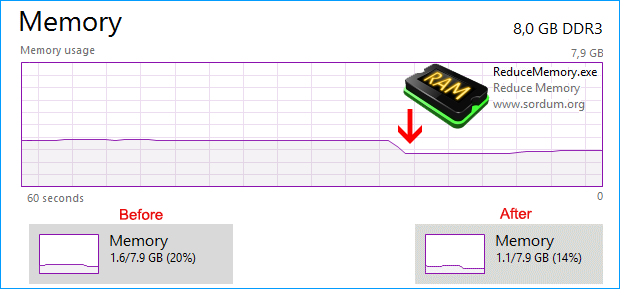 If you use Reduce Memory under the Normal/restricted user or with /O parameter , it will free up Memory for current user and only for Applications but if you use it with Administrator privileges it can optimize memory usage for services and Background working programs. How to use it: Extract the ZIP to any folder and then run the program. Click the “Clear memory” button to clear Memory Cache , You can see how much memory has been freed up for a short time. 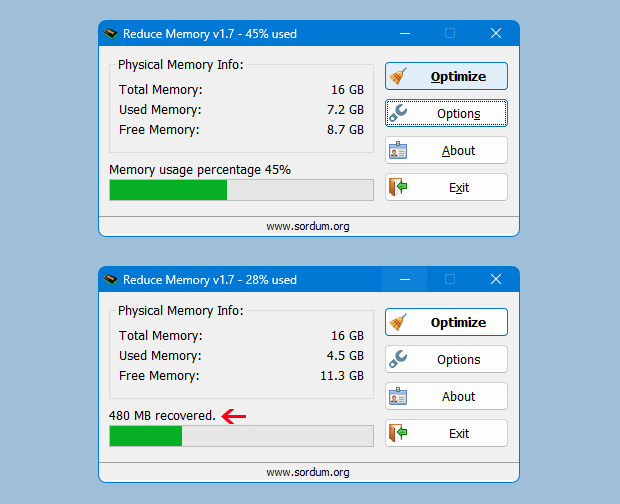 Under Options button you can find some other options for example ; Automatically start at window startup, Hide window at startup,Minimize to the sytem try,Always show Program window on top , Set the Amount of memory usage exceeds … If you choose Optimize memory every x Seconds , Reduce memory will optimize RAM usage automatically. You can write between 3 – 99999 seconds in the box. If a number which less than 3 is written, the box will recognize it as 3 . If you tick the Set the Amount of memory usage exceeds , when the System Memory usage reaches the threshold which specified by the slider, Ram usage will be Automatically optimized at intervals specified in the seconds box. To use your own taskbar icons ; please Choose 4th icon packs in options menu then save the settings , an icon folder will crate in the Reduce Memory root folder then you can change the icons and use your own. 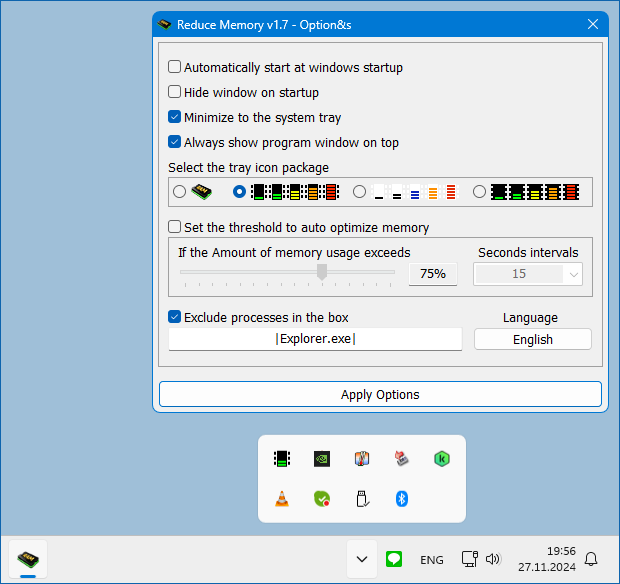 You can add some Processes which you want to exclude from Ram Optimization, into the “Exclude processes in the box” box. If the “Exclude processes in the box” section is unchecked, EmptyWorkingSet is applied to the processes written in the box. Reduce Memory has Cmd Parameter support. 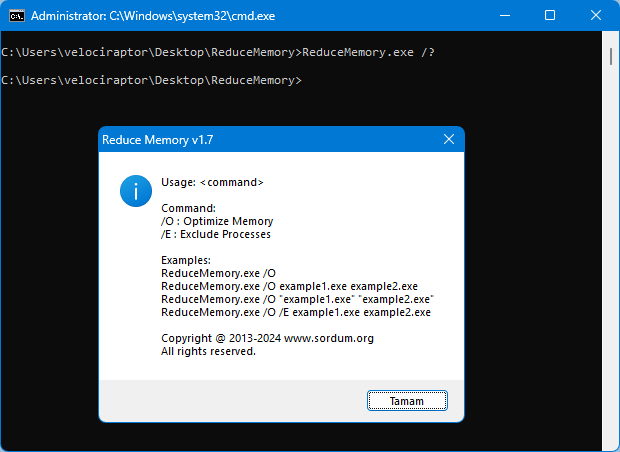 Supported operating systems: Windows 11 , Windows 10 , Windows 8.1 , Windows 8 , Windows 7 , Windows Vista , Windows Xp – (x86 & x64) Supported languages: English , Turkish , German , French , Korean , Russian , Spanish , Italian , Portuguese (BR) , Portuguese (Português), Persian , Romanian , Polish , Chinese (simplified), Chinese (Traditional) , Vietnamese , Dutch (Nederlands) , Japanese , Arabic , Georgian , Greek , Azerbaijani , lithuanian, Hebrew , Ukrainian , Czech , Spanish (Castellano) , Norwegian , Croatian Changes: (Wednesday, 27 November 2024) 1. [ FIXED ] – Language switching bug in the Options menu. 2. [ FIXED ] – Adjustment for Optimisation only in specified jobs. 3. [ ADDED ] – Added /E parameter to exclude specific processes. 4. [ ADDED ] – High contrast support. 5. [ ADDED ] – Some code Improvements. Click here to visit the author's website. Continue below for the main download link. |
||||||||
| Downloads | Views | Developer | Last Update | Version | Size | Type | Rank | |
| 1,068 | 3,938 | Sordum.org | Jan 03, 2025 - 11:59 | 1.7 | 1.04MB | ZIP |  , out of 44 Votes. , out of 44 Votes. |
|
| File Tags | ||||||||
| v1.7 Memory Reduce | ||||||||
Click to Rate File Share it on Twitter → Tweet
|


