|

|
Processed through Paypal No account required. |








Buy our over-priced crap to help pay the bills.



|
|
Processed through Paypal No account required. |
| File - Download SD Memory Card Formatter v5.0.3 | ||||||||
| Description | ||||||||
|
Always scroll to the bottom of the page for the main download link. We don't believe in fake/misleading download buttons and tricks. The link is always in the same place. SD Memory Card Formatter v5.0.3 Free formatter for SD/SDHC/SDXC/SDUC memory cards in Windows, macOS and Linux. The SD Memory Card Formatter formats SD Memory Card, SDHC Memory Card, SDXC Memory Card and SDUC Memory Card (respectively SD/SDHC/SDXC/SDUC Cards) complying with the SD File System Specification created by the SD Association (SDA). It is strongly recommended to use the SD Memory Card Formatter to format SD/SDHC/SDXC/SDUC Cards rather than using formatting tools provided with individual operating systems. In general, formatting tools provided with operating systems can format various storage media including SD/SDHC/SDXC/SDUC Cards, but it may not be optimized for SD/SDHC/SDXC/SDUC Cards and it may result in lower performance. SD/SDHC/SDXC Cards have a “Protected Area” for SD Card security purposes. The SD Memory Card Formatter does not format the protected area in the SD/SDHC/SDXC Cards. The protected area shall be formatted by an appropriate PC application or SD host devices that provide SD security function. Note: SDUC Card has no Protected Area. The SD Memory Card Formatter doesn’t support SD/SDHC/SDXC/SDUC Card encrypted by the “BitLocker To Go” functionality of Windows. Please format the SD/SDHC/SDXC/SDUC Card after it has been unlocked. 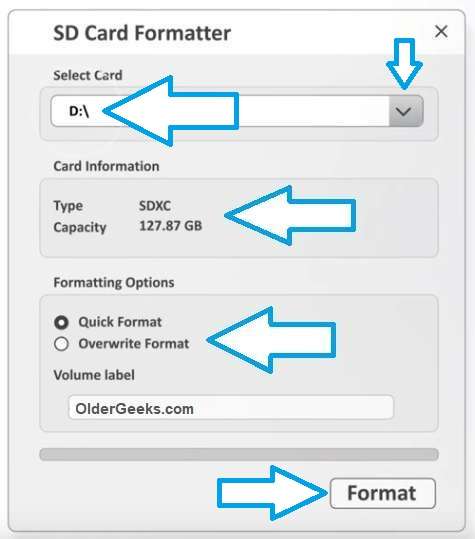 Supported operating systems: Windows 10 Version 22H2 Windows 11 Version 22H2 Windows 11 Version 23H2 Windows 11 Version 24H2 macOS 11 Big Sur macOS 12 Monterey macOS 13 Ventura macOS 14 Sonoma macOS 15 Sequoia Note: If you have a Mac with Apple silicon, e.g. M1, you might be asked to install Rosetta in order to open the SD Card Formatter. Important: Administrator Rights is required for Windows and macOS to execute SD Memory Card Formatter. User's Manuals English Japanese This download is for the Windows version (very bottom of page). All other download assets are below: macOS: Install SD Card Formatter.mpkg Linux: SDCardFormatterv1.0.3_Linux_x86_64.tgz SDCardFormatterv1.0.3_Linux_ARM64.tgz Click here to visit the author's website. Continue below for the main download link. |
||||||||
| Downloads | Views | Developer | Last Update | Version | Size | Type | Rank | |
| 1,363 | 8,939 | Tuxera | Dec 20, 2024 - 13:25 | 5.0.3 | 12.31MB | ZIP |  , out of 33 Votes. , out of 33 Votes. |
|
| File Tags | ||||||||
| SD Memory Card Formatter v5.0.3 | ||||||||
Click to Rate File Share it on Twitter → Tweet
|


