|

|
Processed through Paypal No account required. |








Buy our over-priced crap to help pay the bills.



|
|
Processed through Paypal No account required. |
| File - Download CopyPath v2.0 | ||||||||
| Description | ||||||||
|
Always scroll to the bottom of the page for the main download link. We don't believe in fake/misleading download buttons and tricks. The link is always in the same place. CopyPath v2.0 Adds "Copy File Path" and "Copy Folder Path" to the Windows Context Menu (Right-click menu). 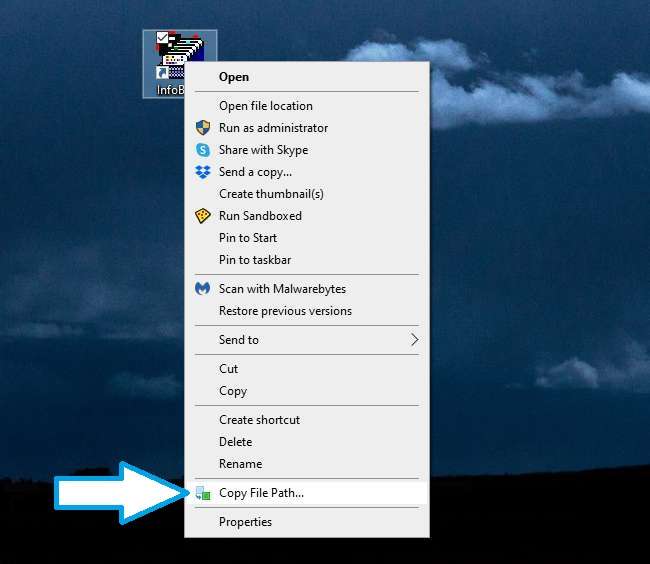 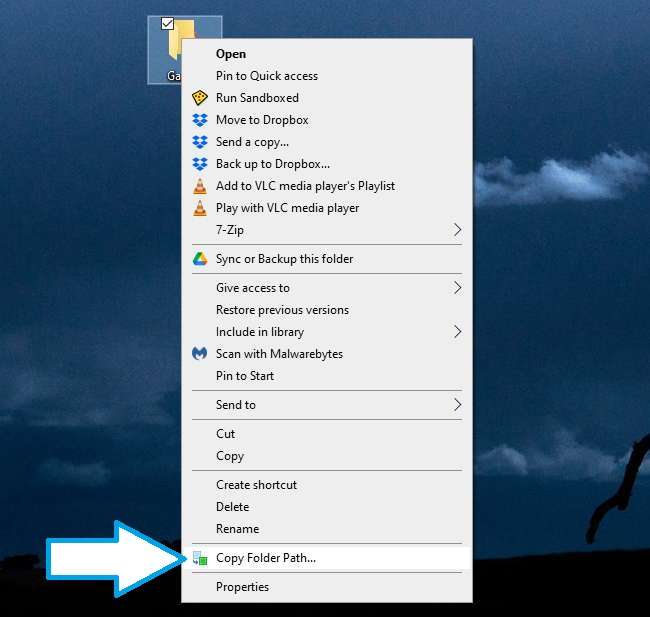 Usage: 1) Right-click on CopyPath.zip and choose extract. 2) From the resulting folder, run CopyPath.reg and allow it to make changes to your device. 3) In the warning box about adding information, answer yes to "Are you sure you want to continue?" 4) Now right-click any file or folder to see your new menu command. To remove CopyPath: 1) Run RemoveCopyPath.reg and allow it to make changes to your device. 2) In the warning box about adding information, answer yes to "Are you sure you want to continue?" Changes: v2.0 Added a removal process. Updated instructions. Click here to visit the author's website. Continue below for the main download link. |
||||||||
| Downloads | Views | Developer | Last Update | Version | Size | Type | Rank | |
| 1,450 | 5,828 | OlderGeeks.com | Apr 11, 2024 - 10:57 | 2.0 | 1.1KB | ZIP |  , out of 55 Votes. , out of 55 Votes. |
|
| File Tags | ||||||||
| CopyPath v2.0 | ||||||||
Click to Rate File Share it on Twitter → Tweet
|


