|

|
Processed through Paypal No account required. |








Buy our over-priced crap to help pay the bills.



|
|
Processed through Paypal No account required. |
| File - Download USB Drive Factory Reset Tool v3.00 | ||||||||
| Description | ||||||||
|
Always scroll to the bottom of the page for the main download link. We don't believe in fake/misleading download buttons and tricks. The link is always in the same place. USB Drive Factory Reset Tool v3.00 Restore USB flash drive back to full capacity After having tooled around with a bootable USB flash drive using your raw image overwritten or multi-partitioned USB pen drive, you might find it mandatory to revert it back to factory defaults. Essentially recovering or restoring the USB flash drive back to its original state with a single disk drive partition loaded with any of FAT, FAT32, exFAT or NTFS file system is easy. This allows the USB storage device to be easily detected and used again by all computers, routers, and smart TVs. You might find it necessary to restore a USB drive after working with tools, such as Rufus, USB Disk Storage Format Tool on Windows to burn an ISO or dd command on Linux, to write an image file to the USB storage drive. Depending on the file used, these tools can make your USB device appear corrupted or unreadable on some computers or smart TVs. In some cases, the flash drive might not be assigned a drive letter and the USB not detected by your computer or smart TV. This is simply because these tools use raw-write style to transfer data in disk image (usualy an .img or .iso file) to a USB flash drive. As a result, the existing MBR (Master Boot Record is the boot sector located at the very beginning of partitioned storage devices), partition table, HPA (Host Protected Area is an area of a storage drive that is not normally visible to an operating system), and/or file system is overwritten with that of the raw image file. USB Drive Factory Reset Tool is software that helps you wipe clean and factory set your USB flash drive, pen drive, thumb drive, and any other USB storage devices back to the way they were when you bought them. The program has a simple user interface that is easy to figure out, despite the fact that it doesn't support languages other than English. Both novice and pro should find it easy to figure out. System Requirements Windows 11 Windows 10 Windows 8.1 Windows 8 Windows 7 Windows Vista Windows XP Windows 2000 Windows Server 2022/2019/2016/2012/2008/2003/2000 Changes: v3.00 Fixed frozen issue for new SanDisk flash drives. Reclaim disk space used by HPA on Linux. 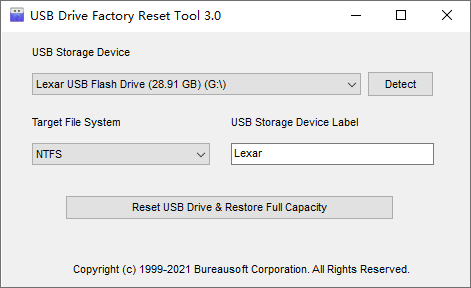 Click here to visit the author's website. Continue below for the main download link. |
||||||||
| Downloads | Views | Developer | Last Update | Version | Size | Type | Rank | |
| 3,784 | 7,882 | Bureausoft Corporation | Oct 31, 2021 - 10:49 | 3.00 | 945.9KB | EXE |  , out of 62 Votes. , out of 62 Votes. |
|
| File Tags | ||||||||
| USB Drive Factory Reset Tool v3.00 | ||||||||
Click to Rate File Share it on Twitter → Tweet
|


