|

|
Processed through Paypal No account required. |








Buy our over-priced crap to help pay the bills.



|
|
Processed through Paypal No account required. |
| File - Download Cygwin v3.6.1 | ||||||||
| Description | ||||||||
|
Always scroll to the bottom of the page for the main download link. We don't believe in fake/misleading download buttons and tricks. The link is always in the same place. Cygwin v3.6.1 Get that Linux feeling - on Windows Cygwin is: • a large collection of GNU and Open Source tools which provide functionality similar to a Linux distribution on Windows. • a DLL (cygwin1.dll) which provides substantial POSIX API functionality. Cygwin is not: • a way to run native Linux apps on Windows. You must rebuild your application from source if you want it to run on Windows. • a way to magically make native Windows apps aware of UNIX® functionality like signals, ptys, etc. Again, you need to build your apps from source if you want to take advantage of Cygwin functionality. 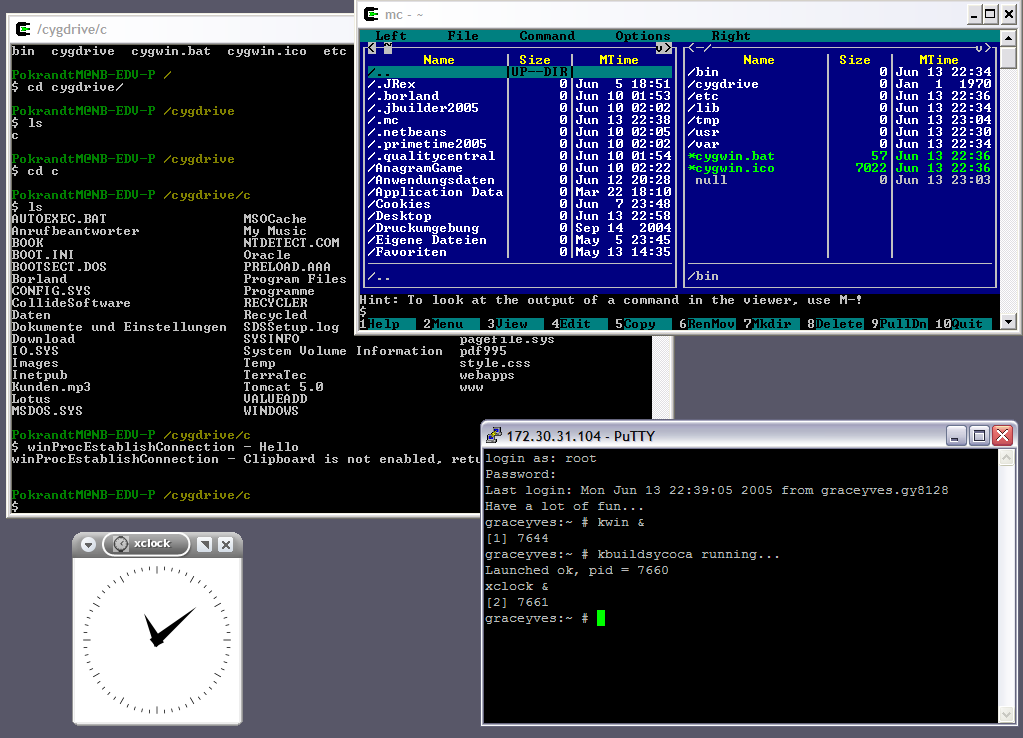 Supported operating systems: Windows 8.1 64bit or higher and Windows Server 2012 R2 64bit or higher. Note: The last installer supporting 32bit versions of Windows is available below. General installation notes When installing packages for the first time, the setup program does not install every package. Only the minimal base packages from the Cygwin distribution are installed by default, which takes up about 100 MB. Clicking on categories and packages in the setup program package installation screen allows you to select what is installed or updated. Individual packages like bash, gcc, less, etc. are released independently of the Cygwin DLL, so the Cygwin DLL version is not useful as a general Cygwin release number. The setup program tracks the versions of all installed components and provides the mechanism for installing or updating everything available from this site for Cygwin. Once you've installed your desired subset of the Cygwin distribution, the setup program will remember what you selected, so re-running it will update your system with any new package releases. The setup program will check by default if it runs with administrative privileges and, if not, will try to elevate the process. If you want to avoid this behaviour and install under an unprivileged account just for your own usage, run setup with the --no-admin option. Q: How do I add a package to my existing Cygwin installation? A: Run the setup program and select the package you want to add. Tip: if you don't want to also upgrade existing packages, select 'Keep' at the top-right of the package chooser page. Be sure to download and read the Cygwin User's Guide. You're gonna need it. Cygwin User's Guide PDF This download is for the Windows 64bit version (very bottom of page). If you need the last Windows 32bit version, download here. Click here to visit the author's website. Continue below for the main download link. |
||||||||
| Downloads | Views | Developer | Last Update | Version | Size | Type | Rank | |
| 6,102 | 14,555 | Cygwin Developers | May 04, 2025 - 13:40 | 3.6.1 | 1.5MB | EXE |  , out of 113 Votes. , out of 113 Votes. |
|
| File Tags | ||||||||
| Cygwin v3.6.1 | ||||||||
Click to Rate File Share it on Twitter → Tweet
|


