|

|
Processed through Paypal No account required. |








Buy our over-priced crap to help pay the bills.



|
|
Processed through Paypal No account required. |
| File - Download NetworkCountersWatch v1.06 | ||||||||
| Description | ||||||||
|
Always scroll to the bottom of the page for the main download link. We don't believe in fake/misleading download buttons and tricks. The link is always in the same place. NetworkCountersWatch v1.06 Show counters of network interfaces in Windows NetworkCountersWatch is a tool for Windows that displays system counters for every network interface on your system. The system counters include the number of incoming/outgoing bytes, number of incoming/outgoing packets, number of broadcast packets, and more. You can also initialize all counters to zero at any time in order to watch the network counters for specific event. NetworkCountersWatch also calculates and displays the current download speed and upload speed on your network interface. 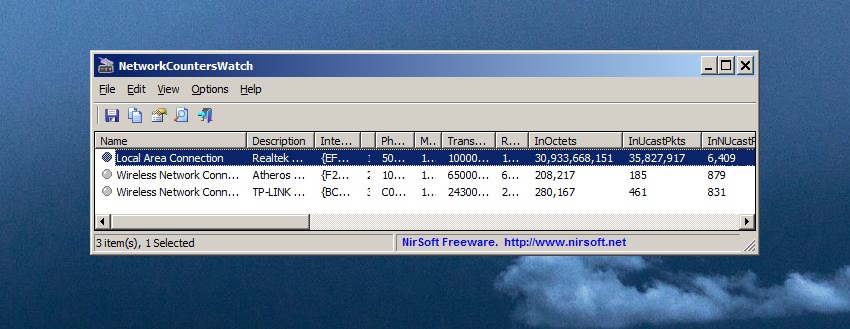 Supported operating systems: Windows Vista and up to Windows 11. Both 32-bit and 64-bit systems are supported. Start Using NetworkCountersWatch: NetworkCountersWatch doesn't require any installation process or additional DLL files. In order to start using it, simply run the executable file - NetworkCountersWatch.exe After running NetworkCountersWatch, the main window displays a table with the counters of active network interfaces. By default, Both 'Show Only Items With Non-Zero Counters' and 'Show Only Hardware Interfaces' options are turned on. In order to see all network interfaces on your system, you should turn off these options, but when you do it, you might see multiple interfaces with exactly the same counters. Reset And Restore Counters: You can use the 'Reset Counters Of Selected Items' option (F7) in order to initialize all counters to zero. Be aware that NetworkCountersWatch doesn't actually reset the system counters, it simply takes a snapshot of the current counters and then shows you the difference between the snapshot and the system counters. You can restore back the display of actual system counters by using the 'Restore Counters Of Selected Items' option. Counters Description: Here's the description of all network counters displayed by NetworkCountersWatch, taken from official documents of Microsoft: • InOctets: The number of octets of data received without errors through this interface. This value includes octets in unicast, broadcast, and multicast packets. • InUcastPkts: The number of unicast packets received without errors through this interface. • InNUcastPkts: The number of non-unicast packets received without errors through this interface. This value includes broadcast and multicast packets. • InDiscards: The number of inbound packets which were chosen to be discarded even though no errors were detected to prevent the packets from being deliverable to a higher-layer protocol. • InErrors: The number of incoming packets that were discarded because of errors. • InUnknownProtos: The number of incoming packets that were discarded because the protocol was unknown. • InUcastOctets: The number of octets of data received without errors in unicast packets through this interface. • InMulticastOctets: The number of octets of data received without errors in multicast packets through this interface. • InBroadcastOctets: The number of octets of data received without errors in broadcast packets through this interface. • OutOctets: The number of octets of data transmitted without errors through this interface. This value includes octets in unicast, broadcast, and multicast packets. • OutUcastPkts: The number of unicast packets transmitted without errors through this interface. • OutNUcastPkts: The number of non-unicast packets transmitted without errors through this interface. This value includes broadcast and multicast packets. • OutDiscards: The number of outgoing packets that were discarded even though they did not have errors. • OutErrors: The number of outgoing packets that were discarded because of errors. • OutUcastOctets: The number of octets of data transmitted without errors in unicast packets through this interface. • OutMulticastOctets: The number of octets of data transmitted without errors in multicast packets through this interface. • OutBroadcastOctets: The number of octets of data transmitted without errors in broadcast packets through this interface. NetworkCountersWatch also displays the current download/upload speed ('Current Upload Speed' and 'Current Download Speed' columns) , calculated according to the change in InOctets and OutOctets counters. Changes: v1.06: Added 'Always On Top' option. License This utility is released as freeware. You are allowed to freely distribute this utility via floppy disk, CD-ROM, Internet, or in any other way, as long as you don't charge anything for this and you don't sell it or distribute it as a part of commercial product. If you distribute this utility, you must include all files in the distribution package, without any modification. Disclaimer The software is provided "AS IS" without any warranty, either expressed or implied, including, but not limited to, the implied warranties of merchantability and fitness for a particular purpose. The author will not be liable for any special, incidental, consequential or indirect damages due to loss of data or any other reason. Feedback If you have any problem, suggestion, comment, or you found a bug in this utility, you can send a message to nirsofer@yahoo.com Click here to visit the author's website. Continue below for the main download link. |
||||||||
| Downloads | Views | Developer | Last Update | Version | Size | Type | Rank | |
| 6,158 | 12,568 | Nir Sofer | Sep 22, 2025 - 11:03 | 1.06 | 52.2KB | ZIP |  , out of 93 Votes. , out of 93 Votes. |
|
| File Tags | ||||||||
| NetworkCountersWatch v1.06 | ||||||||
Click to Rate File Share it on Twitter → Tweet
|


