|

|
Processed through Paypal No account required. |








Buy our over-priced crap to help pay the bills.



|
|
Processed through Paypal No account required. |
| File - Download DShutdown v1.78.71 | ||||||||
| Description | ||||||||
|
Always scroll to the bottom of the page for the main download link. We don't believe in fake/misleading download buttons and tricks. The link is always in the same place. DShutdown v1.78.71 A few antivirus engines detect this as "Shutdown Malware". This is a false positive. This is because the program allows you to shut down a computer remotely. You know... like a virus. ;) The file is safe. DShutdown is a stand-alone program that allows you to easily shutdown and wake up local or remote PCs, with many specific options. DShutdown supports more than just standard shutdown options, there are options relating to "pure" shutdown (such as the "force after wait" option which causes a forced, but 'clear' shutdown). There are monitoring options that allow you to shutdown a PC after a particular application terminates (useful at the end of compressing several files). There are also options to shutdown a PC when Internet traffic reduces below a particular data-rate (useful to shutdown a PC when it has finished a large download). It is also possible to intercept a shutdown request, initiated by the user or an application, and to then execute the shutdown request with selected options from DShutdown. (For example: to simultaneously shut down all Lan PCs when the server shuts down). DShutdown doesn't force a power-off without logging off and saving settings. DShutdown instead provides a means to log-off, shutdown and safely power-off your PC. Administrators who use roaming profiles will appreciate the benefits of this feature. (Windows 9x/NT/2000/XP/Vista/Seven/8/Win10) 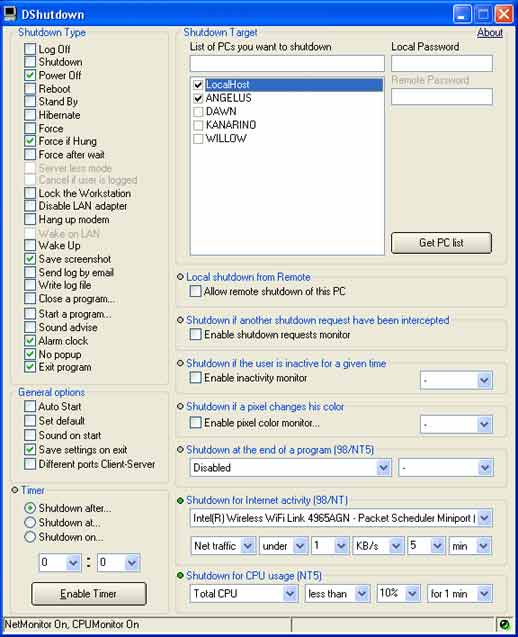 MODE 1 1. On local PC start 'DShutdown.exe'. 2. Select 'Server less mode' option 3. Set 'Remote User' and 'Remote Password' of a remote user that own shutdown privileges on remote PC you want shutdown. 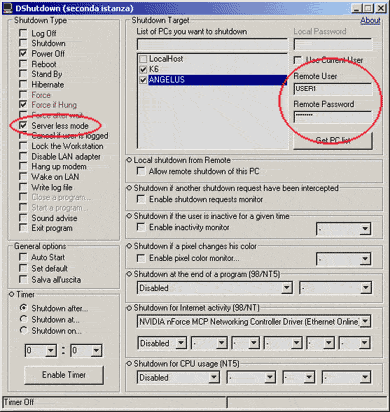 MODE 2 1. Install 'RDShutdown.exe' on remote PC (you can use 'RDShutdown Setup Utility.exe' to set a password). 2. On local PC start 'DShutdown.exe' (if you have set a password you must put it on 'Remote Password' box). 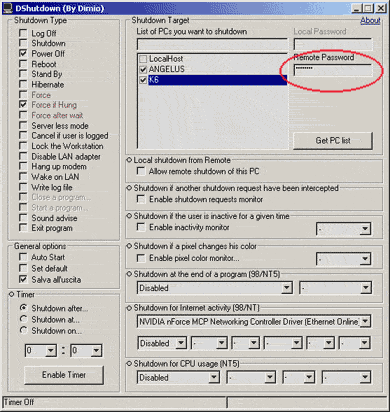
Continue below for the main download link. |
||||||||
| Downloads | Views | Developer | Last Update | Version | Size | Type | Rank | |
| 6,988 | 15,846 | Dimio | Dec 27, 2020 - 12:33 | 1.78.71 | 1.11MB | ZIP |  , out of 98 Votes. , out of 98 Votes. |
|
| File Tags | ||||||||
| DShutdown v1.78.71 | ||||||||
Click to Rate File Share it on Twitter → Tweet
|


