|

|
Processed through Paypal No account required. |








Buy our over-priced crap to help pay the bills.



|
|
Processed through Paypal No account required. |
| File - Download Bart v3.00 | ||||||||
| Description | ||||||||
|
Always scroll to the bottom of the page for the main download link. We don't believe in fake/misleading download buttons and tricks. The link is always in the same place. Bart v3.00 Bart is a file and folder backup tool, which transfers changes from multiple source directory trees to destination trees. When run, it will copy any files which have changed since the last run, bringing the destination up to date with the source in an efficient way, copying only files required. Bart can read from a list of source directories, so not only can it keep your My Documents folder backed up, but also any other data stored on your drive in other locations. Direct the target of each of these folders at a network drive on another machine, a second hard drive in the same machine, or removable media such as a USB pen drive. When first run, all the files will be copied, and then on subsequent runs only the files which have altered will be updated, new files copied, and deleted ones removed. Bart keeps the target completely in line with the source. It does not perform two-way synchronisation. If a file in the target was changed, on next run of Bart, it would be replaced with the file from the source. Source The source can be either a single file, or a directory. If a directory is used, then a checkbox controls whether all subdirectories are also copied. Multiple source directories can be chosen, so that all your data areas can be backed up at once. Destination The destination folder is kept synchronised with the source. Any changes which are made to the destination would be overwritten the next time Bart is run - to this end do not edit files in the destination, or save anything new! The syncronisation is one-way, and is complete. Exclusions An exclusion list can be set for each task, so that certain files can be ignored. To back up a photos directory, but leave out thumbnail files, the pattern "thumbs*" would be added. Multiple file specifications can be made, such as "*obj;*pdb;*aps;*.sbr;*.pch;*.idb;*.res", and full paths can be excluded by specifying them. "d:\photos\2004;thumbs*;00_index*;*gif" would omit the 2004 folder, and also skip over any file starting with "thumbs" or "00_index" and any ending with "gif". Exclude directories by specifying the whole directory, eg "c:\program files\firewall". Exclude files by specifying the filename, eg "persfw.conf", not the whole path "c:\program files\firewall\persfw.conf" Command line The following can be specified on the command line: -runall - Bart will run all enabled jobs, show the balloon summary and quit -show - When used with -runall, the main dialog is displayed while the jobs are running -stay - Bart will stick around once it's finished running the jobs. Clicking any buttons in the interface if -show is specified will also cause it to remain -shutdown - the computer will be shut down once the jobs have been run, as long as there were no errors in any of the tasks -ignoreerrors - if -shutdown has been specified and errors were found, shut down anyway -datelog - save detailed logs to different files, named as the date on which the job was run -logexclusions - also write files which are skipped to the detailed log file -file <filename> - open the specified job file -noballoon - do not display a tray icon balloon when the job has completed -auto - run silently with no user interaction, or windows: use this for running Bart from a Scheduled Task -showdetlog - open the detailed log file when the job completes -letter:x - set 'x' as the variable drive eg: c:\program files\bart\bart.exe -runall -show -shutdown This will start Bart, run all the jobs, and at completion the computer will be shut down Logging Bart writes an HTML-based log file (log.html) of its operations, a CSV with details of each run (summary.log), and pops up a task-tray balloon when the tasks are complete. 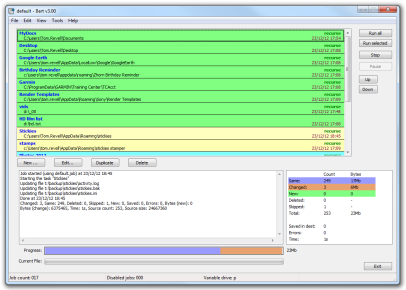 Click here to visit the author's website. Continue below for the main download link. |
||||||||
| Downloads | Views | Developer | Last Update | Version | Size | Type | Rank | |
| 6,784 | 13,893 | Zhorn Software | Jan 18, 2019 - 12:43 | 3.00 | 203.3KB | ZIP |  , out of 74 Votes. , out of 74 Votes. |
|
| File Tags | ||||||||
| v3.00 Bart | ||||||||
Click to Rate File Share it on Twitter → Tweet
|


