|

|
Processed through Paypal No account required. |








Buy our over-priced crap to help pay the bills.



|
|
Processed through Paypal No account required. |
| File - Download Remove Windows 10 Upgrade Tray Icon | ||||||||
| Description | ||||||||
|
Always scroll to the bottom of the page for the main download link. We don't believe in fake/misleading download buttons and tricks. The link is always in the same place. Remove Windows 10 Upgrade Tray Icon This will remove the pesky Windows 10 upgrade tray icon. Which started appearing on Windows 7,8 and 8.1 computers recently. Unzip the file. Right-click the file called "KillWin10TrayIcon.bat" and choose "Run as Administrator". All done! 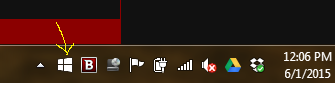
Continue below for the main download link. |
||||||||
| Downloads | Views | Developer | Last Update | Version | Size | Type | Rank | |
| 7,236 | 13,457 | OlderGeeks.com | Jun 01, 2015 - 19:19 | 1.0 | 495B | ZIP |  , out of 81 Votes. , out of 81 Votes. |
|
| File Tags | ||||||||
| Remove Windows 10 Upgrade Tray Icon | ||||||||
Click to Rate File Share it on Twitter → Tweet
|


