|

|
Processed through Paypal No account required. |








Buy our over-priced crap to help pay the bills.



|
|
Processed through Paypal No account required. |
| Files | ||||
| File Name | Rating | Downloads | ||
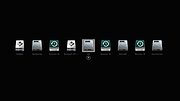 |
CloverBootloader v5172g CloverBootloader v5172g 👉 Boot macOS, Windows and Linux in UEFI or legacy mode. CloverBootloader is an open source bootloader for macOS, Windows and Linux on Mac or PC hardware with UEFI or BIOS firmware. Features: • Boot macOS, Windows and Linux in UEFI mode • Boot in legacy mode on Mac or PC with UEFI or BIOS firmware • Boot using UEFI firmware directly • CloverEFI UEFI firmware emulation • Customizable GUI with themes, icons, fonts, background images, animations and mouse pointers • Native screen resolution in GUI • Multilingual help from the boot GUI, depending on configuration • Save preboot logs from the GUI • Show hidden boot entries • Save original OEM ACPI tables • Test DSDT patching • Save screenshots from the GUI • Reset NVRAM • Create custom boot entries • Launch EFI command shell from the GUI Supported operating systems: • Bootloader support: macOS, Windows, Linux • Firmware support: UEFI, legacy BIOS Supported languages: Multilingual interface and help system. The project does not publish an official list of supported languages. Changes: v5172 03-22-26 The release corresponds to commit 6645e05. The release updated for compilation by gcc-15.2 because Xcode compilation is not fully correct. Fix errors in string usage. Changed XString8 -> XStringW for FullTitle and LoaderTitle. Explicit conversion from XString8 and XStringW. Restore old fixes abandoned at 5171. Restore laptop brightness fix. This download is for the ISO version (very bottom of page). A bootable ISO image (compressed with 7-Zip) containing Clover. Typically used to create a bootable CD/DVD or virtual machine boot image. All other download assets are below: EFI file: BOOTX64.efi.zip Contains the standalone BOOTX64.efi UEFI bootloader file. Useful for manually repairing or replacing the EFI boot file on a USB drive or EFI System Partition. macOS installer: Clover_r5172.pkg The macOS installer package. This is what most Hackintosh users running macOS would use to install or update Clover directly from macOS. Clover distribution archive: CloverV2-5172.zip The main Clover distribution archive. Contains the Clover bootloader files for manual installation or updating an existing Clover ... |
 |
6,571 | Jun 15, 2026 CloverHackyColor |
 |
Grub2Win v3.0.2.6 Grub2Win v3.0.2.6 👉 Safely multiboot Windows and Linux from a Windows-based GRUB setup. Grub2Win is a free and open source Windows application that lets you configure GRUB boot screens and boot options directly from Windows. It includes GNU GRUB 2.12, supports Windows and Linux multiboot setups, and can automatically generate boot configuration files for many popular systems including Windows, Ubuntu, Debian, Fedora, Kali, Manjaro, Mint, PhoenixOS, Android, OpenCore and more. Features: • Includes GNU GRUB 2.12 boot modules and libraries • Configure GRUB boot screens and options directly from Windows • Simple Windows GUI for setting up boot entries • Lets you set EFI firmware boot order from within Windows • Automatically generates config files for Windows and many Linux distributions • Import Linux config files for most other distributions • Supports GPT and MBR disks • Supports extremely large disks and partitions over 40 TB • Works with many filesystems including NTFS, FAT, ext, Btrfs and Mac HFS • Search for and boot partitions by UUID or label • Supports advanced scripting • Customize boot menu wallpaper with included images or your own JPG files • Installs to a small directory on the Windows C: drive • Free and open source with no adware or spyware Supported operating systems: • Windows 11, Windows 10 64-bit EFI • Older Windows versions and BIOS firmware through Grub2Win Legacy Supported languages: • Arabic, Chinese, Croatian, Czech, Danish, Dutch, English, Finnish, French, German, Greek, Hebrew, Hindi, Hungarian, Indonesian, Italian, Japanese, Korean, Norwegian, Polish, Portuguese, Romanian, Russian, Serbian, Slovak, Slovenian, Spanish, Swedish, Thai, Turkish, Ukrainian, Vietnamese and more Changes: v3.0.2.6 05-18-26 Code cleanup. Minor updates to the GUI and help files. More Info: Grub2Win is a tool that lets you boot grub2 from your PC's EFI firmware or MBR. It supports Windows 11, Windows 10. Download this simple Windows program and instructions that help you get grub2 booting quickly. All the files for Grub2Win reside on the Windows ... |
|
5,852 | May 28, 2026 Drummer |
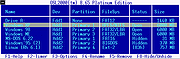 |
OSL2000 Boot Manager v9.32 OSL2000 Boot Manager v9.32 OSL2000 is an advanced multi boot manager. Using OSL2000, you can easily install, boot and manage up to 100 independent OSs in your system. A boot manager is a program that lets you have multiple operating systems in your system. OSL2000 boot manager, in addition to being a normal boot manager, has advanced features that let you seamlessly install, boot and manage 100s of OSs like Windows (all versions), Linux, DOS, etc. It lets you have independent copies of Windows. It even lets you have multiple copies of the same Windows. It lets you boot Windows (all versions) from logical partitions, second hard disk, etc. It has tons of advanced features and does not require any manual configuration. In fact, it is so advanced that it does not even have a configuration screen! Lets you have up to 100 independent operating systems. Lets you have completely independent copies of Windows. Lets you even have multiple copies of the same Windows. Lets you boot Windows (all versions) from logical partitions. Lets you boot Windows (all versions) from the second hard disk. Supports Windows (all versions), Linux, DOS and most others. Supports boot from hard disk, cd-rom, floppy, usb, zip & more. Supports command-line mode, batch files, desktop shortcuts, etc. BootMenu sports a elegant, customizable yet powerful interface. Has tons of advanced features like Stealth, AutoBoot, AutoScan, AutoSense, SafeBoot, AutoHide, MenuLock with password, Self Timer & more.... There are no feature limits. All features are available to users. Absolutely no configuration required! Simply 100% automatic. One click install. 100% automatic ... |
|
12,824 | Feb 05, 2020 OSL Corp. |
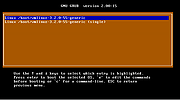 |
Super Grub2 Disk 2.02s9 Super Grub2 Disk 2.02s9 Super GRUB2 Disk is a live cd that helps you to boot into most any Operating System (OS) even if you cannot boot into it by normal means. Features Everything option to detect most Operating Systems Operating Systems grub.cfg – (GRUB2 configuration files) menu.lst – (GRUB legacy configuration files) core.img – (GRUB2 installation (even if mbr is overwritten)) Bootable ISOs (in /boot-isos or /boot/boot-isos Enable GRUB2’s LVM support Enable GRUB2’s RAID support Enable GRUB2’s PATA support (to work around BIOS bugs/limitation) Mount encrypted volumes (LUKS and geli) Enable serial terminal A new stable release The former Super Grub2 Disk stable release was 2.02s8 version and released on March 2017 (2 months ago) . New features or changes since previous stable version are: Updated grub 2.02 build to tag: 2.02 . This is the final stable 2.02 upstream Grub release. Added Chinese translation (Thanks to shankerwangmiao) Added Finnish translation (Thanks to tavallinenvirtanen7) supergrub-release-news helps release team to generate a template for its news. Added supergrub-release-changes to help with the release team. Rename ‘(GRUB2 installation (even if mbr is overwritten))’ to: ‘(GRUB2 installation)’ Supported Operating Systems Excluding too custom kernels from university students Super Grub2 Disk can autodetect and boot most every Operating System. Some examples are written here so that Google bots can see it and also to make more confident the final user who searchs his own special (according to him) Operating System. Windows Windows 10 ... |
|
7,089 | Aug 09, 2018 supergrubdisk.org |
| Showing rows 1 to 4 of 4 | Showing Page 1 of 1 | 1 |
OlderGeeks.com Copyright (c) 2026
