|

|
Processed through Paypal No account required. |








Buy our over-priced crap to help pay the bills.



|
|
Processed through Paypal No account required. |
| Files | ||||
| File Name | Rating | Downloads | ||
 |
Clownfish Voice Changer v1.90 Clownfish Voice Changer v1.90 The ultimate system wide voice changer for Windows Clownfish Voice Changer is an application for changing your voice. It's installed on system level so every application that uses microphone or other audio capture device will be affected. In general - your voice will be modified in Steam, Skype, Hangouts, ooVoo, Viber, Ekiga, Jitsi, Ventrilo, TeamSpeak, Mumble, Discord, etc. Voice effects list: • Alien • Atari • Clone • Mutation • Fast Mutation • Slow Mutation • Male pitch • Silence • Female pitch • Helium pitch • Baby pitch • Radio • Robot • Custom pitch Music player with enhanced audio control and playlist. Various media formats supported. Sound player with build-in sounds and management. Virtual Studio Technology (VST) plugin support. . Supported operating systems: Windows Vista / 7 / 8 / 8.1 / 10 / 11 When you start the application Voice Changer logo icon will appear in Windows traybar. When you right click on this icon main control menu will appear. Double-clicking on icon turns on and off the application. When Hear microphone option is checked you will be able to hear your modified voice. From VST Effects menu you can manage and configure your VST plugins. Main Voice Changer Window - here you select active voice effect. When enabled the icon gets colored. If you want to stop all effect press Clear effect button. This window is opened from Set Voice Changer option in main menu. Music Playlist Window - here you can mange and control your background microphone's music. Supported commands - play, stop, pause, resume, next/prev track, volume ... |
 |
3,737 | Jan 28, 2025 Bogdan Sharkov 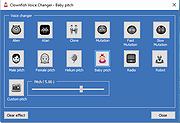 |
|
Discord portable v1.0.9232-25 Discord portable v1.0.9232-25 👉 Portable Discord desktop client for voice, video, and text chat. Discord portable is a portable Windows build of Discord made with Portapps. It lets you use Discord for voice calls, video calls, direct messages, servers, and community chat while storing its portable data in a local folder instead of a standard installed profile. Portapps also notes that this build forces the Electron user data path to the data folder, disables app update checks, and creates a temporary shortcut for native notifications while Discord is running. Features: • Portable Discord package for Windows • Voice, video, and text chat with friends and communities • Works with Discord servers, channels, and direct messages • Stores Electron user data in the portable data folder • App update checks are disabled by Portapps for portability • Creates a temporary shortcut to support native notifications • Simple upgrade process by installing the latest portable setup over the current one Supported operating systems: • Windows 10, Windows 11 Supported languages: English (US), English (UK), Bulgarian, Chinese (Simplified), Chinese (Traditional), Croatian, Czech, Danish, Dutch, Finnish, French, German, Greek, Hindi, Hungarian, Indonesian, Italian, Japanese, Korean, Lithuanian, Norwegian, Polish, Portuguese (Brazil), Romanian, Russian, Spanish (Spain), Spanish (Latin America), Swedish, Thai, Turkish, Ukrainian, Vietnamese Changes: v1.0.9232-25 04-13-26 Discord 1.0.9232 Portapps 3.18.0 Click here to visit the author's website. |
|
6,585 | Apr 19, 2026 CrazyMax and Discord 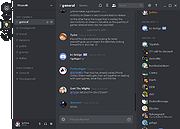 |
 |
US Robotics 56K Voice Modem, model number 3CP2976 driver US Robotics 56K Voice Modem, model number 3CP2976 driver. Windows install files for OEM product 2976. 2976_080100.zip |
 |
9,713 | Apr 01, 2009 US Robotics |
|
Voice Changer v1.0 Voice Changer v1.0 Portable audio software that allows users to apply various effects to sound files. Users are given an intuitive interface for changing audio files. There are only a few steps required for voice changing. Users can import any audio file to this software, then select the effect, play the generated audio and finally export it as .MP3 or .WAV format. Free audio enhancer Vovsoft Voice Changer is a free audio enhancer tool that lets you add special sound effects to your recordings. There's a simple user interface where you can select the file and make any alterations you wish. It also has the ability to play the tracks and export in various formats. When you've selected the track, you'll see a large selection of effects appear. While the name of the software implies you can only use voice recordings, it's worth noting that any audio files are compatible, even music. Before you can start using Vovsoft Voice Changer, you'll need to select a track you want to enhance or alter. You can opt for a voice recording, or you can use a song. With the recording at hand, you can open the panel for special effects. When you've selected the one you want to use, you can play it back to test how it sounds in case you want to try something else. You don't need to accept the built-in effects in Vovsoft Voice Changer if it doesn't completely meet your needs. When you open up the "Custom" setting, you can play with elements to change the output. If you do it right, you may be able to find a unique sound for your voice or track that no one else has created yet. Finally, you'll need to save your file so you don't lose it. The export options are .WAV and .MP3. ... |
|
3,358 | Oct 05, 2021 Vovsoft 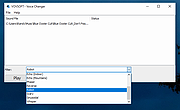 |
|
Work by Speech v3.0 Work by Speech v3.0 Control and work on your Windows computer by speech alone. Work by Speech is a Windows app that allows efficient computer use by speech alone. It includes voice commands for common actions, application switching and opening, custom voice commands, macro recording, dictation mode and speech-controlled mouse control. Features: • Work on a computer by speech alone • Quiet speaking support • Application switching and opening by speech • Built-in voice commands for common actions • Custom voice commands management • Macro recording • Separate dictation mode • Speech-controlled mouse actions • Customizable and movable mousegrid with up to 2550 figures • Automatic mousegrid optimization for every used application • Very low processor usage • Works with any microphone • Requires .NET Framework 4.7.2 or higher • Requires administrator rights for mouse clicking and key pressing in administrator-run apps Supported operating systems: • Windows 7 SP1, Windows 8.1, Windows 10, Windows 11 Supported languages: • English Changes: v3.0 07-19-26 Fixed a Smart Mousegrid bug occurring after updating from version 2.7 or earlier to versions 2.8 or 2.9, or from version 2.6 or earlier to versions 2.7, 2.8, or 2.9. Note: This program requires administrator rights to run (without them mouse clicking and keys pressing by speech would not work in apps that were run as administrator). Click here to visit the author's website. |
|
530 | Jul 21, 2026 Mikolaj Magowski 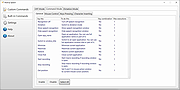 |
| Showing rows 1 to 5 of 5 | Showing Page 1 of 1 | 1 |
OlderGeeks.com Copyright (c) 2026
