|

|
Processed through Paypal No account required. |








Buy our over-priced crap to help pay the bills.



|
|
Processed through Paypal No account required. |
| Files | ||||
| File Name | Rating | Downloads | ||
 |
Konvertor v5.04.18 Konvertor v5.04.18 A fast and reliable two-panel file converter for Windows supporting 4793 file types. It has an intuitive interface, offers viewers for all popular file formats as well as uncommon and very rare ones. Konvertor is a way to work with files more efficiently. (Konvertor does not change any settings in Windows, and does not hook itself into anything inside Windows.) Performance Konvertor is designed to be as fast as possible: quick navigation among directories, fast directories reading, fast and smooth painting of panels and thumbnails. Konvertor is portable, it is configured to store all configuration and settings in the same folder that it is run from. Viewers Built-in viewers will instantly display content of all file formats. Text and binary files, bitmap and vector images, videos, audios and 3D files, Office documents or programs files. Archives Formats Work with your files even if they are stored in archives. All major formats as ZIP, RAR, 7-Zip, TGZ, ARJ, APK, ZOO, LZH, ISO/UDF (and 170 more) archive formats are supported. 3D Formats Display, convert (to 2D or 3D), snap, rotate, lights, support many different formats (102). eBooks Formats Convert, extract between eBooks formats. Images / Photos Formats Most popular (or not so popular) formats are supported (2192), filters to enhance them or make funny effects (many filters). Audio Formats Support almost all kind of audio formats (833), convert to MP3, MP4, OGG, WAV etc. Video Formats Play, convert, extract audio, split video, support almost all kind of video formats (230), convert to MP4, DivX, WEBM, VOB etc. File Manager Manage files and folders: creating, opening (e.g. viewing, playing, editing or printing), renaming, moving or copying, deleting and searching for files, as well as modifying file attributes, properties and file permissions. Much much more Konvertor has much more useful features built in, including native UNICODE display, Search plugin, Upload plugin. Windows Support Konvertor 5.04 works seamlessly with both 32-bit and 64-bit Windows 11, 10, ... |
 |
1,754 | Oct 26, 2023 Jean Piquemal 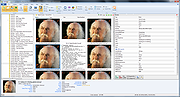 |
| Showing rows 1 to 1 of 1 | Showing Page 1 of 1 | 1 |
OlderGeeks.com Copyright (c) 2026
