|

|
Processed through Paypal No account required. |








Buy our over-priced crap to help pay the bills.



|
|
Processed through Paypal No account required. |
| Files | ||||
| File Name | Rating | Downloads | ||
 |
Oubliette Portable v1.9.5 Oubliette Portable v1.9.5 Full-featured password manager for Windows with strong Blowfish encryption. Store passwords for internet accounts, PIN numbers, credit cards. Securely encrypts data with Blowfish or IDEA. Easy navigation, search, import/export, clipboard protection. All info is stored securely on YOUR computer, NOT the Internet! This is a pretty old program that was originally created in 1999. It's last release was in 2003 and intended for Windows XP. OlderGeeks.com grabbed it and made it portable. IMPORTANT: In order for the program to properly register it's icon, YOU MUST right-click Oubliette.exe and Run as Administrator the first time you open it. After that, just run it normally. We tested it with Windows 10 and Windows 11. Works great so you're good to go! You will find the instructions for the program in the "doc" folder. Click here to visit the author's website. |
 |
3,192 | Nov 18, 2021 Marek Jedlinski/OlderGeeks.com 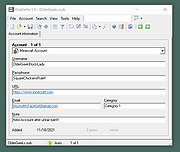 |
|
PosteRazor v1.9.5 PosteRazor v1.9.5 Make your own poster with regular or legal sized paper and a printer. Want to print a poster? PosteRazor cuts an image file into pieces and you can print then on your printer and glue them together to a poster. Easy FLTK based user interface. Uses FreeImage for image loading. Creates PDFs as output. This download is for the Windows version. If you need the MacOSx version, download here. Click here to visit the author's website. |
|
2,575 | Oct 03, 2022 Alessandro Portale 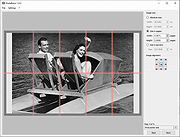 |
|
XnView MP v1.9.5 XnView MP v1.9.5 Image management The enhanced Image Viewer for (Windows/MacOS/Linux) XnView MP is a versatile and powerful photo viewer, image management, image resizer. XnView is one of the most stable, easy-to-use, and comprehensive photo editors. All common picture and graphics formats are supported (JPEG, TIFF, PNG, GIF, WEBP, PSD, JPEG2000, OpenEXR, camera RAW, HEIC, PDF, DNG, CR2). Features Photo Viewer With XnView you can browse, organize, and view your images in numerous ways: • Thumbnail View • FullScreen View • FilmStrip View • SlideShow with FX • Image Compare • EXIF, IPTC, XMP metadata supported Photo Editor XnView allows you to process your images with an arsenal of editing tools: • Resize, Rotate, Crop • Lossless Rotate and Crop (jpeg) • Adjust Brightness, Contrast, ... • Auto Levels, Auto Contrast • Modify Colors depth & palette • Apply filters & Effects Unrivaled Compatibility XnView MP supports more than 500 image formats (including Multipage and animated still formats APNG, TIFF, GIF, ICO, etc..) and export to about 70 different file formats. Batch Conversion XnView MP comes with an easy to use yet powerful batch conversion module. This same module also powers XnConvert And Much More ... Virtually all of standard XnView's much loved features have been preserved in XnView MP and many features have actually been tweaked and enhanced. Download the add-on and learn about how to add Face tags here: Face detection XnView MP is provided as FREEWARE (NO Adware, NO Spyware) for private or educational use (including non-profit organizations). Changes: v1.9.5 10-13-25 3764: [Bug] Edit metadata - crashs 3763: [Bug] Face tag - Crash when user with special characters - viewtopic.php?t=49638 3686: [Bug] ... |
|
2,850 | Nov 24, 2025 XnSoft 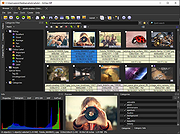 |
| Showing rows 1 to 3 of 3 | Showing Page 1 of 1 | 1 |
OlderGeeks.com Copyright (c) 2026
