|

|
Processed through Paypal No account required. |








Buy our over-priced crap to help pay the bills.



|
|
Processed through Paypal No account required. |
| Files | ||||
| File Name | Rating | Downloads | ||
 |
NetSpeedTray v1.1.7 NetSpeedTray v1.1.7 A free program that displays live upload/download speeds directly on the Windows Taskbar. Features: 💻 Lightweight & Efficient: Sits quietly in your system tray without hogging resources. ✨ Windows Native Look & Feel: Designed to blend in perfectly with the Windows 10/11 UI. 🚀 Intelligent & Stable Positioning: Rock-solid positioning logic ensures no flickering or "fighting" with the cursor. 🎨 Total Customization: Free Move Mode: Unlock the widget and place it anywhere on your screen. Mini-Graph: An optional, real-time graph displayed directly on the widget. Color Coding: Set custom colors and speed thresholds. Text Control: Fine-tune the text alignment, decimal precision, and number format. 📈 Detailed History Graph: Double-click the widget to open a full history of your network activity. ⚙️ Highly Configurable: Adjust the update rate, enable/disable auto-start, and more. Usage: The Widget: The core of NetSpeedTray. It sits on your taskbar, showing your live network speeds. • Right-click to access Settings or Exit. • Double-click to open the full history graph. Positioning Modes: • Adaptive Tray Mode (Default): The widget is locked to your taskbar. Left-click and drag it horizontally to set your preferred distance from the system tray icons. • Free Move Mode: Enable this in the settings to unlock the widget and place it anywhere. Modern Settings: A clean, modern UI to control every aspect of the widget's appearance and behavior. Detailed History Graph: Double-click the widget to see a detailed ... |
 |
1,013 | Nov 17, 2025 Erez  |
|
sChecklist v1.1.7 sChecklist v1.1.7 Like most of my apps, I wrote this because I couldn’t find a simple checklist app that suited my needs. What I’m talking about is off-the-cuff, ad hoc types of lists. The ones that, in the course of your (work) day, you find yourself wanting a quick way to set up a checklist, especially one that can be easily used over and over. Just rows of text entries and a checkbox for each. No B.S., i.e., no categories, no sub-tasks, no time tracking, and no other crazy wizzbang features. In other words, this app is not a time tracker nor is it meant as a full-blown project tracker. There are plenty of extremely well done apps that already do this. Task Coach, MyLifeOrganized, & ToDoList are but three that I’d recommend. Again, rows of text entries and a checkbox for each — that’s what this app strives to provide. Features: Mulitple list interface — quickly add new lists or duplicate existing lists Can hide in the system tray and be used with a hide/show hotkey Cut/copy/paste entries from one list to another maintaining checked state Paste entries in from the clipboard Customizable list font Sort checked items to top or bottom Check all and uncheck all buttons Always on top button Installation: Unzip sChecklist.zip to its own folder and run sChecklist.exe. v1.1.7 - 2016-11-15 + Undo now works after sorting, too. (Thanks, amaretti) |
|
5,955 | Oct 24, 2019 Jody Holmes 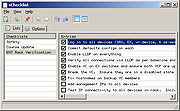 |
| Showing rows 1 to 2 of 2 | Showing Page 1 of 1 | 1 |
OlderGeeks.com Copyright (c) 2026
