|

|
Processed through Paypal No account required. |








Buy our over-priced crap to help pay the bills.



|
|
Processed through Paypal No account required. |
| Files | ||||
| File Name | Rating | Downloads | ||
 |
Multi Icon v1.00.2022 Multi Icon v1.00.2022 Free tool to create stunning, high quality, multi-resolution icons (.ico) and "mainicon" resources (.res). The multi-resolution icon stores a 256 x 256 image in PNG format, and five images at 64 x 64, 48 x 48, 32 x 32, 24 x 24 and 16 x 16 in native Windows icon format for maximum compatibility, back to Windows 95. Open an image from file, or paste one in with transparency, or drag and drop an image directly onto the corresponding icon resolutions, then save. Use a single Master image for the complete set of images, or separately individualise each image resolution for complete control over appearance. Support for 32 bit images with 8 bit alpha mask, and built-in common mask shapes to instantly transform a basic, square image into an alpha-transparent shape with one click. Save as a multi-resolution icon in either the standard Windows icon (.ico) format, or as a Windows resource (.res) in the "mainicon" format for direct inclusion in an app, as the app's icon. Features: • Realtime WYSIWYG (What You See Is What You Get) display • Multi-resolution support: 256, 64, 48, 32, 24 and 16 px image sizes • 13 one click mask shapes to instantly transform an image • 2 custom mask shapes (open from file and paste from Clipboard with transparency) • Supports Clipboard transparency (PNG and CF_DIBV5) • Options: Flip, Mirror, Rotate 0, 90, 180 and 270 • Force: Optionally remove transparent regions from original image mask when using a shape • Variable PNG quality: High, ... |
 |
739 | Jun 17, 2025 Blaiz Enterprises 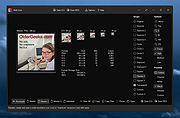 |
| Showing rows 1 to 1 of 1 | Showing Page 1 of 1 | 1 |
OlderGeeks.com Copyright (c) 2026
