|

|
Processed through Paypal No account required. |








Buy our over-priced crap to help pay the bills.



|
|
Processed through Paypal No account required. |
| Files | ||||
| File Name | Rating | Downloads | ||
 |
FileZilla Client Portable v3.70.6 FileZilla Client Portable v3.70.6 👉 Portable FTP, FTPS, and SFTP client for fast and reliable file transfers. FileZilla Client Portable is a portable edition of FileZilla that lets you connect to FTP, FTPS, and SFTP servers for uploading, downloading, and managing files without a traditional installation. It is designed to run from portable storage or local folders and includes drag and drop transfers, resume support, firewall and proxy support, and a tabbed interface for handling file transfer tasks more easily. Features: • Portable package that runs without traditional installation • Supports FTP, FTP over SSL/TLS (FTPS), and SFTP • Resume support for uploads and downloads • Timeout detection • Firewall support • SOCKS4/5 and HTTP/1.1 proxy support • Intuitive drag and drop interface • Tabbed user interface • IPv6 support • Supports transfer of large files over 4GB • Powerful Site Manager and transfer queue • Bookmark support • Configurable speed limits • Filename filters • Directory comparison • Network configuration wizard Supported operating systems: • Windows 7, Windows 8, Windows 10, Windows 11 Supported languages: Aragonese, Arabic, Azerbaijani, Bulgarian, Catalan, Corsican, Czech, Welsh, Danish, German, Greek, Spanish, Estonian, Basque, Persian, Finnish, French, Galician, Hebrew, Croatian, Hungarian, Armenian, Indonesian, Icelandic, Italian, Japanese, Kabyle, Georgian, Khmer, Korean, Kurdish, Kirghiz, Lao, Lithuanian, Latvian, Macedonian, Norwegian Bokmεl, Nepali, Dutch, Norwegian, Occitan, Polish, Portuguese, Romanian, Russian, Slovak, Slovenian, Serbian, Swedish, Tamil, Thai, Turkish, Ukrainian, Vietnamese, Chinese Changes: v3.70.6 06-04-26 New features: SFTP: Added compatibility flag to Site Manager to ignore invalid bits in file attributes flags received from non-compliant servers Bugfixes and minor changes: SFTP: Updated to fzssh 1.3.0 Updated to libfilezilla 0.56.1 Removed autodetection of FTP server type governing the remote path syntax. Exotic server types now need to be set explicitly on the advanced page in the Site Manager Click here to visit the author's website. |
 |
5,229 | Aug 14, 2026 FileZilla Project & PortableApps.com (John T. Haller) 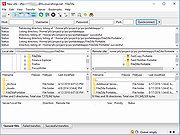 |
|
HFS (HTTP File Server) v3.2.2 HFS (HTTP File Server) v3.2.2 👉 Lightweight and easy-to-use HTTP file sharing server. HFS (HTTP File Server) is a fast and user-friendly file sharing application that allows you to share files over the web with just a few clicks. It transforms your computer into a web server, enabling others to download files using a browser without requiring complex setup or additional software. HFS is designed for simplicity and portability, making it ideal for quick file sharing, temporary hosting, or lightweight server needs. It supports drag-and-drop file management, customizable access permissions, and real-time monitoring of connections. The interface is clean and intuitive, allowing users to easily control uploads, downloads, and bandwidth limits. Advanced users can take advantage of scripting capabilities, customizable templates, and event handling to extend functionality. HFS also includes support for HTTPS, user accounts, and dynamic DNS integration for remote access over the internet. For full documentation and usage details, visit: https://rejetto.com/wiki/index.php%3Ftitle=HFS_Documentation_(English).html Features: • Easy file sharing over HTTP/HTTPS • Drag-and-drop file management • Portable and lightweight (no installation required) • User account and permission control • Real-time connection and transfer monitoring • Upload and download support via browser • Bandwidth limiting and speed control • Customizable web templates and interface • Event scripting and automation support • Dynamic DNS support for remote access Supported operating systems: • Windows 10, Windows 11 Supported languages: English, Italian, Spanish, French, German, Portuguese, Russian, Chinese Changes: v3.2.2 08-01-26 Improved plugin handling and compatibility. Updated project dependencies. Minor fixes and internal improvements. This download is for the Windows 64bit version (very bottom of page). All other download assets are below: macOS: hfs-mac-x64-3.2.2.zip hfs-mac-arm64-3.2.2.zip Linux: hfs-linux-x64-3.2.2.zip hfs-linux-arm64-3.2.2.zip Click here to visit the author's website. |
|
6,166 | Aug 06, 2026 rejetto.com 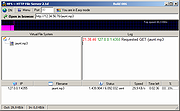 |
 |
Testing Files Generator v0.4.0 Testing Files Generator v0.4.0 👉 Create real test files at exact sizes for upload, import and file-handling tests. Testing Files Generator helps developers and QA testers create files that behave like the formats they claim to be. Specify a format and an exact byte size, then use the resulting files to test upload limits, parsers, import tools or storage rules. It offers both a desktop window and a command-line program. The generator supports 26 formats, including PDF, DOCX, XLSX, PPTX, PNG, JPEG, ZIP, CSV and WAV. A generated ZIP can contain actual files, and formats such as images and spreadsheets have their own settings. Each run writes a manifest describing the files and their expected outcomes. For example, a size-boundary test can produce files one byte below a limit, exactly at it and one byte above it, with the expected accept or reject result recorded for each. Recipes and a seed let you reproduce the same test files later. The program works offline. Features: • Generate files at an exact byte size, including sizes around an upload limit. • Create 26 formats across documents, images, text and data, archives, and audio. • Set format-specific details such as image dimensions, PDF pages, spreadsheet rows and columns, and archive contents. • Generate large batches of files with sizes drawn from a specified range. • Save a manifest with file details and expected accept, reject, sanitize or unspecified outcomes. • Use built-in presets for common test scenarios or write reusable YAML recipes. • Reproduce file contents with the same recipe and seed. • Deliberately damage files to test whether an application rejects malformed input. • Preview a run without writing files, validate recipes, verify generated files and clean up files ... |
|
61 | Sep 27, 2026 DonislawDev 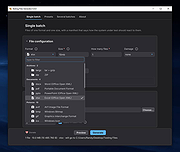 |
| Showing rows 1 to 3 of 3 | Showing Page 1 of 1 | 1 |
OlderGeeks.com Copyright (c) 2026
