|

|
Processed through Paypal No account required. |








Buy our over-priced crap to help pay the bills.



|
|
Processed through Paypal No account required. |
| Files | ||||
| File Name | Rating | Downloads | ||
 |
Bluefin v20260527 Bluefin v20260527 👉 A modern Fedora-based Linux workstation built for everyday use and cloud-native development. Bluefin is a next-generation Linux desktop operating system based on Fedora Atomic and the Universal Blue project. It is designed to provide a stable, secure, and maintenance-friendly workstation experience while still offering modern development tools, gaming support, multimedia features, and a polished GNOME desktop environment. Unlike traditional Linux distributions that rely heavily on manual package management and upgrades, Bluefin uses an immutable image-based system architecture. This allows the operating system to update atomically, reducing the risk of broken updates and making system recovery significantly easier through built-in rollback capabilities. Bluefin is focused on delivering an “install and use” Linux experience with many essential tools already configured. The system integrates Flatpak applications, Homebrew package management, containerized development environments, and modern virtualization technologies directly out of the box. It also includes developer-oriented workflows for Docker, Podman, devcontainers, and cloud-native software development. Features: • Fedora Atomic based immutable operating system • Built on Universal Blue technology stack • Modern GNOME desktop environment with user-friendly layout • Separate standard images for AMD/Intel graphics and NVIDIA graphics hardware • Atomic image-based updates with rollback support • Automatic operating system updates and maintenance • Integrated Flatpak application ecosystem with Flathub support • Homebrew package manager preconfigured for command-line software • Developer-ready environment with container-first workflows • Built-in Podman and Docker support • Devcontainer and cloud-native development integration • Distrobox support for running software from other Linux distributions • Tailscale support for secure mesh networking • WireGuard VPN tools included • Virtualization and container management support • Optimized multimedia codec support • Secure Boot compatible • Wayland-based modern graphics stack • Gaming-friendly Mesa and NVIDIA driver support • Integrated terminal enhancements including Starship prompt • Flatpak management utilities included • Rollback functionality for safer upgrades and experimentation • Designed for developers, power users, creators, and advanced desktop users • Minimal manual maintenance required after installation • Fast deployment and recovery ... |
 |
792 | May 31, 2026 Project Bluefin and Universal Blue 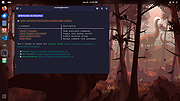 |
|
LAME 3.98.2 for MacOS X LAME 3.98.2 for MacOS X A universal binary (lybrary + frontend) which will run on both PowerPC and Intel powered Mac's compiled by Paul Sanders. Works with Audacity lame.exe - the command line encoder, used from the Windows command shell lame_enc.dll - LAME encoding library, generally used with CD rippers, etc |
 |
9,427 | Dec 09, 2012 LAME |
 |
Qucs v0.0.19 Qucs v0.0.19 👉 Open-source circuit simulator for analog and digital electronics design and analysis. Qucs (Quite Universal Circuit Simulator) is an open-source electronics circuit simulator designed to perform circuit simulation using graphical schematic capture and a powerful simulation backend. It allows users to design circuits visually and analyze them with a wide range of simulation types including DC, AC, S-parameter, transient, harmonic balance, and noise analysis. Qucs features an intuitive graphical user interface for schematic entry, simulation setup, and result visualization. Simulation results can be displayed in various forms such as Cartesian, polar, Smith charts, tabular data, and timing diagrams. The software supports analog and digital components, RF simulation capabilities, and equation-defined devices, making it suitable for students, hobbyists, and engineers. Qucs uses SPICE-compatible simulation engines and supports netlist-based simulation, giving users flexibility in circuit analysis. It also includes optimization tools, parameter sweeps, and support for user-defined components and models. Features: • Graphical schematic capture with component library • DC, AC, transient, S-parameter, noise, and harmonic balance simulations • RF circuit simulation capabilities • Parameter sweeps and optimization tools • Equation-defined devices and custom models • SPICE-compatible netlist support • Data visualization including Cartesian, polar, and Smith charts • Tabular and timing diagram result display • Subcircuit and hierarchical design support • Cross-platform open-source application Supported operating systems: • Windows (XP, Vista, 7, 8, 10) • Linux • FreeBSD • macOS Supported languages: • English This download is for the Windows version (very bottom of page). If you need the macOS version, download here. Click here to visit the author's website. |
|
6,495 | Mar 01, 2026 Qucs team 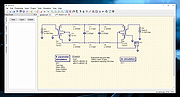 |
 |
Universal Android Debloater v2.9.1 Universal Android Debloater v2.9.1 Description and information from the author: "DISCLAIMER: Use this script at your own risk. I am not responsible for anything that could happen to your phone. Summary I try to maintain a universal tool which removes bloatwares on any Android phones by using ADB. The main goal is to improve battery performance and privacy by removing unnecessary and obscure system apps. This can also contribute to improve security by reducing the attack surface. The script has a menu that lets you choose what debloat list you want to use. I strongly encourage you to take a look at the lists because the default selection may not suit you. All packages are as well documented as possible in order to provide a better understanding of what you can delete or not. This script should be safe with the default selection. The worse thing which could happen is preventing an essential system process to be loaded during boot causing then an unfortunate bootloop. If you used the non-root solution, after about 5 failed system boots, the phone will automatically reboot in recovery mode and you'll have to perform a FACTORY RESET. So make a backup! If you have a rooted device you can also physically delete the apks. Ironically this solution is safer because the script saves the apks before their removal. In case of bootloop you just need to run the script from a recovery with ADB support (e.g TWRP) and restore them. In any case, you can NOT brick your device with this script! That's the main thing, right? Features Quick search among all the packages of an android device Uninstallation of system/user packages (manually or with the debloat lists) Reinstallation of system packages (manually or with the debloat lists) ADB backup/restore (not really reliable, see the FAQ) Device brand detection and auto-selection of ... |
|
3,558 | Jun 09, 2021 W1nst0n  |
 |
Universal Blood Pressure Manager v1.13.0 Universal Blood Pressure Manager v1.13.0 👉 Manage, track, and analyze blood pressure readings with a simple open-source logging tool. Universal Blood Pressure Manager is an open-source application designed to help users record and monitor their blood pressure readings. It provides a straightforward interface where users can log systolic and diastolic values, pulse rate, and additional notes for each measurement. Universal Blood Pressure Manager stores entries locally and allows users to keep a long-term history of their blood pressure readings. This makes it easier to track trends over time and share useful information with healthcare providers when needed. The program focuses on privacy, simplicity, and reliability while remaining lightweight and easy to use. Features: • Record systolic and diastolic blood pressure measurements • Log pulse rate and optional notes for each entry • Maintain a long-term history of blood pressure readings • Simple and easy-to-use interface for quick data entry • Local storage of data for privacy • Open-source project allowing community review and contributions Supported operating systems: • Windows 10, Windows 11 • Linux • macOS Supported languages: English Changes: v1.13.0 08-03-25 • Added the option to show the latest measurement in the title bar • Improved the database migration process • Updated translations • Minor improvements and fixes This download is for the Windows installer version (very bottom of page). All other download assets are below: Other Windows: ubpm_qt5-1.13.0-x86_64.exe(Try this version if the Qt6 version does not run properly on your system.) macOS: ubpm_qt6-1.13.0-x86_64+aarch64.dmg ubpm_qt5-1.13.0-x86_64+aarch64.dmg (Try this version if the Qt6 version does not run properly on your system.) Linux: ubpm_qt6-1.13.0-x86_64.AppImage ubpm_qt6-1.13.0-aarch64.AppImage ubpm_qt5-1.13.0-x86_64.AppImage ubpm_qt5-1.13.0-aarch64.AppImage (Try this version if the Qt6 version does not run properly on your system.) Click here to visit the author's website. |
|
423 | Mar 06, 2026 Thomas Lowe  |
|
Universal Extractor 2 v2.0.0 RC3 Universal Extractor 2 v2.0.0 RC3 Universal Extractor is a powerful and well-known tool to extract files from hundreds of different archive types, installers or otherwise compressed files. It has been created and maintained by Jared Breland until he set it on hiatus after the release of version 1.6.1. Currently, there are several slightly updated modifications floating around, which consist mainly of helper binary updates. Additionally, some improved versions with auto-updaters, more supported file types and GUI redesigns exist. Sadly, these are scattered around the internet and no central and easy download packages are available. As a user you would have to search through many forums in a wide variety of languages to even find a link to the program. Universal Extractor 2 is the most advanced inofficial modification around, aiming at the inclusion of many wanted features, improvement of current ones, ongoing support and a central open-source distribution. UniExtract 2 started as a simple modification disabling the always-on-top status box and ended with the addition of dozens of extractors to expand the range of supported file types. New - and unique amongst the available modifications - features like a scan-only mode to identify unknown file types using multiple scanning applications, the batch mode or the extraction of audio and video tracks from multimedia files make it stand out against these. As a short overview here is a list of the core improvements: Batch mode Silent mode, not showing any prompts Scan only mode to determine file types without extracting Integrated updater 100+ new supported file types Audio and video extraction for multimedia files Cascading context menu Support for password list for common archives Improved optional ... |
|
6,287 | Jan 12, 2022 Bioruebe.com 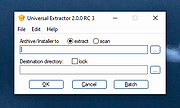 |
|
Universal Media Server v13.0.0 Universal Media Server v13.0.0 Stream your media to your devices, whether they are TVs, smartphones, gaming consoles, computers, audio receivers, and more! Universal Media Server is a free DLNA, UPnP and HTTP/S Media Server. We support all major operating systems, with versions for Windows, Linux and macOS. The program streams or transcodes many different media formats with little or no configuration. It is powered by FFmpeg, MediaInfo, OpenSubtitles, Crowdin, MEncoder, tsMuxeR, AviSynth, VLC and more, which combine to offer support for a wide range of media formats. Device Support We support any device that supports DLNA/UPnP or HTTP, including future devices. Below is a partial list of devices that we explicitly support, which means that we have customized our support for them in order to make them work even better than they would be default. AC Ryan PlayOn!HD AnyCast Apple iPad Apple iPhone Apple iPod Apple TV Asus O!Play BlackBerry Boxee Brite-view CinemaTube Cambridge Audio BD Players DirecTV HR D-Link DSM Freebox Freecom MusicPal Google Android Google Chromecast Hama Internet Radio LG Smart TV Upgrader LG TVs Logitech Squeezebox Microsoft Xbox 360 Microsoft Xbox One Miracast M806 Netgear NeoTV Nokia N900 Onkyo A/V Receivers OPPO Blu-ray players Panasonic Sound Systems Panasonic TVs Philips Streamium Philips TVs Pioneer Kuro Popcorn Hour Realtek media players Roku Samsung smart phones Samsung TVs Sharp TVs Showtime Sony A/V receivers Sony Blu-ray players Sony Network Media Players Sony PlayStation 3 (PS3) Sony PlayStation 4 (PS4) Sony PlayStation Vita Sony smart phones Sony TVs Telstra T-Box Technisat S1+ VideoWeb TV Vizio Smart TVs Western Digital WD TV Live XBMC Media Center Xtreamer Yamaha A/V receivers Changes: https://github.com/UniversalMediaServer/UniversalMediaServer/releases This download is for the Windows version. All other download assets are below: MacOS: UMS-13.0.0.dmg UMS-13.0.0-arm.dmg UMS-13.0.0-pre10.15.dmg Linux: UMS-13.0.0-x86_64.tgz UMS-13.0.0-x86.tgz UMS-13.0.0-arm64.tgz UMS-13.0.0-armel.tgz UMS-13.0.0-armhf.tgz Click here to visit the author's website. |
|
8,699 | Dec 22, 2022 Universal Media Server 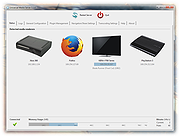 |
|
Universal Radio Hacker v2.9.1 Universal Radio Hacker v2.9.1 The Universal Radio Hacker (URH) is a complete suite for wireless protocol investigation with native support for many common Software Defined Radios. URH allows easy demodulation of signals combined with an automatic detection of modulation parameters making it a breeze to identify the bits and bytes that fly over the air. As data often gets encoded before transmission, URH offers customizable decodings to crack even sophisticated encodings like CC1101 data whitening. When it comes to protocol reverse-engineering, URH is helpful in two ways. You can either manually assign protocol fields and message types or let URH automatically infer protocol fields with a rule-based intelligence. Finally, URH entails a fuzzing component aimed at stateless protocols and a simulation environment for stateful attacks. Download user guide here. Instructional Video: This download is for the Windows 64bit version. If you need the Windows 32bit version, download here. If you need the MacOS version, download here. If you need the Linux version, download here. Changes: v2.9.1 Dec 30, 2020 0c8f383 use *.wav format for demodulated signal export 8af7da3 change separation colors to green and magenta a3eceba fix disappearing separation area in demod view 6a7048c fix #829 7d2e41b fix overflow in AutoInterpretation for certain signals Click here to visit the author's website. |
|
5,820 | Feb 11, 2021 Dr. Johannes Pohl 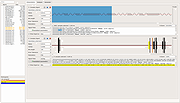 |
|
Universal USB Installer v2.0.3.8 Universal USB Installer v2.0.3.8 👉 Create bootable USB drives for Linux distributions and system utilities with ease. Universal USB Installer is a straightforward Windows utility designed to help you create bootable USB flash drives for a wide variety of Linux distributions, antivirus rescue disks, system utilities, and other bootable ISO images. It guides you through the process step by step, making it accessible for beginners while still offering flexibility for advanced users. The program supports both BIOS and UEFI systems and can optionally format USB drives as FAT32 or NTFS depending on the selected distribution. Universal USB Installer can also be used to create persistent storage for supported Linux distributions, allowing saved changes and files to remain available between reboots. Features: • Create bootable USB drives from ISO files • Supports hundreds of Linux distributions and utilities • Optional persistent storage for supported Linux builds • Works with BIOS and UEFI systems • Automatic USB formatting options • Simple step by step interface Supported operating systems: • Windows 7, Windows 8, Windows 8.1, Windows 10, Windows 11 Supported languages: English Universal USB Installer- Easily Make Bootable USB Using this open source USB boot maker software is easy as 123. To create a bootable USB drive, you simply select your target flash drive, choose your distribution from the list, browse to the ISO file (or choose to download the ISO), and then click Create. Once finished, you should have a ready to run Live USB containing the Live operating system, Windows installation media, or system diagnostics utility, or advanced system cleaner tool you previously selected. Some boot from USB tools use simple DD (Disk/Data Duplicator) copy and convert commands to directly burn ISO to USB. The DD method of copying, also commonly referred to as "Data Destroyer" works by overwriting the entire file system on a flash drive with that of a CD or DVD image. This process ... |
|
14,968 | Jul 16, 2026 Pen Drive Linux 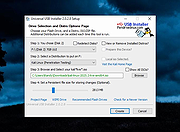 |
| Showing rows 1 to 9 of 9 | Showing Page 1 of 1 | 1 |
OlderGeeks.com Copyright (c) 2026
