|

|
Processed through Paypal No account required. |








Buy our over-priced crap to help pay the bills.



|
|
Processed through Paypal No account required. |
| Files | ||||
| File Name | Rating | Downloads | ||
 |
ADATA SSD ToolBox v4.0.2 ADATA SSD ToolBox v4.0.2 ADATA SSD ToolBox provides multiple ways for users to obtain disk information, and change settings easily. Additionally, it can speed up your SSD and improve its lifespan. Applicable products: ADATA Solid State Drives series products Features Drive Info Get assigned drive information including capacity, used space on drive,drive temperature, drive health, and lifespan of drive. Diagnostics Two options: Quick Diagnostics, which will run basic tests on free space of the selected drive, and Full Diagnostics, whick runs a read test on all used space of the selected drive. Utilities SSD utilities include Security Erase, Firmware update, SSD Toolbox upgrade, and export log. System Optimization SSD Optimization provides TRIM service on free space of drive. OS Optimization provides simple settings SSD optimization. System Info Displays current system information. ADATA SSD Toolbox Manual Click here to visit the author's website. |
 |
4,647 | Feb 24, 2021 ADATA Technology Co., Ltd. 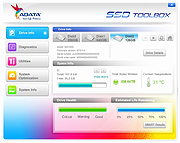 |
|
Commodore Repair Toolbox v2025-March-10 Commodore Repair Toolbox v2025-March-10 A Windows .NET Framework utility tool for Commodore hardware repairing and diagnosing. With Commodore Repair Toolbox (CRT) you can easily view schematics, zoom in/out, identify components, see chip pinouts, study datasheets, resources and various other information, helping you diagnosing and repairing good old vintage hardware. It is primarily dedicated to Commodore, and have a few built-in configurations for Commodore computers, but it does support any kind of hardware, as you can add your own data - e.g. other computers, radios, DIY electronics or whatever else you can imagine. It probably works the best, if the hardware is "simple" and have good documentation available, and if it is something you need to revisit multiple times - then you can add the needed information yourself, and use it for easy future reference. Supported operating systems: Windows 10 or Windows 11 (both 32-bit and 64-bit) Changes: v2025-March-10 First public BETA available Digitally signed executable in ZIP file Click here to visit the author's website. |
|
1,108 | Mar 16, 2025 Dennis (HovKlan-DH) 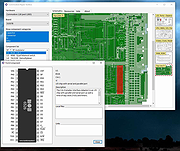 |
 |
Euler Math Toolbox v2020-07-08 Euler Math Toolbox v2020-07-08 This is the homepage of Euler Math Toolbox (EMT), a powerful math program combining numerical and symbolic tools (using the computer algebra system Maxima) in one free and open source package. Its idea is similar to Matlab, but the syntax is not exactly compatible. The projected was started in 1987 by Rene Grothmann, professor of mathematics in Eichstδtt, Germany. The main design goal of Euler Math Toolbox is to provide a clean and simple surface that gives easy access to powerful tools. Euler Math Toolbox is free to use for anyone without costs or loyalties under the GPL license. It is also an open source program, hosted on SourceForge and supports the idea of open software and libraries. The program runs on Windows 7, 8 or 10, 32-bit or 64-bit. The most recent version supports only Windows 8 or above with 64-bit, and the most recent Ubuntu through the stable Wine emulator. EMT is for you if you are looking for a mighty, easy to use and free substitute for Matlab, you need to do symbolic algebra or numerical mathematics in schools or the universities, you are a student or a teacher and want to demonstrate mathematics, you want to make good looking mathematical illustrations or even photo realistic scenes, you have a need to present mathematics on web pages. Download the PDF manual here. This is the notebook interface of EMT. It contains a menu, commands, comments to each command with markdown syntax, links and Latex formulas, plots, other images, and a status bar for immediate help to a function. The command line highlights brackets during the input. The following is the graphics window. This window can also be incorporated into the ... |
|
4,391 | Aug 11, 2020 Rene Grothmann 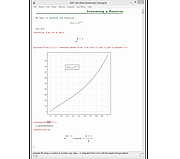 |
|
Jim's Toolbox v7 Jim's Toolbox v7 👉 A free Windows toolbox for reinstall help, repair tools, diagnostics, shortcuts, and handy system fixes. Jim's Toolbox is a collection of functions and links created to make reinstalling Windows quicker and easier by gathering programs, settings, hacks, repair tools, diagnostic tools, and useful fixes into one place. The author says the project began as a personal tool for reinstalling Windows without having to search all over for programs, settings, and hacks, and later expanded with additional tools for fixing an install and adding handy registry hacks and fixes. It requires elevated permissions and a minimum of .NET Framework 4.8. Features: • Collects functions and links in one toolbox-style program • Designed to help make Windows reinstalls quicker and easier • Includes access to programs, settings, hacks, and fixes • Adds tools for fixing a Windows install • Includes handy registry hacks and fixes • Includes Windows repair tools • Includes diagnostic tools • Includes a Windows tab • Includes ISO download access and Media Creator direct download access • Can install Chocolatey and restart afterward if needed • You MUST run this program as an Administrator. After unzipping, right-click on Toolbox vx.x.exe and choose Run as Administrator. Supported operating systems: • Windows 10 64-bit, Windows 11 64-bit Supported languages: English Use 7-Zip to unzip this file. Changes: v7 11-24-25 Added Microsoft Malicious Software Removal Tool to windows repair tools. Added Print Management shortcut to windows repair tools. Added backup & restore shortcut to windows repair tools Moved Windows Iso to Diagnostic Tools Background graphics added Main logo made smaller 7.Restart added after installing Chocolatey 8.Windows Tab added Iso download moved to Windows tab 10 . Direct download button added for media creator with the iso menu. The activation script is back as a link to the GitHub page. Debloating script from Chris Titus added. Click here to visit the author's website. |
|
7,549 | Mar 26, 2026 Cemil Taşdemir 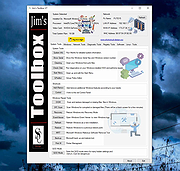 |
|
JTOpen - The IBM Toolbox for Java v20.0.7 JTOpen - The IBM Toolbox for Java v20.0.7 IBM Toolbox for Java, an IBM i communications library. What is the Toolbox? JTOpen is the open source software product known as the "IBM Toolbox for Java." It is also commonly referred to "jt400" or simply "the toolbox." In short, this package provides a set of Java classes that enable applications to integrate with IBM i. JTOpen is governed by the IBM Public License. JTOpen is the open source counterpart to a version of the IBM Toolbox for Java that is delivered as part of the 5770-SS1 Licensed Program Product (LPP). The LPP version is supported by IBM and can be obtained from the IBM Toolbox for Java web site. The Toolbox is available as an installable licensed program for IBM i. Here is a breakdown of the supported Toolbox releases versus operating system versions: Changes v20.0.7 JDBC AAF by @jeber-ibm in #147 Loom initial work by @mdg1349 in #125 Fix javadoc generation (#126) by @NicolaIsotta in #141 Bump org.codehaus.mojo:build-helper-maven-plugin from 3.4.0 to 3.5.0 by @dependabot in #142 Bump org.apache.maven.plugins:maven-compiler-plugin from 3.11.0 to 3.12.0 by @dependabot in #148 Bump org.apache.maven.plugins:maven-compiler-plugin from 3.12.0 to 3.12.1 by @dependabot in #149 fix: DDM signon with passwords greater than 10 chars by @ThePrez in #152 Added methods to ISeriesNetServer to work with disabled IDs by @MikSwens in #151 Fix NPE when using password in Properties by @jeber-ibm in #158 feat: build native package for JDKs 7, 8, and 11 by @ThePrez in #153 doc-files fixes and modernization by @NicolaIsotta in #150 Fixup build to make jar contents match 11.x by @ThePrez in #159 Click here ... |
|
2,708 | Mar 07, 2024 IBM  |
|
Windows Repair Toolbox v3.0.4.8 Windows Repair Toolbox v3.0.4.8 A free software created to help you repair a Windows system, by making the process faster, easier and uniform. Features: • Download and run "on-the-fly" the best free portable software when it comes to diagnose and solve several kinds of Windows problems. The tools are categorized by their function, and the program will automatically download the correct version for the Windows edition in which you're working. When you finish, simply uninstall the tool, and all downloaded software it's also removed. Note: there are 3 tools that aren't portable, those are marked with an [ i ] (stands for "installer"); • Displays relevant information about the computer to be repaired: CPU temperature, name and % of use; amount of RAM installed on the system and % of use; amount of free space left in C:\ partition; Windows edition and install date. • Allows you to perform quality assurance tests after the repair is complete; • Allows you to save notes about the repair process; • Provides 1-click access to some useful Windows tools (chkdsk, sfc, regedit, msconfig); • "Unattended fix" option, automatically performs: malware removal, system cleaning and repair and disk defragmentation. A email letting you know that the automatic repair is complete, and containing the logs, can be sent to you. Disclaimer (read carefully): By running Windows Repair Toolbox you accept COMPLETE responsibility for ANYTHING that happens. This tool has ZERO WARRANTY for any purpose. Run it AT YOUR OWN RISK. All 3rd-party tools you might download using Windows Repair Toolbox belong to their respective owners and authors, and are bound by their respective licences. It is YOUR RESPONSIBILITY to determine if you have the rights to use those 3rd-party tools in whatever environment you use this software. Requirements: Windows 7 through Windows 11. Changes: v3.0.4.8 - 2025-09-29 Changed - Updated 7-Zip components to version 25.01. - Various minor internal updates and ... |
|
17,016 | Oct 21, 2025 Alex Canotilho 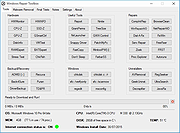 |
| Showing rows 1 to 6 of 6 | Showing Page 1 of 1 | 1 |
OlderGeeks.com Copyright (c) 2026
