|

|
Processed through Paypal No account required. |








Buy our over-priced crap to help pay the bills.



|
|
Processed through Paypal No account required. |
| Files | ||||
| File Name | Rating | Downloads | ||
 |
Generate Thumbnail v1.0 (Portable) Generate Thumbnail v1.0 (Portable) Generate Thumbnail will resize photos or images from a folder you choose and out put them to another folder you choose. The new thumbnail-sized images are then ready to be published to a website or Social Media. You are given full control of the output of your resized images with tons of options. This program was originally created as an installable program. OlderGeeks created this portable version for you. Supported operating systems: Windows XP, Vista, 8, 8.1 and 10 |
 |
3,535 | Jan 04, 2021 Resize-Large-Image.com (defunct) 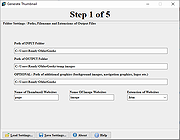 |
|
Imagine v2.5.7 Imagine v2.5.7 👉 Fast freeware image and animation viewer for Windows with broad format and plugin support. Imagine is a freeware image and animation viewer for Windows that focuses on speed while supporting a huge range of image, animation, archive, and RAW camera formats. It includes a thumbnail browser, slideshow, batch conversion and rename tools, screen capture, basic paint tools, color corrections, ICC color management, and optional add-on plugins plus Total Commander integration. Features: • View and save image and animation files with very fast speed • Supports many image and animation formats (including ANI, GIF, PNG, SVG, TIF, WEBP, and more) • Supports digital camera RAW formats (including ARW, CR2, CR3, DNG, NEF, ORF, RAF, SRW, and more) • Supports archive formats (ZIP, RAR, 7Z, ALZ, HV3, CBZ, CBR, CB7) • Extract single or all frames from animation files • Shows detailed file information plus Exif, IPTC, DICOM, and Comment information • Thumbnail browser • Basic paint tools, color corrections, and ICC color management • Batch conversion and batch rename • Slideshow and tiled view • Screen capture • Create animations, multiple page images, and panorama images • Customizable keyboard and mouse shortcuts, plus command line parameter support • Shell extension support, add-on plugin support, and Total Commander Lister, Packer, and Content plugin support • INI-based configuration (does not write unnecessary registry entries) • Native builds for x86, x64, and ARM64 Supported operating systems: • Windows 95, Windows 98, Windows ME, Windows NT 4.0, Windows 2000, Windows XP, Windows 2003, Windows Vista, Windows 7, Windows 8, Windows 10, Windows 11 Supported languages: • Arabic, Czech, Danish, Dutch, French, German, Italian, Japanese, Korean, Polish, Portuguese (Brazil), Portuguese (Portugal), Romanian, Russian, Simplified Chinese, Slovenian, Spanish, Traditional Chinese, Turkish, Ukrainian, Uzbek (O'zbekcha) Changes: v2.5.7 06-02-26 - Added: Support for PIC (Softimage) file format - Added: Support for custom metadata information (Stable Diffusion, etc.) - Added: 'Remove' button in metadata information dialog - Added: ... |
|
6,736 | Jul 07, 2026 Sejin Chun 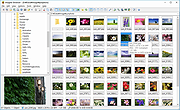 |
|
Thumbnail and Icon Cache Rebuilder for Windows 10 Thumbnail and Icon Cache Rebuilder for Windows 10 humbnail and Icon Cache Rebuilder for Windows 10 is a portable freeware that will purge, clear and delete your Thumbnail and Icon Cache Rebuilder in a click. If your icons appear blank or look corrupted or do not refresh correctly, when they should, then it is quite possible that your icon cache database may have become corrupted in on your Windows 10 PC. The same thing applies to Thumbnails too. If they do not display correctly then they may have become corrupted. In such a scenario, you may need to delete the cache files in order to rebuild the Icon cache and clear the Thumbnail cache. Once you have downloaded the zip file, extract its contents and run the .exe file. You might want to create a system restore point first. If you are having problems with Thumbnails or Icons not displaying correctly, open Thumbnail and Icon Cache Rebuilder, Check the delete Icon cache or Delete Thumbnail Cache or both, depending on your requirement. Next click Rebuild, wait for Explorer to refresh itself. Restart your computer. Once your computer restarts it will build a new Cache. Do note that ending Icon Cache Rebuilder before it finishes can result in Windows giving you an error for your user profile as it needs to refresh Explorer and restart your computer to rebuild the Icon Cache. |
 |
6,962 | Sep 02, 2015 Lavish Thakkar 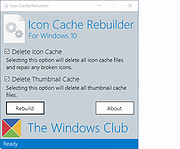 |
| Showing rows 1 to 3 of 3 | Showing Page 1 of 1 | 1 |
OlderGeeks.com Copyright (c) 2026
