|

|
Processed through Paypal No account required. |








Buy our over-priced crap to help pay the bills.



|
|
Processed through Paypal No account required. |
| Files | ||||
| File Name | Rating | Downloads | ||
 |
Atomic - Periodic table v3.0.0 Atomic - Periodic table v3.0.0 Bring a free periodic table with you anywhere you go. Multiple Data Sets Atomic – Periodic Table offers a versatile electro negativity table which both gives you the relevant electronegativity number but also a visualization of the difference between elements electronegativity. Explore a vast amount of elements isotopes in a clean panel with data as halftime and mass. With future versions of Atomic – Periodic Table even more isotopes will slowly be added. Element Details • Favorite Bar Tailor the details to focus on those most important to you with the help of the favorite bar. • Large data set The element details give you all the data you could need for your amazing science project. • Offline Mode The inbuilt offline mode of Atomic hides images loaded from the web to save network data. User Interface ‘Atomic – Periodic Table’ features an intuitive user interface based on the material design guidelines. Every element from the shadows, buttons, margins to the cards come together in a thoughtful way to make your digital life more simple. Supported operating systems: Android Changes: v3.0.0 Build 111 Mar 2 2025 Added Molar Mass Calculator Added Geology Table Added most used tables section in Table Page Moved Isotope page to Tables and replaced with calculator Added ability to save compounds from Calculator and their respective weights Fixed some foregrounds having wrong corner radius. Fixed some back buttons not being clickable Price for PRO shows in local currency Disabled Right-to-Left drawing as there are major issues with this currently Note: This .apk file is for installing on an Android device in Developer Mode. Enable Developer Mode: 1) Open Settings 2) Tap the gear ... |
 |
1,074 | Jun 23, 2025 J.Lindemann 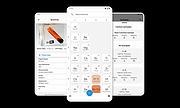 |
 |
RisohEditor v6.1.4 RisohEditor v6.1.4 👉 Free Win32 resource editor for editing resources in RC, RES, EXE, and DLL files. RisohEditor is a free resource editor for Win32 development that can edit, extract, clone, and delete resource data in RC, RES, EXE, and DLL files. It supports common Windows resources such as dialogs, menus, icons, cursors, string tables, and message tables, with Unicode support for international resources. Features: • Edit, extract, clone, and delete resource data • Supports RC, RES, EXE, and DLL files • Edit dialogs, menus, icons, cursors, string tables, and message tables • Full Unicode support • Can read resource.h header files • Supports GUI editing • Exported resources can be read by Visual C++ • Supports window class libraries • 32-bit and 64-bit support • Portable version uses an INI file instead of the registry Supported operating systems: • Windows XP, Windows Server 2003, Windows Vista, Windows 7, Windows 8.1, Windows 10 • ReactOS Supported languages: English, Chinese, Italian, Russian, Japanese, Korean, Portuguese, Ukrainian Changes: v6.1.4 08-13-26 Made configuration a property sheet. Accelerated OnDeleteRes. Prevented the tree view's drop-down arrow from appearing twice. Fixed MRadWindow index labels. Supported resource compression by WonRes. Improved UPX handling. Enhanced support for Help IDs. Improved MEditMenuDlg. Supported zooming of code editor. Fixed word wrap. Note: This file has four hits on VirusTotal. We have confirmed these to be false positives. The file is safe. This download is for the Windows portable version (very bottom of page). If you need the Windows 32bit installer version, download here. If you need the Windows 64bit installer version, download here. Click here to visit the author's website. |
|
3,768 | Aug 18, 2026 Katayama Hirofumi 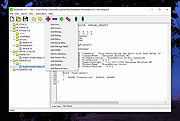 |
| Showing rows 1 to 2 of 2 | Showing Page 1 of 1 | 1 |
OlderGeeks.com Copyright (c) 2026
