|

|
Processed through Paypal No account required. |








Buy our over-priced crap to help pay the bills.



|
|
Processed through Paypal No account required. |
| Files | ||||
| File Name | Rating | Downloads | ||
 |
AnyViewer Free v5.8.0 WARNING: If someone you don’t know called you... or you dialed a number that suddenly appeared on your screen... and they told you to download this program... IT IS A SCAM. HANG UP IMMEDIATELY! AnyViewer Free v5.8.0 👉 Free remote desktop software for accessing and supporting computers from another computer, tablet, or phone. AnyViewer Free is remote desktop software for personal use that lets you remotely access and support devices, whether attended or unattended, from another computer, tablet, or smartphone. It is designed for fast remote control, stable connections, high-quality image display, remote file transfer, chat, multiple monitor support, screen mirroring, and secure remote sessions using end-to-end encryption. Features: • Remotely access personal devices from a PC, Mac, tablet, or smartphone • Supports attended and unattended remote access • Fast remote control with stable connection routing • High-quality image display with low latency • In-session and off-session remote file transfer • Chat during remote support sessions • Multiple monitor support • Display multiple remote screens in separate windows • Adaptive screen scaling • Mirror Android or iOS screens to a computer • Remote reboot and reconnect • Shortcuts to tools such as Command Prompt and Task Manager • Blacklist and whitelist access permissions by account or device ID • 256-bit asymmetric ECC end-to-end encryption • Two-factor authentication support Supported operating systems: • Windows 8.1, Windows 10, Windows 11 • Windows Server 2012 R2, Windows Server 2016, Windows Server 2019, Windows Server 2022 • macOS 10.15 or later • iOS 10.0 to iOS 16 • Android 6.0 or later Supported languages: English, French, German Changes: v5.8.0 07-07-26 Enhanced: Support for quick file transfer between My Devices on Windows. Simply drag and drop files into the Send Files area to send them directly to the target device without the need to open the File Transfer window. This download is for the Windows portable version (very bottom of page). All other download assets are below: Other Windows: AnyViewerSetup_x64.exe AnyViewerSetup.exe (32bit) macOS: AnyViewer.dmg iOS: App Store Android: AnyViewerSetup.apk Google Play Click here to visit the author's website. |
 |
1,312 | Sep 16, 2026 AOMEI Technology Co., Ltd 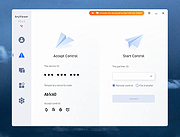 |
|
HopToDesk v1.46.50 WARNING: If someone you don’t know called you... or you dialed a number that suddenly appeared on your screen... and they told you to download this program... IT IS A SCAM. HANG UP IMMEDIATELY! HopToDesk v1.46.50 👉 Free and secure remote desktop software with screen sharing, remote control, file transfer, and live chat. HopToDesk is a free remote desktop tool that lets you share your screen, remotely control computers and devices, transfer files, and chat during support sessions. It is free for personal and commercial use, open source, and uses end-to-end encryption for screen sharing, chats, and file transfers. Features: • Remote desktop control • Screen sharing • File transfer • Live chat • End-to-end encrypted traffic • Free for personal and commercial use • Open source • Portable mode on Windows • Installed mode with background service support • Unattended access with permanent password • Direct IP access • IP whitelisting • SOCKS5 proxy connections • Remote terminal • Port forwarding • Camera / view-only mode • Quick Support mode • Address book and tags • LAN discovery • Multiple screen support • Remote printing on Windows and macOS • Audio streaming • Session recording • Screenshots • Switch sides during a session • Privacy mode on Windows and macOS • Two-factor authentication • Clipboard sync permission control • File transfer permission control • Remote restart permission control • TCP tunneling permission control • Wake On LAN permission support Supported operating systems: • Windows XP, Windows 7 or newer • macOS 10.14 Mojave or newer • Ubuntu 18.04 or newer, Debian 9 or newer, CentOS 7 or newer, openSUSE 42/15 or equivalent, Fedora, Manjaro, AppImage, Flatpak • FreeBSD 13 or newer • Raspberry Pi 2 and newer • ChromeOS devices compatible with Google Play • Android 5.0 or newer • iOS 11.0 or newer Supported languages: English, French, Spanish, Portuguese, German, Dutch, Polish, Czech, Norwegian, Swedish, Russian, Turkish, Hebrew, Arabic, Bahasa, Vietnamese, Simplified Chinese, Traditional Chinese, Japanese, Korean, Thai Changes v1.46.50 09-12-2026 Wayland, Windows Server and other Linux improvements, translation updates. This download is for the Windows 64bit version (very bottom of ... |
|
4,657 | Sep 16, 2026 HopToDesk 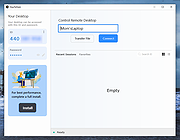 |
|
Malwarebytes Support Tool v1.9.16.1154 Malwarebytes Support Tool v1.9.16.1154 Troubleshoots, repairs, and resolves issues with Malwarebytes for Windows. The Support Tool troubleshoots and repairs issues for Desktop Security. If you're experiencing a technical issue that can't be repaired, you can use the Support Tool to uninstall and reinstall the app. To do this, use the Advanced Clean option to delete all app files and configurations. You then have the option to reinstall app once removed. 1) Download the Malwarebytes Support Tool below. 2) In the Downloads folder, open the mb-support-x.x.x.xxx.exe file. 3) In the User Account Control pop-up window, click Yes to continue the installation. • Microsoft .NET 4.0 Framework is required to run the Support Tool on your computer. If you do not have a .NET 4.0 Framework, you will receive the following error while running the tool: In the pop-up window, click OK to open Microsoft's download page and download the latest update. • In the .NET 4.0 Framework not found pop-up window, click OK to open Microsoft's download page and download the latest .NET Framework components. 4) In the Malwarebytes Software License Agreement pop-up window, check the box ( mceclip0.png ) next to Accept License Agreement after consenting to the agreement terms. 5) Click Next to complete the installation. The Malwarebytes Support Tool automatically opens. 6) In the left navigation pane of the Malwarebytes Support Tool, click Advanced. 7) In the Advanced Options, click Clean. 8) In the Malwarebytes Cleanup pop-up window, click Yes. A pop-up window indicating the loading of the cleanup appears. Before the next step, make sure all your work is saved in the background. 9) In the Malwarebytes Cleanup pop-up window, click OK to restart your computer. 10) Once your computer restarts, ... |
|
3,686 | Nov 24, 2025 Malwarebytes 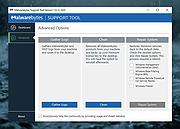 |
 |
Microsoft Support and Recovery Assistant v17.01.0268.003 Microsoft Support and Recovery Assistant v17.01.0268.003 The Microsoft Support and Recovery Assistant works by running tests to figure out what's wrong and offers the best solution for the identified problem. System Requirements: Supported Operating Systems Windows 7, Windows 8, Windows 8.1, Windows 10, Windows 11 Outlook in any of the following Office versions can be scanned: Microsoft Office 365 (2019, 2016, or 2013, 32-bit or 64-bit) Microsoft Office 2019 (32-bit or 64-bit; Click-to-Run or MSI installations) Microsoft Office 2016 (32-bit or 64-bit; Click-to-Run or MSI installations) Microsoft Office 2013 (32-bit or 64-bit; Click-to-Run or MSI installations) Microsoft Office 2010 (32-bit or 64-bit) Note: If you are running any edition of Windows 7, you must also have .NET Framework 4.5 installed. Windows 8 and later versions of Windows include at least .NET Framework 4.5. The Microsoft Support and Recovery Assistant offers the best solution for these identified problems: Office I get an error when I install Office I can't activate Office I need to uninstall Office Outlook Outlook won't start I can't setup my Microsoft 365 email in Outlook Outlook keeps asking for my password Outlook keeps saying "Trying to connect..." or "Disconnected" Shared mailboxes or shared calendars don't work I'm having problems with my calendar Outlook stops responding Outlook keeps crashing I can't send, receive, or find email OneDrive for Business I can't sync my files with OneDrive I can't install OneDrive Other Office apps I can't sign into Skype for Business I can't get email on my phone I'm having trouble opening or signing in to Outlook on the web I can't install, connect, or enable Dynamics 365 for Outlook The Teams Meeting option isn’t shown or the Teams Meeting add-in doesn’t load in Outlook There are additional scenarios for Outlook on the web, Outlook for Mac, and Mobile devices, plus advanced diagnostics for Exchange Online and Outlook. Click here to visit the author's website. |
|
4,354 | Jul 02, 2023 Microsoft Corp. 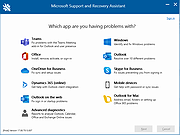 |
|
Mozilla Thunderbird v140.6.0 Extended Support Release Mozilla Thunderbird v140.6.0 Extended Support Release This release is intended for users who want all available new features on an annual basis and stability/security fixes on a monthly basis. Mozilla's fastest, most beautiful email, calendar, and contacts release yet. Designed to maximize your freedoms. Freedom from Chaos. Waste less time finding browser tabs. Access all your messages, calendars, and contacts in one fast app. Filter and organize the way you like. Manage all accounts separately or in a unified inbox. Thunderbird simply makes your life simpler. Freedom from Manipulation Mozilla's agenda isn’t hidden. It’s to make the world better. Thunderbird is funded by user donations. They don’t collect personal data, sell ads in your inbox, or secretly train AI with your private conversations. Thunderbird is open source. As part of the Mozilla family you can be confident they always put your privacy and security first. Freedom to Geek Out Thunderbird is yours. Thunderbird is clean and elegant by default, but easily customizable to match your workflow and visual preferences. It is loaded with unique and powerful features. Key Features Include: • Mail Account Setup Wizard • One-click Address Book • Attachment Reminder • Tabbed Email • Quick Filter Toolbar • Search Tools • Message Archive • Large Files Management • Smart Folders • Add-ons Manager • Robust Privacy • Phishing Protection • Automated Update • Junk Mail Tools • Open Source System Requirements: Windows Windows 10 or later Windows Recommended Hardware 1GHz or faster Intel/AMD compatible processor 1GB RAM / 2GB of RAM for the 64-bit ... |
|
8,837 | Dec 17, 2025 The Mozilla Organization 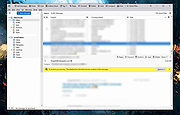 |
|
Windows XP Service Pack 2 Support Tools Windows XP Service Pack 2 Support Tools The Windows Support Tools for Microsoft Windows XP are intended for use by Microsoft support personnel and experienced users to assist in diagnosing and resolving computer problems. For individual tool descriptions, see the Windows Support Tools documentation (Suptools.chm). The Windows Support Tools for Windows XP can be installed only on a computer that is running the Windows XP operating system. The Windows Support Tools for Windows XP cannot be used to upgrade Microsoft Windows NT or Microsoft Windows 2000 Support Tools installed on Windows NT or Windows 2000. It is highly recommended that you remove all previous versions of Support Tools, including beta versions of the Windows Support Tools for Microsoft Windows XP, before you run the Support Tools installation program. Important: These tools have not been localized; they are written and tested only in the English language. Using these tools with a different language version of Microsoft Windows XP may not work. The following Support Tools have been updated in Service Pack 2: bitsadmin.exe extract.exe httpcfg.exe iadstools.dll ipseccmd.exe netdom.exe replmon.exe The following is a list of all Support Tools in Service Pack 2: acldiag.exe activate.exe addiag.exe adprop.dll adsiedit.msc apimon.exe apmstat.exe bindiff.exe bitsadmin.exe browstat.exe cabarc.exe clonepr.dll depends.exe dfsutil.exe dhcploc.exe diruse.exe dmdiag.exe dnscmd.exe dsacls.exe dsastat.exe dskprobe.exe dumpchk.exe ... |
|
4,137 | May 13, 2021 Microsoft Corp.  |
| Showing rows 1 to 6 of 6 | Showing Page 1 of 1 | 1 |
OlderGeeks.com Copyright (c) 2026
