|

|
Processed through Paypal No account required. |








Buy our over-priced crap to help pay the bills.



|
|
Processed through Paypal No account required. |
| Files | ||||
| File Name | Rating | Downloads | ||
 |
Delta v0.1.8 Delta v0.1.8 👉 Disk space analyzer with historical snapshot comparison. Delta is a disk space analysis tool that allows you to scan your drives, save storage snapshots, and compare changes over time. It helps you quickly identify which folders and files have grown or shrunk between scans. Designed to work fully offline, Delta stores scan data locally and focuses on lightweight performance with a modern user interface. Features: • Scan drives and analyze folder and file size usage • Save disk usage snapshots for historical tracking • Compare past and current scans to detect size changes • Fully offline operation with no telemetry • Lightweight application built with Rust and Tauri • Modern interface powered by React Supported operating systems: • Windows 10, Windows 11, Linux Supported languages: English Changes: v0.1.8 05-31-26 • Bug fixes • Added sorting improvements • UI changes Note: This file has one hit on VirusTotal. We have confirmed this to be a false positive. The file is safe. This download is for the Windows 64bit setup version (very bottom of page). All other download assets are below: Other Windows: delta_0.1.8_x64_en-US.msi Linux: delta-disk-analyzer_0.1.8_amd64.deb delta-disk-analyzer-0.1.8-1.x86_64.rpm delta-disk-analyzer_0.1.8_amd64.AppImage Click here to visit the author's website. |
 |
798 | Jul 11, 2026 Austin Bian 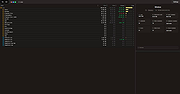 |
 |
Directory Size Calculator 1.0 Directory Size Calculator 1.0 Tool for recursively calculating the total size of a directory tree. |
|
6,097 | Dec 21, 2021 LoRd_MuldeR 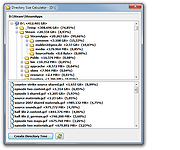 |
|
Folder Size Analyzer v2.1.0 Folder Size Analyzer v2.1.0 Quickly find out which files or folders who taking up your hard drive space. Ever wonder how your hard drive becomes full so quickly? Today, people use computers more for social activity and entertainment than for doing a real job. Not surprising that within a year or two, most of your hard disk is already populated by many photos, videos, music, applications, and games collections. This should not be a problem if you can keep your files organized. When you’re running low on disk space simply move those multimedia and games collections to an external drive and you’re done. But unfortunately, this is not the case for most people. Most people tend to store files in random folders and that makes finding files’ location would be a tiresome task and time-consuming. This is where our Folder Size Analyzer tool can be very helpful. With this tool, you can quickly locate all large files and folders’ locations. Supported operating systems: Windows 11 and 10 Changes: v2.1.0: Administrator account no longer required to install Folder Size Analyzer. Added option to exclude OneDrive folder. Click here to visit the author's website. |
|
2,892 | Jul 12, 2023 Tweaknow.com 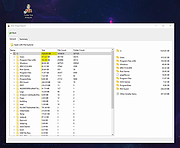 |
|
MeinPlatz v8.66 MeinPlatz v8.66 👉 Quickly scan drives and folders to find lost disk space. MeinPlatz helps you quickly analyze hard drive, SSD, USB drive, and folder space usage so you can see where your storage has gone. It displays results by folder, file type, size, date, percentage usage, file count, and folder count, making it easier to locate large files and space-hogging directories. Features: • Fast disk and folder space scanning • Percentage-based storage analysis • Group results by folders, file types, size, or date • Export results to XLS, CSV, TXT, and HTML • Print function with print preview • Small built-in screen magnifier • Portable version available • Low resource use Supported operating systems: • Windows XP, Windows Vista, Windows 7, Windows 8.1, Windows 10, Windows 11 • Windows Server 2016, Windows Server 2019 Supported languages: German, English, Polish, Chinese Traditional, Chinese Simplified, French, Russian, Dutch, Korean Changes: v8.66 05-22-26 • New: Right-click option to open file properties and the target file path for shortcuts. • Updated MeinPlatz language files. This download is for the Windows 64bit version (very bottom of page). If you need the Windows 32bit version, download here. Click here to visit the author's website. |
|
6,984 | May 22, 2026 Nenad Hrg 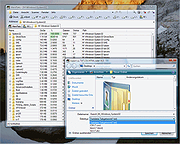 |
|
System Font Size Changer v1.4.0.30 System Font Size Changer v1.4.0.30 System Font Size Changer is a text display repair tool. It enables to change the font sizes used by the system. The program was created as a consequence of the fact that Microsoft has removed this option in the Windows 10 Creators Update version. It is a fundamental problem of Windows operating systems that the default font sizes used by the system are quite small when using a high resolution display setting, thus making reading difficult. In previous Windows versions there was a customization option for this. Another issue with the Windows 10 Creators Update is that in upgrade installation mode the previously set font sizes return to default, that is, to small size. Thus the problem of system font size is inevitable if someone is installing the new Windows or upgrading to it. Advantages of System Font Size Changer: Enables the setting of system font sizes in the Windows 10 operating system (Windows 10 Creators Update, Windows 10 Fall Creators Update and Windows 10 2018 April Update) Creates backup when first started Six system font sizes can be set (Title bar, Menu, Message box, Palette title, Icon, Tooltip) Settings can be exported Doesn’t require installation Black and white theme Free to use It supports Windows 7/8/10 operating systems New: Windows 10 November 2019 Update ready System Font Size Changer - Changelog Version: 1.4.0.30 - Date: 2019-06-21 Add: Tip Change: Tools menu item Click here to visit the author's website. |
|
7,351 | Dec 16, 2019 WinTools 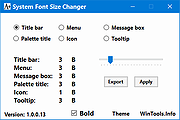 |
| Showing rows 1 to 5 of 5 | Showing Page 1 of 1 | 1 |
OlderGeeks.com Copyright (c) 2026
