|

|
Processed through Paypal No account required. |








Buy our over-priced crap to help pay the bills.



|
|
Processed through Paypal No account required. |
| Files | ||||
| File Name | Rating | Downloads | ||
 |
adb-tools-mac v1.1 adb-tools-mac v1.1 👉 A handy macOS menu bar app for common Android ADB tools. adb-tools-mac is a lightweight macOS menu bar app written in SwiftUI that gives Android users quick access to common ADB functions without needing to run commands manually in Terminal. It can connect to Android devices over TCP, take screenshots, record the screen, open deeplinks and capture logcat output. The app includes the adb executable internally, helping avoid common ADB setup and installation problems. Features: • Runs from the macOS menu bar • Connect Android devices over TCP • Take screenshots from connected devices • Record Android device screens • Open deeplinks for testing apps and links • Capture logcat output • Includes adb internally to reduce setup problems • Written in SwiftUI • Free and open source under the GPL Supported operating systems: • macOS Supported languages: English Changes: v1.1 03-12-21 Moved adb commands to background thread to avoid adb daemon stalling the app process. Click here to visit the author's website. |
 |
3,554 | Jun 14, 2026 Naman Dwivedi 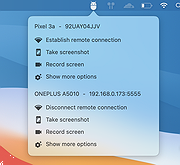 |
 |
Greenshot v1.3.323 Greenshot v1.3.323 👉 A free, fast and flexible screenshot tool with built-in editing and sharing options. Greenshot is a free and open-source screenshot utility designed for quick and efficient screen capturing on Windows systems. It allows users to capture full screens, active windows, or selected regions with ease, and provides built-in editing tools to annotate, highlight, or obfuscate parts of the image. Greenshot integrates seamlessly with various destinations such as file saving, clipboard, printers, and third-party applications, making it ideal for productivity, documentation, and support workflows. Features: • Capture full screen, active window, or user-defined region • Capture Internet Explorer content including scrolling pages • Built-in image editor with annotation tools • Add text, shapes, arrows, and highlights to screenshots • Obfuscate sensitive information with blur or pixelation • Save to file, copy to clipboard, print, or email directly • Upload to services like Imgur and integrate with Office apps • Customizable hotkeys for fast capture workflows • Plugin support for additional functionality • Efficient performance with minimal system impact • Multi-language user interface • Open-source and actively maintained Supported operating systems: Windows 8/10/11 (Windows 8 may ask to install .NET 3.5. You can skip this.) Supported languages: English, German, French, Spanish, Italian, Dutch, Portuguese, Russian, Chinese, Japanese, Korean, Czech, Polish, Hungarian, Turkish, Swedish, Finnish, Danish, Norwegian, Greek Changes: v1.3.323 10-08-26 What's Changed Security Fixed a security issue where TLS certificate validation was disabled process-wide, exposing OAuth tokens and plugin uploads (Imgur, Box, Dropbox, Flickr, Confluence, Jira) to man-in-the-middle attacks. Reported by @sondt99, @lihnucs, and @dungNHVhust; fixed in backport PR #1122. GHSA-q4w7-9m8v-53fm Fixed an out-of-bounds read that could cause denial of service when processing crafted CF_DIBV5 clipboard data. Reported by @hacker1984; fixed by @Lakritzator and @jklingen in commit 80ccbde9d. GHSA-4674-75g5-79mx Fixed server-side request forgery when opening crafted SVG files by preventing Svg.NET from resolving external resources and entities. Reported by @Zenquiem; fixed ... |
|
10,253 | Oct 09, 2026 Greenshot Dev Team  |
| Showing rows 1 to 2 of 2 | Showing Page 1 of 1 | 1 |
OlderGeeks.com Copyright (c) 2026
