|

|
Processed through Paypal No account required. |








Buy our over-priced crap to help pay the bills.



|
|
Processed through Paypal No account required. |
| Files | ||||
| File Name | Rating | Downloads | ||
 |
JSONedit v0.9.45 JSONedit v0.9.45 👉 A portable JSON editor with text, tree and list views. JSONedit lets you inspect and edit JSON documents as text, expandable trees or filtered lists. It requires no installation. Tools support formatting, CSV conversion, reusable snippets, Lua scripting and schema validation. You can also locate browser configuration files and edit Mozilla MOZLZ4/JSONLZ4 files. Note: Full Unicode support is unavailable. The jq filtering tool requires a separate jq executable in the application directory. Features: • Text, tree and list views. • Syntax highlighting, code folding and brace matching. • Compact or indented formatting. • Node copying, cloning, sorting and reordering. • Searching and list filtering. • Duplicate-value detection. • CSV import and export. • Reusable snippets. • Lua scripting and configurable hotkeys. • JSONPath and JMESPath queries. • JSON Patch and Merge Patch tools. • JSON Schema validation. • NDJSON viewing and export. • Mozilla MOZLZ4/JSONLZ4 support. • Browser configuration access. • External jq filtering. Supported operating systems: • Windows; specific versions: Not Found • Linux through Wine, with limitations Supported languages: English. Changes: v0.9.45 09-30-26 added File/"Open browser config" menu: lists JSON configuration files of Chromium-based browsers (Vivaldi, Opera, Chrome, Edge, Brave) and Firefox profiles saving browser configuration file: warning if browser is running (it may overwrite file on exit), warning for Chromium "Secure Preferences" (HMAC-protected values), option to remove "checksum" from Chromium "Bookmarks" added Tools/"jq filter (using external jq.exe)" window: filtering JSON with jq (https://jqlang.org/) if jq executable (jq.exe, jq-win64.exe, jq-windows-amd64.exe, jq-win32.exe or jq-windows-i386.exe) is placed in application directory; options: compact (-c), raw output (-r), sort keys (-S), slurp (-s); MRU list of filters pre-filled with basic examples MOZLZ4/JSONLZ4 files are detected also ... |
 |
5,825 | Oct 05, 2026 Tomasz Ostrowski 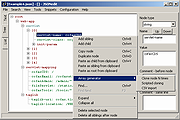 |
| Showing rows 1 to 1 of 1 | Showing Page 1 of 1 | 1 |
OlderGeeks.com Copyright (c) 2026
