|

|
Processed through Paypal No account required. |








Buy our over-priced crap to help pay the bills.



|
|
Processed through Paypal No account required. |
| Files | ||||
| File Name | Rating | Downloads | ||
 |
FineTune v1.9.0 FineTune v1.9.0 👉 Per-app volume control, audio routing, multi-device output and EQ for macOS. FineTune is a free and open-source macOS menu bar app that lets you control the volume of individual apps, boost quiet apps up to 4x, route apps to different speakers, use multi-device output, adjust input and output devices, and shape sound with a 10-band EQ and headphone correction. Features: • Per-app volume sliders and mute controls • Per-app volume boost with 2x, 3x and 4x gain presets • Global hotkeys for app volume up, app volume down, app mute and popup toggle • Configurable volume step size • Keyboard navigation for the menu bar popup • Multi-device output support • Route apps to different audio outputs • Auto-restore app volume, routing and EQ when devices reconnect • 10-band EQ with presets • Custom user EQ presets • AutoEQ headphone correction support • Loudness compensation using ISO 226:2023 equal-loudness contours • Input device and microphone level control • macOS alert volume control • Bluetooth device management from the menu bar • External monitor speaker control via DDC • Dynamic menu bar icon styles • Light and Dark theme support • Adjustable popup size: Compact, Comfortable or Spacious • URL schemes for automation Supported operating systems: • macOS 15.0 Sequoia or later Supported languages: English, Simplified Chinese Changes: v1.9.0 07-09-26 Pick your own icon for any device, and the menu bar icon stops nudging its neighbors. Two DDC fixes land alongside, including the crash on external-monitor volume changes that shipped in v1.8.0. New Features Choose Any Device's Icon Open edit mode in the popup and click a device's icon to pick a new one from a catalog of 85 symbols across five categories — Headphones & Earbuds, Speakers, Computers & Displays, Microphones, and Connectors & Other — or search by keyword ("soundbar", "projector", "aux"). A Suggested section leads with FineTune's automatic guess from the device's name and connection type, so the right ... |
 |
826 | Oct 07, 2026 Ronit Singh 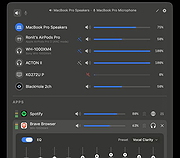 |
 |
PolyHostInterface v3.1.1 PolyHostInterface v3.1.1 👉 A lightweight, portable Windows host for loading, chaining and controlling VST2 and VST3 audio plugins. PolyHostInterface is a standalone and VST3 plugin host designed for musicians, synthesizer programmers and audio users who want a compact way to load multiple instruments and effects without the overhead of a full DAW. Plugins are organized in tabs, with synths operating in parallel and effects arranged in a serial processing chain. The routing view provides an overview of each loaded plugin and lets you reorder, bypass, mute, solo and select individual tabs. PolyHostInterface can also operate as a VST3 plugin inside another host. Its 128 host-visible macros can be mapped to parameters of hosted plugins, allowing those parameters to be automated from a DAW. A built-in MIDI Monitor displays notes, CC messages, pitch bend, aftertouch, system messages and other incoming MIDI data, with filtering, copy and export capabilities. A distinctive feature is Pointer Control, which lets a MIDI controller manipulate the mouse pointer over a plugin interface. MIDI controls can move the pointer horizontally and vertically and adjust the parameter beneath it using scrolling or dragging. Editable Pointer Maps provide reusable jump points for individual plugins, including multiple maps for plugins with different skins, pages or layouts. The standalone application can record audio to WAV files or MIDI to MID files. Presets can store plugin configurations, and a missing-plugin repair function helps locate moved plugins when loading an existing preset. PolyHostInterface is fully portable, keeping its settings alongside the program instead of using AppData or the Windows Registry. Features: • Hosts multiple VST2 and VST3 plugins in a tabbed interface • Available as a standalone Windows application and a VST3 plugin for use inside other hosts • 64-bit VST2 and VST3 plugin support • Separate 32-bit standalone version supports 32-bit VST2/VST3 plugins • Routing view shows plugin order, synth/effect type, bypass ... |
|
93 | Oct 14, 2026 sl2365 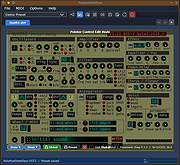 |
| Showing rows 1 to 2 of 2 | Showing Page 1 of 1 | 1 |
OlderGeeks.com Copyright (c) 2026
