|

|
Processed through Paypal No account required. |








Buy our over-priced crap to help pay the bills.



|
|
Processed through Paypal No account required. |
| Files | ||||
| File Name | Rating | Downloads | ||
 |
CPUSetter v1.7.1 CPUSetter v1.7.1 👉 Control CPU cores, hyperthreading, and process CPU usage on macOS. CPUSetter is a macOS utility that lets you control how your Mac's processor resources are used. It can enable or disable CPU cores and hyperthreading on supported processors, apply separate settings for battery and AC power, and limit the CPU usage of individual processes. CPUSetter also includes a process manager for adjusting process priority, viewing running applications, terminating processes, and monitoring system performance with built-in CPU, memory, disk, and network graphs. Administrator privileges are required for hardware-related changes, and a privileged helper tool is installed during first launch. Features: • Enable or disable physical and logical CPU cores • Enable or disable hyperthreading on supported processors • Apply separate CPU settings for battery and AC power • Limit the maximum CPU usage of individual processes • Change process priority (nice value) • Enable or disable throttling of low-priority processes • View and manage all running processes • Terminate running processes • Reveal process executables in Finder • Bring applications to the foreground • Display live CPU, memory, disk, and network performance graphs • Optionally apply saved settings automatically at system startup Supported operating systems: • macOS Big Sur 11.5 or higher Supported languages: English Changes: v1.7.1 12-16-25 • Requires macOS Big Sur (11.5) or later • Updated to Sparkle 2.7.0 • Fixed CPU sampling for hyperthreaded hosts In this screenshot, the Handbrake process has been limited to a maximum of 100% CPU usage (i.e. 1 whole core from the 4 available) and also reduced to a priority of 19. It is constrained as can be seen by it requesting more CPU resource than it is allowed to use. Click here to visit the author's website. |
 |
3,537 | Jun 23, 2026 Bryan Christianson 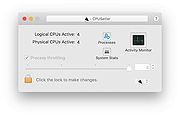 |
|
Resource Hacker v5.2.8 Resource Hacker v5.2.8 A freeware resource compiler and decompiler for Windows applications. Resource Hacker is a resource editor for 32bit and 64bit Windowsฎ applications. It's both a resource compiler (for *.rc files), and a decompiler - enabling viewing and editing of resources in executables (*.exe; *.dll; *.scr; etc) and compiled resource libraries (*.res, *.mui). While Resource Hacker is primarily a GUI application, it also provides many options for compiling and decompiling resources from the command-line. Compiling: Compiling can be initiated either by opening an existing resource script file, or by creating one from scratch using Resource Hacker's editor. A complete list of Resource-Definition Statements can be found here. Additional features of Resource Hacker's compiler include: The #INCLUDE directive (to access definition statements in header files etc) can be nested to multiple levels, as can the #IF, and #IFDEF directives. #DEFINE, #UNDEF, #IF, #ELIF, #ELSE, #IFDEF, #IFNDEF, #INCLUDE, and #PRAGMA directives are all supported. Strings, between double-quote (") characters, may contain typical 'C' style backslashed 'escaped' characters \t , , \\ , \" , \x, \u and \377 (octal). A double-quote within a string must be 'escaped' using either a preceding backslash or with another double-quote. Script comments are preceded either by double forward-slashes (//) or by a semi-colon (;). Filenames with relative paths are allowed. Filenames that contain spaces must be enclosed within double-quote characters. Compiler error messages are reported, even errors nested within INCLUDE statements... Viewing and Editing Resources: Once a resource file has been opened, its resources will generally be displayed as either an image (or group of images) or as decompiled text. Binary resources, usually images, can't be edited directly with Resource Hacker, but they can still be very easily exported and imported once they've been modified by an external image editor. (I see no benefit in duplicating what third-party image editors do ... |
|
6,693 | Mar 06, 2025 Angus Johnson 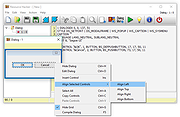 |
 |
Resource Progress Bar v1.3.0.44 Resource Progress Bar v1.3.0.44 The Resource Progress Bar visualizes the load of the four most important resources defining user experience (CPU, RAM, network, HDD) in real time. The tool is useful when setting up the computer, and when installing programs. It helps to identify at once if the system is overloaded due to incorrect software or settings. Overload states may occur during general computer use as well. These could be either normal loads generated by operations that require high computing power, or abnormal loads caused by program errors and malicious background tasks. In such cases, the Resource Progress Bar effectively provides system status information. In case of overload, the Resource Progress Bar sends a warning via the tray icon. The actual data transfer speed of the network is displayed according to the pre-set limits. It also informs about the data transfer activity if the network or HDD usage is low (HDD Led and Network Led). The Resource Progress Bar can be set up to start automatically so that is loads together with the operating system according to the last saved status. Program size and other display options can be set, and the settings saved. The Resource Progress Bar is capable of operating with full functionality while running in the background. Benefits of the Resource Progress Bar: Effectively informs about the state of system resources Sends a warning in case of overload Can be set to start automatically Display options (position, size, Opacity, Show/Hide, Top) can be set, and the settings saved; the program will launch next time with the saved settings Limits can be set for the network process display Support for low network traffic and low HDD usage display (HDD LED and Network LED) ... |
|
5,963 | Feb 05, 2020 WinTools  |
|
RisohEditor v6.1.4 RisohEditor v6.1.4 👉 Free Win32 resource editor for editing resources in RC, RES, EXE, and DLL files. RisohEditor is a free resource editor for Win32 development that can edit, extract, clone, and delete resource data in RC, RES, EXE, and DLL files. It supports common Windows resources such as dialogs, menus, icons, cursors, string tables, and message tables, with Unicode support for international resources. Features: • Edit, extract, clone, and delete resource data • Supports RC, RES, EXE, and DLL files • Edit dialogs, menus, icons, cursors, string tables, and message tables • Full Unicode support • Can read resource.h header files • Supports GUI editing • Exported resources can be read by Visual C++ • Supports window class libraries • 32-bit and 64-bit support • Portable version uses an INI file instead of the registry Supported operating systems: • Windows XP, Windows Server 2003, Windows Vista, Windows 7, Windows 8.1, Windows 10 • ReactOS Supported languages: English, Chinese, Italian, Russian, Japanese, Korean, Portuguese, Ukrainian Changes: v6.1.4 08-13-26 Made configuration a property sheet. Accelerated OnDeleteRes. Prevented the tree view's drop-down arrow from appearing twice. Fixed MRadWindow index labels. Supported resource compression by WonRes. Improved UPX handling. Enhanced support for Help IDs. Improved MEditMenuDlg. Supported zooming of code editor. Fixed word wrap. Note: This file has four hits on VirusTotal. We have confirmed these to be false positives. The file is safe. This download is for the Windows portable version (very bottom of page). If you need the Windows 32bit installer version, download here. If you need the Windows 64bit installer version, download here. Click here to visit the author's website. |
|
3,768 | Aug 18, 2026 Katayama Hirofumi 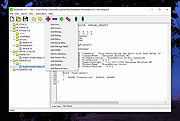 |
| Showing rows 1 to 4 of 4 | Showing Page 1 of 1 | 1 |
OlderGeeks.com Copyright (c) 2026
