|

|
Processed through Paypal No account required. |








Buy our over-priced crap to help pay the bills.



|
|
Processed through Paypal No account required. |
| Files | ||||
| File Name | Rating | Downloads | ||
 |
PDF Arranger v1.14.0 PDF Arranger v1.14.0 👉 Merge, split, rotate, crop and rearrange PDF pages with an easy graphical interface. PDF Arranger is a lightweight open-source application for merging, splitting, rotating, cropping, and rearranging PDF documents through a simple drag-and-drop graphical interface. Built with Python and GTK, it allows users to visually organize pages and create new PDF layouts without needing complex editing software. PDF Arranger is based on the functionality of PDF-Shuffler and uses pikepdf for PDF manipulation. It is designed to be fast, efficient, and easy to use for both casual and advanced users needing quick PDF document management. Features: • Merge multiple PDF documents into a single file • Split PDF documents into separate pages or ranges • Rotate pages individually or in groups • Crop pages visually • Rearrange pages using drag-and-drop • Duplicate pages quickly • Zoom and preview PDF pages • Supports password-protected PDFs • Import image files and convert them into PDF pages • Undo and redo editing actions • Customizable keyboard shortcuts • Open-source and cross-platform Supported operating systems: • Windows 10, Windows 11 • macOS • Linux • FreeBSD Supported languages: Arabic, Catalan, Catalan (Valencian), Czech, Danish, German, Greek, English, Spanish, Basque, Finnish, French, Hebrew, Croatian, Hungarian, Indonesian, Icelandic, Italian, Japanese, Georgian, Korean, Dutch, Occitan, Polish, Portuguese (Brazil), Portuguese (Portugal), Russian, Slovenian, Swedish, Turkish, Ukrainian, Vietnamese, Simplified Chinese, Traditional Chinese Changes: v1.14.0 04-13-26 • Added support for importing JBIG2 image files • Improved crop dialog behavior • Added new keyboard shortcuts • Improved handling of password-protected PDFs • Updated translations • Fixed several bugs and stability issues This download is for the Windows version (very bottom of page). Linux install instructions below: For Linux: pdfarranger requires pikepdf >= 6. pip will automatically install the latest pikepdf if there is no pikepdf installed on the system. On Debian based distributions sudo apt-get install python3-pip python3-wheel python3-gi python3-gi-cairo \ gir1.2-gtk-3.0 gir1.2-poppler-0.18 gir1.2-handy-1 python3-setuptools \ gettext python3-dateutil python3-venv On Arch Linux sudo pacman -S poppler-glib python-pip python-gobject ... |
 |
5,122 | May 28, 2026 Jerome Robert 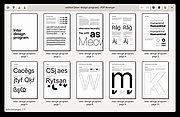 |
| Showing rows 1 to 1 of 1 | Showing Page 1 of 1 | 1 |
OlderGeeks.com Copyright (c) 2026
