|

|
Processed through Paypal No account required. |








Buy our over-priced crap to help pay the bills.



|
|
Processed through Paypal No account required. |
| Files | ||||
| File Name | Rating | Downloads | ||
 |
mDNSView v1.00 mDNSView v1.00 👉 Scan and view mDNS records published by devices on your local network. mDNSView is a simple Windows utility from NirSoft that displays mDNS records published by devices connected to your local network. For every discovered mDNS record, it shows the device IP address, name, record type, and record value. Features: • Displays mDNS records from devices on your local network • Shows IP address, name, record type, and record value • Supports A, AAAA, TEXT, PTR, and SRV record types • Start a scan with the toolbar button or F5 key • Export results to CSV, tab-delimited, XML, HTML5, or JSON • Copy selected records to the clipboard • Portable; no installation or extra DLL files required Supported operating systems: • Windows XP, Windows Vista, Windows 7, Windows 8, Windows 10, Windows 11 • 32-bit and 64-bit systems Supported languages: English, Dutch, French, German, Hungarian, Italian, Russian, Traditional Chinese Changes: v1.00 05-23-26 Initial release. Note: This file has multiple hits on VirusTotal because it's new and because it sniffs your network for information. We have determined these to be fair warnings but as long as you are the one using it, the file is safe. Click here to visit the author's website. |
 |
533 | Jun 03, 2026 Nir Sofer 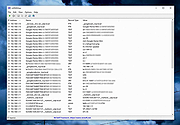 |
 |
Wireshark v4.6.7 Wireshark v4.6.7 👉 Analyze and troubleshoot network traffic with the industry's leading protocol analyzer. Wireshark is a free and open-source network protocol analyzer used by network administrators, security professionals, developers, students, and IT enthusiasts to capture, inspect, and analyze network traffic in real time or from previously saved capture files. It supports hundreds of protocols and provides powerful filtering, coloring, and statistical analysis tools to help diagnose network problems, investigate security issues, debug applications, and understand how network protocols work. Wireshark can capture traffic from wired and wireless network interfaces, display packet details down to the individual protocol fields, reconstruct conversations, and export captured data in multiple formats. Its flexible display filters, extensive protocol support, customizable interface, and built-in analysis tools make it an essential utility for anyone working with computer networks. Features: • Capture live network traffic from Ethernet, Wi-Fi, Bluetooth, USB, and many other interface types • Open and analyze previously captured packet trace files • Decode hundreds of network protocols with detailed packet inspection • Powerful display filters for quickly isolating specific traffic • Colorize packets for improved readability and faster analysis • Follow TCP, UDP, HTTP, HTTP/2, TLS, QUIC, WebSocket, and other protocol streams • Generate protocol hierarchy, endpoint, conversation, I/O, and flow graphs • Inspect packet contents down to individual protocol fields • Search captured traffic by protocol, address, port, payload, or custom criteria • Support for decryption of supported encrypted protocols when appropriate keys are available • Extensive capture and display customization options • Export captured packets and analysis results in multiple formats • Extensible through Lua scripting and plugins • Cross-platform interface with consistent functionality Supported operating systems: • Windows 10, Windows 11 • macOS 12 Monterey or higher • Linux (major distributions including Debian, Ubuntu, Fedora, Red Hat Enterprise Linux, openSUSE, Arch Linux, and others) • FreeBSD, NetBSD, OpenBSD Supported languages: English, Chinese (Simplified), Chinese (Traditional), French, German, Italian, Japanese, Korean, Polish, Russian Changes: v4.6.7 07-02-26 Bug Fixes The ... |
|
10,976 | Jul 09, 2026 Gerald Combs 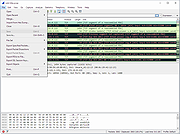 |
| Showing rows 1 to 2 of 2 | Showing Page 1 of 1 | 1 |
OlderGeeks.com Copyright (c) 2026
