|

|
Processed through Paypal No account required. |








Buy our over-priced crap to help pay the bills.



|
|
Processed through Paypal No account required. |
| Files | ||||
| File Name | Rating | Downloads | ||
 |
Pinned: Malwarebytes Anti-Malware v5.7.2.358 Malwarebytes Anti-Malware v5.7.2.358 OlderGeeks.com is an official mirror of Malwarebytes Anti-Malware 👉 Advanced malware detection and removal tool to protect your PC from threats. Malwarebytes Anti-Malware is a powerful security application designed to detect, block, and remove malware, ransomware, spyware, adware, and other online threats that traditional antivirus programs may miss. Using advanced heuristic analysis and signature-based detection, it provides real-time protection and on-demand scanning to keep your system clean and secure. Malwarebytes Anti-Malware works alongside other antivirus software or as a standalone solution, offering layered defense against emerging threats. Its streamlined interface makes it easy for both beginners and advanced users to perform quick scans, deep scans, and custom scans, while maintaining minimal impact on system performance. Features: • Real-time protection against malware, ransomware, spyware, and adware • Advanced heuristic and behavior-based threat detection • Quick, Threat, and Custom scan options • Protection against malicious websites and phishing attempts • Automatic updates to the malware database • Quarantine and restore functionality • Lightweight design with minimal system impact • Compatible with other antivirus programs Supported operating systems: • Windows 10, Windows 11 Supported languages: English, Spanish, French, German, Italian, Portuguese, Dutch, Japanese, Korean, Chinese (Simplified), Chinese (Traditional) Changes: v5.7.2.358 10-01-26 Features and improvements Added the ability to directly open Browser Guard's extension settings from the Malwarebytes for Windows Settings page. This link only appears when Chrome or Edge is your default browser. Improved the error messages that appear when license activation fails, so it's clear what went wrong and what to do next. Improved detection of malicious scripts. Issues fixed Fixed security, stability, and performance issues related to detection, protection, and remediation. Fixed minor localization issues. Note: Malwarebytes initially installs as a 14 day trial of full real-time protection. After the 14 days are up, Malwarebytes reverts to a free version that will only disinfect ... |
 |
28,659 | Oct 09, 2026 Malwarebytes.com 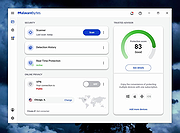 |
|
AOMEI Backupper Standard v8.4.0 AOMEI Backupper Standard v8.4.0 👉 Free backup, sync, restore, and disk cloning software for protecting your system and personal data. AOMEI Backupper Standard is free backup software designed to protect personal data and operating systems with backup, restore, sync, and cloning tools. It can back up files, folders, disks, partitions, and systems, create automatic scheduled backups, sync files to local and network locations, clone data disks for drive replacement or upgrades, and create bootable rescue media for recovery when the system cannot start. Features: • System, disk, partition, and file backup • File restore, system restore, disk restore, and partition restore • Automatic scheduled backups with daily, weekly, and monthly options • Incremental backup support • Basic file sync to local disks, external drives, network shares, and NAS • Disk clone for data disks and partition clone • Intelligent sector clone and SSD alignment support • Bootable media creation for recovery • Backup to local disk, external disk, USB flash drive, network/NAS, cloud drive, and CD/DVD • Backup image splitting, compression, checking, and task import/export • Recovery environment creation in the boot menu • Email notifications with Gmail and Hotmail SMTP support in the Standard edition Supported operating systems: • Windows 7, Windows 8, Windows 8.1, Windows 10, Windows 11 • macOS 10.13 (High Sierra) or higher Supported languages: • English, German, French, Japanese, Italian, Dutch, Spanish, Turkish, Polish, Simplified Chinese, Traditional Chinese Changes: v8.4.0 06-18-26 Optimized: Now it allows to reset the System Security Identifier (SID) during system/system disk clone and restore. This seamlessly eliminates network and permission conflicts after migrating systems to multiple PCs, making IT management and batch deployment much more efficient. Optimized: The task execution details page now displays "Transfer Speed" and "Estimated Time Remaining" in real-time, providing clear, at-a-glance visibility into your progress. Optimized: When the window of the backup source and destination selection pop-up is enlarged, the list column widths will automatically adjust the spacing according to ... |
|
10,109 | Aug 14, 2026 AOMEI Technology Co., Ltd 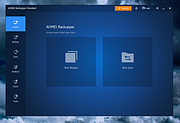 |
|
BitDefender Antivirus Free Edition v27.0.62.352 BitDefender Antivirus Free Edition v27.0.62.352 👉 Free real-time antivirus protection for Windows PCs. BitDefender Antivirus Free Edition provides lightweight, cloud-powered antivirus protection designed to defend Windows computers against viruses, malware, ransomware, phishing attacks, and other online threats. It uses Bitdefender’s award-winning security technologies while maintaining a simple “install and forget” approach that runs quietly in the background without slowing down your system. The program delivers real-time threat detection, automatic malware scanning, web attack prevention, anti-phishing protection, and malicious website blocking. It also includes integrated Bitdefender VPN access with limited daily encrypted traffic for safer browsing. BitDefender Antivirus Free Edition is optimized for gaming, multimedia editing, and other resource-intensive activities by minimizing system impact while maintaining continuous protection. Features: • Real-time antivirus and malware protection • Cloud-powered threat detection • Advanced anti-phishing protection • Malicious website and scam blocking • Automatic security updates • Lightweight system resource usage • Optimized for gaming and multimedia tasks • Integrated Bitdefender VPN with limited daily traffic • Automatic threat remediation and quarantine • Simple install-and-forget interface • Web traffic scanning • Protection against ransomware and online threats Supported operating systems: • Windows 7 SP1, Windows 8.1, Windows 10, Windows 11 Supported languages: English, German, French, Spanish, Italian, Romanian, Dutch, Swedish, Chinese Traditional, Chinese Simplified, Portuguese, English UK, English AU Changes: v27.0.62.352 08-20-26 Fixed an issue where protection review reports included monitored web and email activity even when the related protection features were disabled Fixed an issue where Bitdefender services were not responding at startup Fixed an issue where Bitdefender services could appear unresponsive while the product remained functional Fixed an issue where SecurePass could not remain disabled in Safepay Fixed an issue causing continuous notifications about webcam access Fixed an issue where the verified links counter reset to zero after rebooting on Windows 11 Fixed an issue causing multiple firewall notifications stating that an application had changed Note: BitDefender Antivirus Free Edition requires you to create a free account. Click here to ... |
|
11,998 | Aug 27, 2026 BitDefender Labs 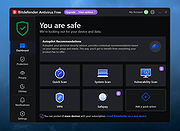 |
 |
ClickShield v1.2.1 ClickShield v1.2.1 👉 Helps block ClickFix phishing attacks and suspicious clipboard commands in Windows. ClickShield is a free Windows security utility designed to help protect against ClickFix and similar phishing attacks that attempt to trick users into executing malicious commands. These attacks commonly use fake CAPTCHA or verification screens that copy a command to the clipboard and instruct the user to paste it into the Windows Run dialog or Command Prompt. ClickShield monitors clipboard changes for suspicious commands, including PowerShell commands and Windows LOLBINs such as mshta, bitsadmin, wmic and regsvr32. When suspicious clipboard content is detected, it can alert the user and prevent the Run dialog from opening. Its LOLBIN Shield can also block selected Windows utilities from accessing the internet, adding another layer of protection against common ClickFix techniques. Features: • Monitors the Windows clipboard for suspicious text and commands • Helps protect against ClickFix and similar fake CAPTCHA phishing attacks • Detects suspicious PowerShell commands, including encoded commands • Detects commands involving commonly abused Windows LOLBIN utilities • LOLBIN Shield can block several Windows utilities from accessing the internet • Can prevent the Windows Run dialog from opening when suspicious clipboard content is detected • Provides alerts when potentially dangerous clipboard commands are found • Includes an option to completely disable the Windows Run dialog • Run dialog restriction can be useful for administrators managing employee computers • Designed to operate with minimal memory usage • Supports both 32-bit and 64-bit Windows systems Supported operating systems: • Windows 7, Windows 8, Windows 8.1, Windows 10, Windows 11 Supported languages: • English Changes: v1.2.1 09-04-26 [*] Fixes and Improvements: • The alert message now stays on top of all windows instead of launching on the browser. This way it protects itself from ClickFix attack variants that attempt to close it and CrashFix attacks that crash the browser. The alert message remains visible until the user closes it. • The alert ... |
|
656 | Sep 30, 2026 Emir Alp Kocak  |
|
Cyber Prot v4.1.1.53 Cyber Prot v4.1.1.53 👉 Lightweight anti-ransomware protection that monitors system behavior to stop malicious encryption attacks before they damage your files. Cyber Prot is an anti-ransomware security tool designed to protect your system from file-encrypting malware and similar threats. It uses behavioral analysis and advanced algorithms to monitor system activity and detect suspicious operations that may indicate a ransomware attack. Instead of relying solely on signature databases like traditional antivirus software, Cyber Prot analyzes how programs behave. If a process begins performing suspicious actions such as rapid file encryption, mass file renaming, or unusual changes to file headers, the program can immediately intervene and terminate the offending process before it causes serious damage. Cyber Prot is designed to run alongside your existing antivirus solution, adding an additional layer of protection without significantly impacting system performance. The program runs quietly in the system tray and continuously monitors processes in the background. When a potential threat is detected, Cyber Prot can respond in several ways depending on your configuration. Possible actions include playing a warning sound, sending an email notification, shutting down the computer, or preventing the system from booting again until the issue is addressed. These flexible response options allow users to tailor the program’s behavior to their specific security needs. Features: • Behavioral monitoring of running processes to detect ransomware activity • Heuristic detection capable of identifying previously unknown threats • Real-time monitoring of file system activity • Ability to stop malicious processes before files are encrypted • Customizable actions when threats are detected • Email notification and sound alerts for detected attacks • Can shut down or lock the system to prevent further damage • Designed to run alongside existing antivirus solutions • Lightweight system tray operation with minimal performance impact Supported operating systems: • Windows 10, Windows 11 Supported languages: English Changes: v4.1.1.53 Not provided Click here to visit the author's website. |
|
778 | Mar 06, 2026 Cyberland 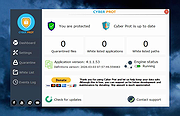 |
|
EpilepsyGuard v1.02 EpilepsyGuard v1.02 👉 Protects photosensitive users by reducing potentially harmful flashing on the screen. EpilepsyGuard is an open-source accessibility utility designed to help reduce the risk of photosensitive seizures while using a computer. It monitors the contents displayed on your screen in real time and automatically detects rapid flashing patterns that may exceed safe thresholds. When potentially hazardous flashing is detected, the program temporarily darkens or covers the affected area to reduce exposure while allowing you to continue using your computer. EpilepsyGuard is intended as an extra layer of protection for people with photosensitive epilepsy or sensitivity to flashing images while browsing the web, watching videos, playing games, or using other multimedia applications. It runs quietly in the background with minimal system impact and can be enabled or disabled at any time. ⚠️ Warning: EpilepsyGuard is not a medical device and cannot guarantee protection against seizures. It may not detect every flashing pattern or visual trigger, and should not be relied upon as your only means of protection. If you have photosensitive epilepsy or another light-sensitive medical condition, continue to follow your healthcare provider's recommendations and use appropriate precautions. If you experience symptoms, stop using the affected content immediately and seek medical advice. Features: • Continuously monitors the screen for potentially hazardous flashing patterns • Automatically reduces or obscures detected flashing regions • Designed to help reduce exposure to photosensitive seizure triggers • Runs in the background with low resource usage • Simple interface with quick enable and disable controls • Open source Supported operating systems: • Windows 10, Windows 11 Supported languages: • English Changes: v1.02 06-22-26 • Improved flash detection reliability • Bug fixes and stability improvements Note: This file has one hit on VirusTotal. We have confirmed this to be a false positive. The file is safe. Click here to visit the author's website. |
|
427 | Jul 02, 2026 SanicScript 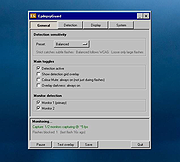 |
|
K9 Web Protection Password Cracker v1.0 K9 Web Protection Password Cracker v1.0 Free tool that reads your K9 Web Protection's license file, and reverses the password encryption algorithm to figure out your password; it "hacks" your password. This, in turn, allows you to uninstall K9 Web Protection. From the author: This application was created as a result of me forgetting my password for a K9 Web Protection installation. In searching for a solution, I came across Dietrich's research on the program's password encryption algorithm. I proceeded to try and decrypt my password file using some quick C++ code, and when it did work, decided to code a small console application. The application automatically searches in two possible password file installation locations and uses a reverse algorithm to attempt password recovery. Click here to visit the author's website. |
|
3,180 | Feb 25, 2022 Isaac Litzenberger 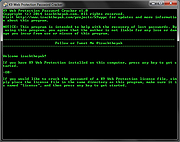 |
|
MJ Registry Watcher v1.2.9.1 MJ Registry Watcher v1.2.9.1 👉 Monitor and protect important registry keys, files, and startup locations. MJ Registry Watcher monitors selected registry keys, files, and directories for changes that could affect Windows startup or system security. It combines hooks, which can report many changes as they happen, with periodic polling to catch changes such as registry key deletions. Its monitored locations and response behavior can be configured, and it keeps a log of detected activity. The program can also monitor process launches and detect DLL injection. It includes registry backup, quarantine, and options for sending alert details by email. The author recommends running it with administrator rights so it can access the registry properly. Features: • Monitors configurable registry keys, files, and directories • Uses system hooks and periodic polling to detect changes • Protects common startup locations, registry values, and system files • Monitors process launches and detects DLL injection • Supports Accept, Reject, and Prompt modes in interactive use • Offers an invisible Windows service mode with Accept and Reject modes • Can send alert details by email and play alert sounds • Includes quarantine and an activity log • Creates periodic registry backups and retains the last 15 snapshots • Stores settings in a configuration file Supported operating systems: Windows 11, Windows 10, Windows 8, Windows 7 Supported languages: English Changes: v1.2.9.1 09-10-26 Latest Features : 64-bit OSes, Service Mode, Process Launch Monitoring, DLL Injection Detection, Emailing of Alerts, Quarantine, Registry Backup. Latest Fixes : Circular registry entries now handled without going into an infinite loop, Windows 11 support, Tray icon colour when loading. How to launch MJ Registry Watcher: Extract the downloaded files with their folder paths preserved, then open the MJRegWatcher folder and run RegWatcher.exe. The author recommends ... |
|
6,320 | Oct 14, 2026 Mark Jacobs 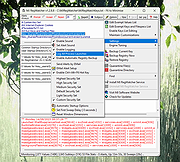 |
|
Privacy Guardian Keep your what you do on your computer and the Internet protected from prying eyes! Internet and Online Privacy PC Tools Privacy Guardian works with popular Internet browsers to erase your browsing history, search history, cookies, passwords, and download logs to help keep your Internet activities private. It even works with chat programs, media players, FTP browsers, email clients, and peer-to-peer file transfer programs to protect your other online activities as well. Everyday Computing Privacy PC Tools Privacy Guardian also helps maintain your day-to-day computing privacy. Temporary and recent file history erasers clear your temporary file folders, as well as your recently opened files lists, keeping your PC use and file access history private. Other cleaners erase Windowsฎ history, including the ones found in Microsoftฎ Office, the Recycle Bin, your Recently Run programs, and the Find and Search bar. Secure File Deletion PC Tools Privacy Guardian helps ensure that the files you delete stay deleted with secure file shredding. And to further safeguard your Recycle Bin, a disk-bleaching tool wipes your free hard disk space, preventing of your deleted files from being restored by file recovery tools. |
 |
13,851 | Mar 01, 2012 Pctools |
|
StasherX v3.12.3.7 StasherX v3.12.3.7 👉 Hide and protect your folders from view with password-based control. StasherX is a simple utility that lets you protect your directories and folders by making them hidden or visible on demand. With password control, it helps prevent casual access to sensitive folders and keeps data out of sight without modifying the files themselves. It’s lightweight and straightforward, ideal for users who want a basic folder-protection tool without complex encryption setups. Features: • Hide directories and folders from view • Toggle visibility on demand • Password protection for folder access • Simple, no-nonsense interface • Lightweight and fast Supported operating systems: • Windows 10, Windows 11 Supported languages: • English Changes: v3.12.3.7 Not provided. Click here to visit the author's website. |
|
723 | Jul 06, 2026 Cyberland 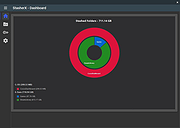 |
| Showing rows 1 to 10 of 10 | Showing Page 1 of 1 | 1 |
OlderGeeks.com Copyright (c) 2026
