|

|
Processed through Paypal No account required. |








Buy our over-priced crap to help pay the bills.



|
|
Processed through Paypal No account required. |
| Files | ||||
| File Name | Rating | Downloads | ||
 |
Core Temp v1.21 Core Temp v1.21 👉 Compact CPU monitoring utility for tracking processor temperatures, loads and other vital information. Core Temp is a small, lightweight processor monitoring utility designed to display the temperature of each individual CPU core in real time. It reads the Digital Thermal Sensors built into modern Intel, AMD and VIA x86 processors, providing accurate temperature information directly from the processor rather than relying on motherboard sensors. It can also display processor model information, frequencies, load levels, power-related data and minimum, maximum and average temperature readings. Core Temp offers customizable notification-area monitoring, logging, Mini-Mode and support for plug-ins that can extend its functionality. Features: • Monitors the temperature of individual CPU cores in real time • Reads temperatures directly from the processor's Digital Thermal Sensors • Supports Intel, AMD and VIA x86 processors • Displays processor identification and model information • Shows individual core load information • Displays processor frequency information • Tracks minimum, maximum and average temperature readings • Provides configurable notification-area sensor displays • Includes a battery status indicator for the notification area • Includes a compact Mini-Mode display • Adjustable user-interface zoom • Can log processor temperature and monitoring information • Supports multiple processors and multiple cores • Motherboard-independent temperature monitoring • Provides shared-memory data for other applications • Supports plug-ins and add-ons for expanded functionality • Lightweight design with a small system footprint Supported operating systems: • Windows XP, Windows 7, Windows 8, Windows 8.1, Windows 10, Windows 11 • Windows Server 2003, Windows Server 2008, Windows Server 2012, Windows Server 2016, Windows Server 2019, Windows Server 2022, Windows Server 2025 Supported languages: English, Abkhaz, Armenian, Bulgarian, Simplified Chinese, Traditional Chinese, Catalan, Czech, Danish, Dutch, Finnish, French, Galician, German, Greek, Hebrew, Hungarian, Italian, Japanese, Korean, Norwegian, Polish, Portuguese, Romanian, Russian, Slovak, Slovenian, Spanish, Swedish, Turkish, Ukrainian, Vietnamese Changes: v1.21 10-03-26 - New: Redesign the notification tray configuration dialog. Should now be more intuitive and flexible. - Fix: Notification tray icons issues; missing ... |
 |
5,444 | Oct 14, 2026 Arthur Liberman 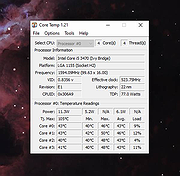 |
|
CPU-Z v3.0.1 CPU-Z v3.0.1 👉 Free system profiling tool that provides detailed information about your CPU, motherboard, memory, and more. CPU-Z is a lightweight diagnostic utility designed to provide in-depth information about your computer’s hardware. It identifies the processor name and number, codename, process, package, cache levels, and real-time core frequency. It also reports detailed information about the motherboard including chipset, BIOS version, and graphic interface details. CPU-Z displays memory information such as type, size, timings, and specifications (SPD), making it especially useful for verifying RAM configurations. The software also includes a built-in benchmark and stress test to evaluate processor performance and compare results with other systems. Features: • Processor name, codename, architecture, process, package, and cache details • Real-time core frequency and multiplier monitoring • Mainboard manufacturer, model, chipset, and BIOS information • Memory type, size, timings, and SPD data for each module • Graphics interface information • Built-in CPU benchmark and stress test • Validation feature to share system configuration Supported operating systems: • Windows 7, Windows 8, Windows 10, Windows 11 Supported languages: English, French, Spanish, German, Italian, Portuguese, Chinese (Simplified), Chinese (Traditional), Japanese, Korean, Russian Changes: v3.0.1 08-20-26 CPU-Z Validator V3 (more information *at that address*). 👉 This download is for the Windows version (very bottom of page). All other download assets are below: Other Windows: cpuz-arm64_1.05.zip (ARM64) cpu-z_1.04-win9x.zip (Vintage Edition for Windows 95/98) Click here to visit the author's website. |
|
9,391 | Oct 01, 2026 CPUID 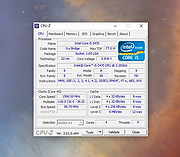 |
|
CPUSetter v1.7.1 CPUSetter v1.7.1 👉 Control CPU cores, hyperthreading, and process CPU usage on macOS. CPUSetter is a macOS utility that lets you control how your Mac's processor resources are used. It can enable or disable CPU cores and hyperthreading on supported processors, apply separate settings for battery and AC power, and limit the CPU usage of individual processes. CPUSetter also includes a process manager for adjusting process priority, viewing running applications, terminating processes, and monitoring system performance with built-in CPU, memory, disk, and network graphs. Administrator privileges are required for hardware-related changes, and a privileged helper tool is installed during first launch. Features: • Enable or disable physical and logical CPU cores • Enable or disable hyperthreading on supported processors • Apply separate CPU settings for battery and AC power • Limit the maximum CPU usage of individual processes • Change process priority (nice value) • Enable or disable throttling of low-priority processes • View and manage all running processes • Terminate running processes • Reveal process executables in Finder • Bring applications to the foreground • Display live CPU, memory, disk, and network performance graphs • Optionally apply saved settings automatically at system startup Supported operating systems: • macOS Big Sur 11.5 or higher Supported languages: English Changes: v1.7.1 12-16-25 • Requires macOS Big Sur (11.5) or later • Updated to Sparkle 2.7.0 • Fixed CPU sampling for hyperthreaded hosts In this screenshot, the Handbrake process has been limited to a maximum of 100% CPU usage (i.e. 1 whole core from the 4 available) and also reduced to a priority of 19. It is constrained as can be seen by it requesting more CPU resource than it is allowed to use. Click here to visit the author's website. |
|
3,537 | Jun 23, 2026 Bryan Christianson 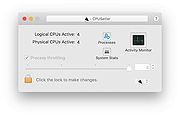 |
 |
Intel Processor Diagnostic Tool v4.1.9.41 Intel Processor Diagnostic Tool v4.1.9.41 The purpose of the Intel® Processor Diagnostic Tool is to verify the functionality of an Intel® microprocessor. The diagnostic tool checks for brand identification, verifies the processor operating frequency, tests specific processor features, and performs a stress test on the processor. Supported Operating Systems: Windows Server 2012 R2 family, Windows 8 family, Windows 8.1 Family, Windows Server 2016 family, Windows Server 2019 family, Windows 10 Family, Windows 11 Family This download is valid for the product(s) listed below. Intel® Core™ i9-12950HX Processor (30M Cache, up to 5.00 GHz) Intel® Core™ i9-12900KF Processor (30M Cache, up to 5.20 GHz) Intel® Core™ i9-12900T Processor (30M Cache, up to 4.90 GHz) Intel® Core™ i9-12900HX Processor (30M Cache, up to 5.00 GHz) Intel® Core™ i9-12900F Processor (30M Cache, up to 5.10 GHz) Intel® Core™ i9-12900 Processor (30M Cache, up to 5.10 GHz) Intel® Core™ i9-12900K Processor (30M Cache, up to 5.20 GHz) Intel® Core™ i9-12900KS Processor (30M Cache, up to 5.50 GHz) Intel® Core™ i9-12900HK Processor (24M Cache, up to 5.00 GHz) Intel® Core™ i7-12850HX Processor (25M Cache, up to 4.80 GHz) Intel® Core™ i7-12700T Processor (25M Cache, up to 4.70 GHz) Intel® Core™ i7-12700KF Processor (25M Cache, up to 5.00 GHz) Intel® Core™ i7-12700F Processor (25M Cache, up to 4.90 GHz) Intel® Core™ i7-12700 Processor (25M Cache, up to 4.90 GHz) Intel® Core™ i7-12700K Processor (25M Cache, up to 5.00 GHz) Intel® Core™ i7-12650H Processor (24M Cache, up to 4.70 GHz) Intel® Core™ i7-12800HX Processor (25M Cache, up ... |
|
3,026 | Jan 16, 2024 Intel 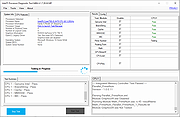 |
|
Intel Processor Identification Utility 5.25 Intel Processor Identification Utility 5.25 This utility is designed to identify current Intel® Processors and technologies, and enables you to run and save a processor ID report. The utility also features a frequency test to make sure that the processor is working at the rated speed. Operating System: Windows XP Professional x64 Edition*, Windows Server 2003 Standard x64 Edition*, Windows Server 2003 Enterprise x64 Edition*, Windows Vista *, Windows Server 2008 *, Windows 7 *, Windows 2000 *, Windows 8*, Windows 8.1*, Windows XP Professional*, Windows XP Home Edition*, Windows Server 2003 Standard Edition* This applies to: Intel® Atom™ Processor Intel® Core™ Duo Processor Intel® Core™ i3 Desktop Processor Intel® Core™ i3 Mobile Processor Intel® Core™ i5 Mobile Processor Intel® Core™ i7 Mobile Processor Intel® Core™ i7 Mobile Processor Extreme Edition Intel® Core™ i7 Processor Extreme Edition Intel® Core™ M Processors Intel® Core™ Solo Processor Intel® Core™2 Duo Desktop Processor Intel® Core™2 Duo Mobile Processor Intel® Core™2 Extreme Mobile Processor Intel® Core™2 Extreme Processor Intel® Core™2 Quad Mobile Processor Intel® Core™2 Quad Processor Intel® Core™2 Solo Processor Intel® Pentium® 4 Processor Extreme Edition Intel® Pentium® 4 Processors Intel® Pentium® D Processor Intel® Pentium® Processor Intel® Pentium® Processor Extreme Edition Intel® Pentium® Processor for Desktop Intel® Pentium® Processor with MMX™ Technology Intel® Processor Identification Utility |
 |
7,629 | Jun 20, 2015 Intel  |
|
TimVer v0.14.1 TimVer v0.14.1 👉 Displays Windows version, hardware, drive, graphics, environment, and build history information. TimVer displays the same Windows version information as the built-in Winver command, along with additional system details that Winver does not provide. It can show information about Windows, the computer's hardware, processors, BIOS, memory, disk drives, graphics controllers, environment variables, and Windows build history. TimVer also provides extensive appearance and language options, clipboard functions, portable versions, and settings backup and restore. Features: • Displays Windows version, build number, build branch, architecture, and installation date • Shows computer manufacturer, model, computer name, processor, BIOS, physical memory, and last boot information • Displays logical drive information with optional physical drive details • Shows graphics controller information including adapter name, type, description, resolution, refresh rate, and number of colors • Supports systems with multiple graphics controllers and lets you select each adapter from a dropdown • Displays current environment variables with filtering by variable name • Optionally keeps a history of installed Windows build numbers • Copies an entire supported information page to the clipboard • Copies individual values to the clipboard by right-clicking • Lets you choose the display language • Provides selectable themes, accent colors, fonts, UI sizing, and row spacing • Supports automatic light and dark theme selection when using the System theme • Exports and imports application settings for backup or transfer to another computer • Can open or list the current application settings • Includes an optional check for newer TimVer releases • Runs without elevation for normal system information gathering Supported operating systems: • Windows 10 64-bit, Windows 11 64-bit Supported languages: • English (United Kingdom), English (United States), Spanish, French, Italian, Japanese, Korean, Dutch, Slovak, Thai Changes: v0.14.1 07-25-26 Fixed an issue where mismatched information could be displayed on the Graphics (Video) Information page when two or more video controllers were present. Cleaned up and optimized video controller information retrieval and UI handling. Inactive controllers may show "Not ... |
|
2,285 | Aug 24, 2026 Tim Kennedy 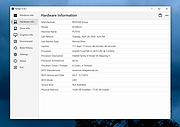 |
| Showing rows 1 to 6 of 6 | Showing Page 1 of 1 | 1 |
OlderGeeks.com Copyright (c) 2026
