|

|
Processed through Paypal No account required. |








Buy our over-priced crap to help pay the bills.



|
|
Processed through Paypal No account required. |
| Files | ||||
| File Name | Rating | Downloads | ||
 |
Bouncy Blob v1.0.1 Bouncy Blob v1.0.1 👉 Infinite climbing and bouncing platform game. Bouncy Blob is a procedurally generated infinite climbing and bouncing platform game created by rocketnine. Your goal is simple: keep climbing as high as possible by bouncing from platform to platform while avoiding a long fall. Every new game generates a fresh world using Perlin noise, ensuring that no two climbs are exactly alike while preserving a familiar starting area so you can quickly get into the action. As you climb higher, the challenge steadily increases, requiring faster reactions and more precise jumps to maintain your momentum. The game records your highest score, greatest height reached, and fastest velocity, encouraging you to improve with each attempt. You can also enter custom seeds to replay the same generated world, making it easy to challenge friends on identical maps or revisit a particularly enjoyable climb. Despite its straightforward controls, Bouncy Blob offers surprisingly addictive gameplay that rewards practice, timing, and quick decision-making. With support for keyboard, mouse, and touchscreen controls, along with fullscreen mode, pause support, customizable color themes, and music muting, it provides a polished arcade-style experience on both Windows and Linux. After toggling fullscreen off (Alt + Enter), simply close the game window to quit. Features: • Procedurally generated infinite climbing levels • Fast bouncing platform action • Unique play-throughs using generated seeds • Manual seed entry for replaying a specific level • Tracks highest velocity, height and score • Pause support • Mouse and touchscreen input support Keyboard controls: • Jump: W / Up / Space • Move Left: A / Left • Move Right: D / Right • Restart: R / Backspace / Delete • Mute Music: Ctrl + M • Toggle Color: F12 / Ctrl + C • Toggle Fullscreen: Alt + Enter • Enter Seed: Ctrl + S • Pause: Escape • After toggling fullscreen off (Alt + Enter), close the window to quit the game Supported operating systems: • ... |
 |
440 | Jul 03, 2026 Trevor Slocum 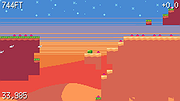 |
 |
Dungeon Crawl Stone Soup v0.34.1 Dungeon Crawl Stone Soup v0.34.1 👉 A deep and challenging free roguelike dungeon adventure game. Dungeon Crawl Stone Soup is a free and open-source single-player roguelike game where players explore dangerous procedurally generated dungeons filled with monsters, traps, magic, treasures, and ancient mysteries. Inspired by classic dungeon crawlers, it combines strategic turn-based gameplay with permanent consequences, requiring careful planning and resource management to survive. Players can choose from a wide variety of fantasy races, backgrounds, religions, weapons, and magic schools, creating countless unique character builds and gameplay styles. Every dungeon expedition is different thanks to randomized layouts, enemies, loot, and encounters. The game focuses heavily on tactical combat, exploration, and meaningful decisions rather than repetitive grinding. Dungeon Crawl Stone Soup supports keyboard-driven controls and offers both traditional ASCII visuals and graphical tile modes. It is actively maintained by a dedicated community and is widely regarded as one of the most polished and content-rich roguelike games available. Features: • Procedurally generated dungeon levels with endless replayability • Large selection of playable species and character backgrounds • Turn-based tactical combat with deep strategic gameplay • Hundreds of spells, weapons, armor types, and magical items • Multiple gods and religions that affect gameplay choices • Permanent death system that rewards careful decision-making • ASCII and graphical tile display modes • Mouse and keyboard support • Detailed monster AI and environmental interactions • Online and offline play options available • Community-developed open-source project with regular updates • Extensive modding and customization support through configuration files Supported operating systems: • Windows 10, Windows 11 • macOS 11 or higher • Linux Supported languages: English Changes: v0.34.1 05-23-26 • Fixed several crashes and gameplay bugs • Improved interface behavior and dungeon generation stability • Corrected issues affecting spells, monsters, and item interactions • Updated translations and documentation • Various balance adjustments and code cleanups This download is for the Windows Installer version (very bottom of page). If you need the MacOS GUI (tiles) version, download ... |
|
2,954 | May 29, 2026 Dungeon Crawl: Stone Soup development team 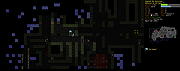 |
|
Luanti v5.17.0 Luanti v5.17.0 👉 Free and open source voxel game engine and sandbox game platform. Luanti is a free and open source voxel game engine that lets you play, create, and share games in vast procedurally generated worlds. Formerly known as Minetest, Luanti provides an extensible sandbox environment with support for thousands of community-created games, mods, texture packs, and worlds through its integrated ContentDB. Whether you want to build creative worlds, survive in challenging adventures, develop your own game, or host multiplayer servers, Luanti offers a lightweight yet highly customizable platform suitable for both players and developers. Designed with flexibility in mind, Luanti features Lua scripting for game development, powerful world generation, multiplayer support, customizable controls, and cross-platform compatibility. The engine emphasizes performance while remaining easy to modify, making it a popular choice for educators, hobbyists, and open source game developers alike. Features: • Play thousands of community-created games and mods • Create nearly infinite procedurally generated voxel worlds • Integrated ContentDB for downloading games, mods, and texture packs • Single-player and multiplayer gameplay • Powerful Lua API for game and mod development • Built-in world editor and creative building tools • Customizable texture packs and visual themes • Cross-platform multiplayer compatibility • Dedicated server support • Lightweight engine with high performance • Open source under the LGPL license • Extensive documentation for developers and creators Supported operating systems: Supported operating systems: • Windows 8, Windows 8.1, Windows 10, Windows 11 • macOS 12.3 or higher • Linux • Android 6.0 or higher • FreeBSD Supported languages: • English, Čeština, Deutsch, Espaρol, Franηais, Bahasa Indonesia, Italiano, 日本語, 한국어, Polski, Portuguκs, Русский, slovenščina, Svenska, தமிழ், Українська, 中文 Changes: v5.17.0 08-20-26 ⚠️ This release fixes security vulnerabilities affecting both the client and server. We advise everyone to upgrade immediately. ⚠️ Client / Audiovisuals# Dropdowns now accept selection by (Mouse) Down -> Drag -> Release. Formspecs no longer close when focusing the window (SmallJoker) ... |
|
7,914 | Aug 30, 2026 The Luanti Team 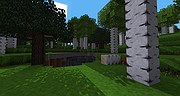 |
|
PixiEditor v2.1.2.4 PixiEditor v2.1.2.4 👉 A free, open-source universal 2D graphics editor for pixel art, painting, image editing, vector art, procedural art, and animations. PixiEditor is a universal 2D graphics editor made for all your 2D creative needs. Create sprites for games, frame-by-frame animations, edit images, draw, paint, make logos, work with vectors, and build non-destructive procedural graphics using its node graph system. Features: • Pixel art, painting, vector art, image editing, procedural art, and animation tools • Node Graph for non-destructive procedural graphics and animations • Dedicated pixel art toolset with palette management • Painting tools with soft brushes and anti-aliased shapes • Vector shapes and paths that can be mixed with raster artwork • Frame-by-frame animation support • Node-based Brush Engine for creating custom brushes • Extension Browser for browsing and installing extensions • Desktop native, cross-platform, and works offline • Export support for PNG, JPG, SVG, GIF, MP4, and more • Pixel Art — Dedicated Pixel Art toolset and advanced palette management. Create pixel art with a dedicated toolset. Perfect for game sprites, animations, or nostalgic artwork. Enjoy features like pixel-perfect pen mode for clean edges. • Animations — Bring stories to life with frame-by-frame Animations. Turn your drawings into moving stories! Create smooth frame-by-frame animations with tools that make it fun and easy to bring your art to life. • Procedural Art — Create non-destructible, procedural graphics with Node Graph. Node Graph allows for creating fully non-destructible graphics and animations. Connect nodes to easily compose complex visuals. From pre-built effects to custom shaders, the possibilities are endless! • Image Editing — Select, delete, clip, resize - everything you need for Image Editing. Use raster tools to edit images, sketch or paint. Whether you're doodling or making a masterpiece, PixiEditor is there for you! • Vector Art — Create and edit Vectors. Snapping included. Craft logos, icons, and illustrations with our flexible curve tool and vector shapes. Your designs ... |
|
1,154 | Sep 18, 2026 Pixi Labs Sp. z o.o 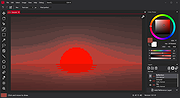 |
| Showing rows 1 to 4 of 4 | Showing Page 1 of 1 | 1 |
OlderGeeks.com Copyright (c) 2026
