|

|
Processed through Paypal No account required. |








Buy our over-priced crap to help pay the bills.



|
|
Processed through Paypal No account required. |
| Files | ||||
| File Name | Rating | Downloads | ||
 |
Hew v1.0.0 Hew v1.0.0 👉 A free, open-source, cross-platform 3D modeler with a familiar SketchUp-style workflow and solids-first design. Hew is a free and open-source 3D modeling application designed around the approachable workflow familiar to SketchUp users. Draw directly on faces, push and pull shapes into three dimensions, snap to endpoints, midpoints and axes, and enter exact measurements while working. Unlike traditional surface-based modeling, Hew creates discrete, watertight solid objects that do not automatically weld together when they touch. Objects are combined only when you explicitly use operations such as Union, Subtract or Intersect. Hew includes tools for drawing, precision modeling, materials, organization, annotation, printing and preparing models for fabrication or 3D printing. It can import existing SketchUp 2017 files as well as COLLADA, glTF and STL models, while its own open .hew format is documented and designed to avoid locking your work into a proprietary format. Models can be exported to formats including glTF, STL, 3MF, USDZ and SVG. The program also includes groups, reusable components, tags, saved scenes and an Outliner for organizing complicated models. Materials and textures can be applied to faces and objects, while dimensions, leader text and 3D text provide annotation tools. Hew can print drawings at an exact scale, tile full-size templates across multiple sheets, save PDF output and create vector SVG drawings. Features: • Solids-first modeling creates discrete, watertight objects instead of automatically welding touching geometry • Familiar SketchUp-style drawing and direct-modeling workflow • Line, rectangle, circle, arc and polygon drawing tools • Draw directly on existing faces • Push/Pull tool for creating solids, reshaping faces and cutting holes • Follow Me tool for sweeping profiles along paths • Offset and Slice tools • Move, Rotate and Scale tools with snapping, axis locking and exact values • Copy objects and create repeated arrays • Inference snapping to model geometry and axes • Type exact, unit-aware dimensions while modeling • Tape Measure ... |
 |
18 | Sep 10, 2026 hew3d  |
|
HP Linux Imaging and Printing v3.21.12 HP Linux Imaging and Printing v3.21.12 n HP developed solution for printing, scanning, and faxing with HP inkjet and laser based printers in Linux. The HP Linux Imaging and Printing (HPLIP) project provides printing support for 3138 printer models--including; Deskjet, Officejet, Photosmart, PSC (Print, Scan, Copy), Business Inkjet, LaserJet, Edgeline MFP, and LaserJet MFP. Note: HPLIP is free, open source software distributed under the MIT, BSD, and GPL licenses. Note: Most HP models are supported, but a few are not. See Supported Devices at the HPLIP website for more information: https://developers.hp.com/hp-linux-imaging-and-printing/supported_devices/index HPLIP Software does NOT support either Windows or OS X operating systems. Changes: HPLIP 3.21.12- This release has the following changes: Added support for following new Distro's: MX Linux 21 Elementary OS 6 Fedora 35 This download is for the .run (installer) version. All other download assets are below: hplip-3.21.12.run.asc hplip-3.21.12.tar.gz hplip-3.21.12.tar.gz.asc IMPORTANT: For this type of file (.run), you must right-click on the download link below and choose to save the link. Click here to visit the author's website. |
|
3,670 | Dec 17, 2021 HP Developers 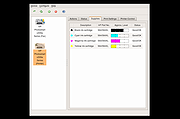 |
 |
Network Aware Printing v5.1 Network Aware Printing v5.1 Automatically change default printers based on connected network. Network Aware Printing allows you to choose different default printers for different networks. This capability is useful for people who use one laptop in multiple locations—for example, at work and at home. Microsoft did not include Location Aware Printing in windows 10/11. Network Aware Printing brings that functionality back. Unlike Location Aware Printing, Network Aware Printing will alert you to choose a new default printer when a new network has been detected. You then "set it and forget it". Network Aware Printing will switch default printers in the background. Features • Alert when a new network has been detected and prompt the user to select a default printer • Automatic Updating Notice: This file has multiple hits on VirusTotal. We have confirmed these to be false positives. The file is safe. - The Older Geeks Click here to visit the author's website. |
|
1,317 | Jan 29, 2025 Robert Jackson 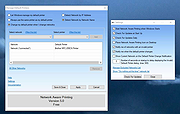 |
|
No Bloat PDF v1.5.0 No Bloat PDF v1.5.0 👉 A tiny, fast and private PDF viewer with no ads, accounts or telemetry. No Bloat PDF is a lightweight, open-source PDF viewer designed to do one thing well: open and read PDF files without the advertising, cloud services, accounts, launchers and other extras found in many modern PDF readers. The complete installer is only about 4.6 MB, yet the program provides tabbed viewing, document search, thumbnails, bookmarks, zooming, rotation and printing. It uses Mozilla's pdf.js rendering engine inside a small native application shell and is designed to open documents quickly without a splash screen or sign-in process. Privacy is a major part of the design. No Bloat PDF makes zero network calls, includes no telemetry and requires no account. PDF documents remain entirely on your computer. Multiple documents can be kept open as tabs in a single window, and the program remembers your position in previously viewed files. Dark mode follows the operating system while leaving the actual PDF pages in their original colors. Features: • Small 4.6 MB installer • Fast PDF opening with no launcher or splash screen • Built on Mozilla's pdf.js PDF rendering engine • Multiple PDF documents open as tabs in a single window • Full-text document search • Page thumbnail navigation • Document outline and bookmark navigation • Zoom controls for easier reading • Page rotation • Remembers your position in each PDF • High-resolution PDF printing directly from the viewer • Drag-and-drop support for opening PDF files • Can be configured as the system's default PDF viewer • Dark mode follows the operating system setting • PDF documents remain true-color when dark mode is enabled • Zero telemetry • Zero network calls • No user account or sign-in required • No cloud services • No advertising or upsells • Documents never leave your computer • Free to use • Open-source software released under the MIT license • Combine multiple PDFs and images into a single ... |
|
244 | Sep 09, 2026 Brian Galvan 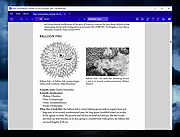 |
|
SourceDoc Pro v2.00 SourceDoc Pro v2.00 👉 Print, analyze, and document Visual Basic 6 source code projects. SourceDoc Pro is a free utility for Visual Basic 6 developers that creates professional printed documentation from VB6 source code projects. It reads VB6 project files (.VBP), displays all project modules and procedures, and allows you to selectively print individual routines, complete modules, dependency reports, or entire projects. Printed output includes syntax highlighting, structured formatting, and unique visual loop bracket connectors that make nested code easier to follow on paper or in PDF form. SourceDoc Pro also generates procedure dependency reports showing which routines call a procedure and which routines are called by it, helping developers understand project flow and maintain legacy applications. Additional options include custom fonts, page layout controls, margin settings, duplex printing support, table of contents generation, and the ability to mimic the appearance of code as displayed within the VB6 IDE. The program includes a complete User Manual and automatically installs the required VB6 runtime components. Features: • Opens and analyzes Visual Basic 6 project files • Displays project modules and procedures in organized lists • Prints individual procedures, modules, or entire projects • Generates procedure dependency reports showing "Called By" and "Calls" relationships • Creates printable project tables of contents • Full syntax highlighting for keywords, comments, constants, variables, procedure names, and literals • Visual loop bracket connectors make nested code structures easier to read • Output can be sent to printers, PDF writers, or text files • Customizable fonts and font sizes • Supports portrait and landscape page orientation • Adjustable page margins and binding offsets • Duplex printing support • Optional aggregation of Get/Set/Let property routines • Option to mimic VB6 IDE code formatting in printed output • User-selectable syntax highlight colors • Includes complete User Manual • VB6 runtime automatically installed when needed Supported operating systems: • Windows 7 or later (32-bit or 64-bit) Supported languages: • English Changes: v2.00 08-05-26 Form Image rendering ... |
|
504 | Aug 07, 2026 Michael W. Cetera 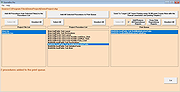 |
| Showing rows 1 to 5 of 5 | Showing Page 1 of 1 | 1 |
OlderGeeks.com Copyright (c) 2026
