|

|
Processed through Paypal No account required. |








Buy our over-priced crap to help pay the bills.



|
|
Processed through Paypal No account required. |
| Files | ||||
| File Name | Rating | Downloads | ||
 |
Dougi v1.0.672 Dougi v1.0.672 👉 Create high-quality JPEG images with realtime quality preview. Dougi is a lightweight portable JPEG optimization utility that lets you create high-quality JPEG images quickly and easily. Simply open, paste, or drag and drop an image, adjust the desired JPEG quality, and save. Its realtime WYSIWYG (What You See Is What You Get) preview lets you instantly see the effect of compression changes, eliminating the guesswork when balancing image quality and file size. Dougi also includes optional maximum file size limits, basic image adjustment tools, batch conversion, clipboard support, customizable appearance settings, and built-in help. Features: • Realtime WYSIWYG JPEG quality preview • Manual JPEG quality adjustment (5-100%) • Automatic quality presets: Low, Fair, Good, High, and Best • Optional maximum JPEG file size limit (5-4,000 KB) • Image adjustments including Mirror, Flip, Grey, Sepia, Noise, Invert, and Soften • Displays image dimensions, JPEG file size, and color count in realtime • Opens PNG, GIF, JPG, JIF, JPEG, TJ32, BMP, DIB, ICO, CUR, ANI, TEA, TGA, PPM, PGM, PBM, PNM, XBM, and IMG32 formats • Saves JPG, JIF, and JPEG formats • Copy images to the Clipboard as JPG or PNG • Batch conversion by dragging and dropping multiple images • Preview output in your default web browser • Customizable colors, fonts, and application settings • Portable - no installation required Supported operating systems: • Windows 7, Windows 8, Windows 8.1, Windows 10, Windows 11, Ubuntu Linux Supported languages: English Changes: v1.0.672 11-19-25 Not Provided. Click here to visit the author's website. |
 |
348 | Jul 17, 2026 Blaiz Enterprises 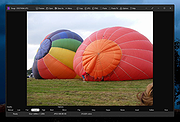 |
|
FontViewOK v9.33 FontViewOK v9.33 👉 A quick visual overview of all installed fonts. FontViewOK creates a quick visual overview of all installed fonts, or fonts from a specific folder, and helps you compare fonts side by side. Features: • Quick overview and comparison of all installed fonts • View fonts from a specific folder • Compare fonts in dual preview panes • Compare installed and non-installed fonts • Change font size, style, and color • Change background and font colors • Print fonts with print preview • Copy the selected font preview as an image to the clipboard • Save the selected font preview as an image • Open font locations in Windows Explorer • Portable use, installation is not required Supported operating systems: • Windows 11, Windows 10, Windows 8.1, Windows 7, Windows Server 2012 through Windows Server 2025, x64, x32, x86 Supported languages: English, German, Thai, Multilingual Changes: v9.33 05-06-26 General adjustments to the Front-View App; improved detection of the default system language; necessary adjustments and language file updates. This download is for the Windows 64bit version (very bottom of page). If you need the Windows 32bit version, download here. Click here to visit the author's website. |
|
6,042 | May 15, 2026 Nenad Hrg 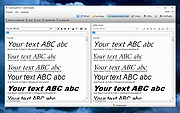 |
 |
QuickLook v4.5.0 QuickLook v4.5.0 👉 Preview files instantly in Windows by selecting one and pressing the spacebar. QuickLook lets you inspect files without opening their usual applications. Select a file in File Explorer and press the spacebar to bring up a preview. You can check an image, read a document, listen to audio, watch a video, or inspect source code, then press Esc or the spacebar to close the preview. Use the arrow keys to move through neighboring files while the preview is open. QuickLook handles images, animated GIFs, video, audio, PDFs, text, Markdown, archives, fonts, and source code. Text and code previews include syntax highlighting, and plugins add support for more formats. QuickLook runs from the system tray. The installer supports previews in Open and Save dialogs. The project is free and open source. Features: • Press the spacebar to preview a selected file without launching its associated application. • Press Esc or the spacebar again to close the preview. • Use the arrow keys to preview neighboring files. • Preview JPEG, PNG, GIF, WebP, RAW, and other supported image formats. • Play supported video and audio files in the preview window. • Read PDFs, text files, and rendered Markdown. • Inspect source code and configuration files with syntax highlighting. • Preview supported archives and fonts. • Zoom images and PDFs, or open a file from its preview. • Follow the Windows light or dark theme. • Add support for more formats with plugins. • Choose an installer or portable download. Supported operating systems: Windows 10, Windows 11 Supported languages: English, Simplified Chinese, Romanian. Changes: v4.5.0 04-14-26 Updated LAVFilters to 0.81.0. Improved LRC handling by merging duplicate timestamps. Improved the Simplified Chinese translation and added Romanian translation. Added the WindowBackdrop option and F11 full-screen toggle. Added support for PKCS7 extensions, Chromium PAK viewing and extraction, Python wheel and egg archives, DICOM images, and additional syntax highlighting. Fixed Markdown previews using absolute resource paths, the Windows 10 transparency option, video loop behavior, OfficeViewer resizing errors, relative command-line paths, and the taskbar ... |
|
3,467 | Sep 28, 2026 Adnan Bhaldar 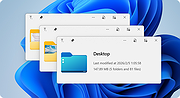 |
|
Waydir v0.22.0 Waydir v0.22.0 👉 A fast, keyboard-first dual-pane file manager for Linux, Windows and macOS. Waydir is a cross-platform desktop file manager built for users who prefer speed, direct control and fewer trips to the mouse. It combines classic dual-pane file management with tabs, live search, network drives, Quick Look previews, archive browsing, a built-in terminal and a native Rust core that keeps heavy file work off the interface thread. Features: • Dual-pane file browsing with tabs in each pane • Keyboard-driven navigation, selection, copying, moving, renaming and searching • Command palette for actions, bookmarks, drives, recent locations, files and plugin commands • Fast live recursive search with substring, regex and glob matching • Quick Look previews for images, PDFs, text, code and file details • Browse ZIP and TAR archives without extracting first • SMB and SFTP network drive support • Built-in terminal per pane • WSL file browsing and terminal support on Windows • Git status, branch switching and stash management • Light, Dark, Nord and One Dark themes, plus custom themes • Lua plugin support for actions, buttons, shortcuts and status bars • Free and open source under the MIT License Supported operating systems: • Windows • macOS • Linux Ubuntu, Debian, Fedora, RHEL, openSUSE and other Linux distributions using AppImage or portable tarball Supported languages: English Changes: v0.22.0 06-29-26 Added duplicate selected files and folders in place with Ctrl+Shift+D, available from the keyboard, command palette and context menu. Faster file copying, especially on Windows and when copying lots of small files. Renamed the "Kind" column to "Format". This download is for the Windows installer version (very bottom of page). All other download assets are below: Other Windows: waydir-0.22.0+29-windows.zip macOS: waydir-0.22.0+29-macos.dmg Linux: waydir-0.22.0+29-linux.AppImage waydir-0.22.0+29-linux.deb waydir-0.22.0+29-linux.rpm waydir-0.22.0-linux-x64.tar.gz Click here to visit the author's website. |
|
436 | Jul 02, 2026 Mikolaj Badyl 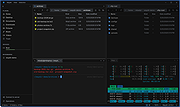 |
| Showing rows 1 to 4 of 4 | Showing Page 1 of 1 | 1 |
OlderGeeks.com Copyright (c) 2026
