|

|
Processed through Paypal No account required. |








Buy our over-priced crap to help pay the bills.



|
|
Processed through Paypal No account required. |
| Files | ||||
| File Name | Rating | Downloads | ||
 |
FluentTweaker v26.06.02 FluentTweaker v26.06.02 👉 Customize and tweak Windows 10/11 with a modern Fluent-style interface. FluentTweaker is a lightweight Windows customization and tweaking utility designed to give users more control over the look, feel, and behavior of Windows 10 and Windows 11. Developed with a clean Fluent Design-inspired interface, the application provides access to a wide variety of system tweaks, personalization settings, and hidden Windows options from a centralized dashboard. FluentTweaker focuses on making Windows customization easier and more accessible by grouping settings into organized categories. Users can quickly adjust privacy features, taskbar behavior, File Explorer settings, visual effects, system performance options, and interface tweaks without manually editing the registry or searching through scattered Windows menus. The program is portable and designed to be simple to use while still offering advanced customization possibilities for enthusiasts who want a cleaner, more personalized Windows experience. Features: • Modern Fluent Design-inspired user interface • Centralized access to Windows 11 customization options • Privacy and telemetry configuration tools • Taskbar and Start menu customization tweaks • File Explorer behavior and appearance adjustments • System performance and visual effect optimizations • Quick access to hidden Windows settings • Portable application with no installation required • Lightweight and easy-to-use design • Registry-based tweaks presented through a graphical interface • Organized categories for simplified navigation • Designed specifically for modern Windows versions Supported operating systems: • Windows 11 • Windows 10 Supported languages: • English Changes: v26.06.02 06-06-26 Not provided Note for Windows 10 users: Microsoft's Windows App Runtime 2.x package is required and you will be offered the download. Click here to visit the author's website. |
 |
835 | Jun 08, 2026 Builtbybel 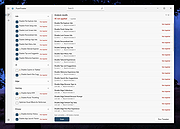 |
|
Flyoobe v3.03.100 Flyoobe v3.03.100 👉 A Windows setup and upgrade toolkit for reviewing, customizing and applying Windows 11 settings from one streamlined interface. Flyoobe is a Windows setup assistant that brings Windows settings, applications, personalization, bloatware management and upgrade tools together in one place. It uses a signature-driven checklist approach to show what is currently configured, what differs from its recommendations and what can be changed. Users can apply individual settings, restore defaults, create portable setup recipes, install apps through winget, review removable preinstalled apps and access common Windows workflows without replacing Windows Settings. The built-in Flyby11 upgrade path also helps Windows 10 systems that do not meet every Windows 11 requirement move to Windows 11. Features: • Unified overview for Windows settings, apps, personalization, bloatware and system tasks • Signature-driven Windows configuration using the editable Flyoobe.ini file • Portable setup recipes that can be saved, imported, reviewed and applied on another PC • Recipe review mode lets you inspect and discard staged changes before applying them • Individual Apply and Restore default controls for supported Windows settings • Searchable winget application installer using an editable Apps.ini catalog • Detects matching preinstalled Windows apps using Bloatware.ini and offers optional removal • Detects installed web browsers and provides quick access to Windows default-app settings • Personalization controls for Windows mode, app mode, taskbar alignment, transparency and wallpaper • Quick access to account, device, network and Windows Update workflows • Integrated Flyby11 upgrade path for Windows 10 PCs that do not meet every Windows 11 requirement • Read-only compatibility checks for TPM, Secure Boot, memory, architecture, storage and Windows version • Optional AI explanations for individual settings without allowing AI to apply changes • Native WinForms interface with improved high-DPI scaling • Editable configuration files keep recommendations, app catalogs, bloatware signatures and upgrade limits separate from the executable Supported operating systems: • Windows 10, Windows 11 Supported languages: • English, German Changes: v3.03.100 09-28-26 [Added] ... |
|
3,855 | Sep 30, 2026 Builtbybel 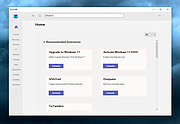 |
|
tacky-borders v1.5.0 tacky-borders v1.5.0 Add colorful, customizable borders to your Windows application windows. tacky-borders is a lightweight open-source utility that adds visible, customizable borders around application windows in Windows. It is designed to make window boundaries easier to see and to give users the ability to style their desktop with colored outlines around active and inactive windows. tacky-borders runs in the background and applies borders dynamically, helping improve window visibility and providing a more personalized desktop experience. Features: • Adds customizable borders around application windows • Supports different border colors and styles • Distinguishes between active and inactive windows • Lightweight and runs in the background • Open-source project hosted on GitHub To Configure tacky-borders: • Run tacky-borders.exe once to generate the config file automatically (created in %userprofile%/.config/tacky-borders/) • Open the config quickly by right-clicking the tray icon and choosing "Show Config" • Edit config.yaml in a text editor, then save: • watch_config_changes: True will automatically reload borders when the config file is modified • global.border_width sets border thickness in pixels • global.border_offset moves the border inwards (negative) or outwards (positive) • global.border_radius can be Auto, Square, Round, RoundSmall, or a numeric value • global.active_color and global.inactive_color support: • Solid colors using a hex value (example: "#ffffff") or "accent" • Gradient colors using a colors list + direction (example direction: 45deg or start/end coordinates) • animations and effects are configurable under global (effects note: they can significantly increase CPU/GPU usage and require rendering_backend: V2) • Per-app overrides: use window_rules to match by Class, Title, or Process (Equals, Contains, or Regex), then override any global setting for just that app • If a border is initialized but not visible for a window, try setting follow_native_border to False in a window rule Supported operating systems: • Windows 10, Windows 11 Supported languages: • English Changes: v1.5.0 04-26-26 Features add theme-aware border colors for Windows by @Louis047 in #74 Bug Fixes fix borders disappearing after waking system from ... |
|
1,113 | Jul 11, 2026 lukeyou05 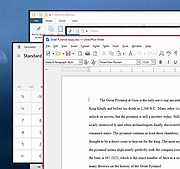 |
| Showing rows 1 to 3 of 3 | Showing Page 1 of 1 | 1 |
OlderGeeks.com Copyright (c) 2026
