|

|
Processed through Paypal No account required. |








Buy our over-priced crap to help pay the bills.



|
|
Processed through Paypal No account required. |
| Files | ||||
| File Name | Rating | Downloads | ||
 |
Cyotek Color Palette Editor v1.7.0.411 Cyotek Color Palette Editor v1.7.0.411 Color palette editing made easy Cyotek Palette Editor allows you to create and work with colour palettes, in a variety of formats such as JASC, GIMP and Adobe Photoshop. Palettes can be created from scratch, imported from other palettes or created from images. Easy editing is provided using RGB or HSL color spaces, although palettes using CMYK can also be opened. Palettes can be converted between formats (including batch conversion), or swatch images exported. Minimum Requirements Windows 10, 8.1, 8, 7, Vista SP2 Microsoft .NET Framework 4.6 20MB of available hard disk space Cyotek Palette Editor has a small but growing set of powerful features. Multiple palette formats Out of the box Palette Editor supports multiple file formats including Adobe Photoshop, Microsoft RIFF, Gimp and JASC. Easy to use The editor features a simple interface to allow you to edit a palette without distraction. Enter colours using hex, RGB or HSL notations. Duplicate colours to make variations, or import from external files. Create a palette from an image As well as creating palettes from scratch, you can get a helping hand by generating a palette from all or part of an existing image. Dynamic palette schemes Automatically generate colour from a base color using a variety of harmonious schemes. Generate swatch image Create a swatch image containing the contents of a palette - perfect for online previews. Images can be customised in a number of ways, and reusable presets saved. Localised Beta localisation support means you can enjoy using the product in your native language. Is your language not listed? Cut, Copy, Paste Cyotek's Palette Editor allows you to copy colours to the clipboard in a variety of formats, and paste colours back into the palette as well. Reordering of colour swatches In addition to several methods for automatically reordering colour swatches, you can ... |
 |
3,457 | Jun 14, 2021 Cyotek Ltd. 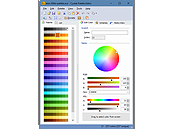 |
 |
TabStick-1.2.0-win-x64-portable.zip TabStick v1.2.0 👉 A lightweight note-taking program that attaches colorful index tabs directly to your application windows. TabStick lets you place quick notes on the edge of an application window, keeping reminders and information beside the program where they are needed. Choose a tab from the color palette, attach it to a window and begin typing. Notes can be organized directly inside each tab and customized with different colors, sizes, text settings and display themes. TabStick is available as an installer or a portable download that can be extracted and run without installation. Features: • Attaches index-style notes directly to application windows • Keeps related notes beside the program where they are needed • Creates new notes by selecting a color from the tab palette • Supports quick text entry and organization within each note • Customizable application and tab sizes • Adjustable text size and line spacing • Multiple note colors • Custom note colors • Light and dark display modes • Configurable palette appearance • Changeable interface language • Available as an installer or portable program • Simple interface designed for fast note-taking Supported operating systems: • Windows 10 64-bit, Windows 11 64-bit Supported languages: Not Found Changes: v1.2.0 Not Found Click here to visit the author's website. |
|
251 | Aug 05, 2026 TabStick 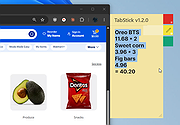 |
| Showing rows 1 to 2 of 2 | Showing Page 1 of 1 | 1 |
OlderGeeks.com Copyright (c) 2026
