|

|
Processed through Paypal No account required. |








Buy our over-priced crap to help pay the bills.



|
|
Processed through Paypal No account required. |
| Files | ||||
| File Name | Rating | Downloads | ||
 |
Ms Pacman 1.0 Ms Pacman 1.0 Remake of the classic arcade game. Goal The goal of this game is to Get the highest score by removing all dots with MsPacman. Ghosts will try to stop you so you should avoid them. The large Pills will help you . When you eat one of those the ghosts temporarily become afraid and can be chased for extra points but beware they get weaker with each level completed until they will not work at all. Touch a ghost whille they are afraid to get more points and they will turn into eyes and head for the prison. You can collect any bonus that appears for extra points. 100=cherry 200=strawberry 500=orrange 700=pretzel 1000=apple 2000=pear 5000=bannana Playing you can use a joystick or You steer MsPacman using the arrow keys. You can press the correct key before you reach the corridor (but keep it pressed). Press <P> to Pause game Levels The game has four levels with diffrent mazes . complete level one twice complete level two three times complete level three and level four times Press F12 at startup for a game of the original pacman. press F8 for three different room scales Press F9 at startup to change resolution to 640X480 |
 |
6,264 | Feb 21, 2019 Crozza Remakes 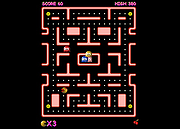 |
 |
Pacman II v2.0.10 Pacman II v2.0.10 A new version of the very classic console game Pacman. It has been done replicating the algorithms used by Pinky, Inky, Blinky y Clyde in the original game by. This version includes new monsters (Wormy) and all the mazes from Ms. Pacman. Features 80s Action Equivalent Movement The default keys to manage the game are: A: Left S: Right P: Forward L: Backward Z: Pause / Continue The keys above can be configured. The joystick is also allowed instead of the keyboard. When playing ESC can be pressed to activate a menu for: save, continue playing or simply exit the game. The main character will not die when this menu is on top, but the game will continue. IMPORTANT: Once installed, you MUST right-click on the game's icon and choose Run as Administrator otherwise the game will not load. Click here to visit the author's website. |
|
3,375 | Aug 23, 2022 Ignacio Cea Forni้s 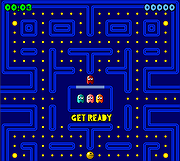 |
|
PacMan v1.0 PacMan v1.0 What's to say? It's free and it's PacMan! Have fun! (Use your arrow keys) Click here to visit the author's website. |
|
2,262 | Oct 31, 2023 SDGGames 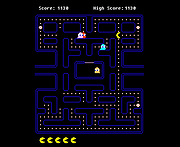 |
|
Team Pacman Team Pacman A multiplayer version of Namco's classic arcade game, Pacman. Released to celebrate Pacman's 35th anniversary, it brings two entertaining new twists to the game. • First, up to eight players can play simultaneously on one PC. You'll need to plug in some controllers though, or it's going to get crowded around that keyboard! • Second, while up to four of you can join Pacman's team, the other four can play as the ghosts! Controls: To make selections pre-game, each player will use their assigned keyboard keys or controller. To view these keys, use the up and down arrows and the space bar to select OPTIONS and then CONTROLS. Next, each player can use their keyboard keys or controller to move their dot to the Pacman side of the selection screen or to the ghost side. |
|
9,239 | Jun 08, 2023 Nathan Cross 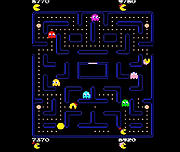 |
|
UniGetUI v2026.2.7.0 UniGetUI v2026.2.7.0 👉 Manage, install, update, and remove software from multiple package managers through one powerful interface. UniGetUI is a free, open-source package manager frontend that makes installing, updating, and removing software simple by bringing multiple package managers together into a single, modern interface. Instead of learning command-line syntax for each package manager, UniGetUI provides an intuitive graphical environment that lets you search, compare, and manage thousands of applications from one place. It is maintained by Devolutions and supports Windows, macOS, and Linux through a modern cross-platform interface. UniGetUI can search across multiple repositories simultaneously, display detailed package information, install or uninstall applications individually or in batches, detect available updates, and automate software maintenance. It supports popular package managers including WinGet, Chocolatey, Scoop, Pip, NPM, .NET Tool, PowerShell Gallery, Homebrew, APT, DNF, Pacman, Flatpak, and Snap, depending on the operating system. Advanced users can view or execute the underlying package manager commands, while new users benefit from an easy-to-use graphical interface. Software bundles allow you to export a collection of installed applications and quickly recreate the same environment on another computer, making UniGetUI particularly useful for technicians, developers, IT administrators, and anyone who frequently configures or rebuilds systems. The application also includes package filtering, update scheduling, notification controls, customizable installation options, and integrated release notes to simplify long-term software maintenance. Features: • Unified interface for multiple package managers • Search thousands of software packages from multiple repositories • Install, update, and uninstall applications individually or in batches • Supports WinGet, Chocolatey, Scoop, Pip, NPM, .NET Tool, PowerShell Gallery, Homebrew, APT, DNF, Pacman, Flatpak, and Snap (platform dependent) • Export and import software bundles for rapid system deployment • Automatic update detection and notifications • View package details, release notes, and version history • Custom installation parameters and package filtering • Manual install, update, and uninstall modes for greater control • NativeAOT builds for faster startup ... |
|
434 | Aug 19, 2026 Devolutions 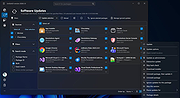 |
| Showing rows 1 to 5 of 5 | Showing Page 1 of 1 | 1 |
OlderGeeks.com Copyright (c) 2026
