|

|
Processed through Paypal No account required. |








Buy our over-priced crap to help pay the bills.



|
|
Processed through Paypal No account required. |
| Files | ||||
| File Name | Rating | Downloads | ||
 |
InstallerClean v2.3.0 InstallerClean v2.3.0 👉 Safely clean orphaned Windows Installer files and reclaim disk space. InstallerClean is a modern, open-source tool for cleaning unneeded files from the hidden C:\Windows\Installer folder. It scans for orphaned .msi and .msp files, checks them against the Windows Installer database, and lets you delete them to the Recycle Bin or move them to a folder you choose. Features: • Scans C:\Windows\Installer for unneeded installer and patch files • Detects orphaned MSI and MSP files • Detects superseded patches, including Adobe Acrobat patches • Uses the Windows Installer API instead of guessing by file names or dates • Shows needed and removable files with sizes • Delete sends files to the Recycle Bin • Move option lets you keep removed files in a safe folder • GUI and command-line versions included • No telemetry, no network activity, no background service, no scheduled task Supported operating systems: • Windows 10, Windows 11 Supported languages: English Changes: v2.3.0 07-25-26 A sixteenth language, a scan bug that a user found, and an accessibility pass. InstallerClean now speaks Dutch A very kind gift from @RijckAlex who submitted this unprompted (#54): every window, dialog, tooltip and button, and the command-line tool's text with it. I've reviewed and completed it, added the installer's Dutch wizard and written a full Dutch README, so Dutch now covers the whole of InstallerClean the way the other fifteen do. On a Dutch-language Windows it applies by itself; anywhere else it's a click on the globe in the bottom bar. Dank je wel, RijckAlex. One unreadable program no longer stops the whole scan Windows can register a program in an unusual but valid way: a per-user install recorded under the system account, which is how some corporate DisplayLink setups arrive. When it does, Windows refuses to give InstallerClean that one program's list of updates, and until now InstallerClean stopped the whole scan rather than work from a half-read list. It now sets ... |
 |
817 | Aug 03, 2026 no-faff  |
|
MultiPack .NET Windows Desktop Installer v2.1 MultiPack .NET Windows Desktop Installer v2.1 👉 “MPDNI” – A Simple GUI installer bundle for the latest .NET Desktop Runtime redistributables. MultiPack .NET Windows Desktop Installer is a simple GUI packaged installer for all the latest .NET Desktop Runtime redistributables. It bundles the newest .NET Desktop Runtimes 6 through 10 into a single installer package, making it easier to deploy the required Microsoft .NET desktop runtimes on supported Windows systems. Features: • Simple GUI packaged installer • Bundles the latest .NET Desktop Runtime redistributables into one package • Includes Windows Desktop Runtime 6.0.36 (x64 only) • Includes Windows Desktop Runtime 7.0.20 (x64 only) • Includes Windows Desktop Runtime 8.0.26 (x64 only) • Includes Windows Desktop Runtime 9.0.15 (x64 only) • Includes Windows Desktop Runtime 10.0.7 (x64 only) Supported operating systems: • Windows 10, Windows 11 Supported languages: • Operating system language Changes: v2.1 04-22-26 MPDNI 2.1 April 2026 Edition (Win10+ supported) Click here to visit the author's website. |
|
1,462 | Apr 23, 2026 BobSpwg 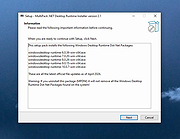 |
 |
Net Disabler v1.2 Net Disabler v1.2 A free, portable Windows utility to temporarily disable/enable Internet access. Net Disabler is a free, portable Windows utility that lets you quickly disable or re-enable your Internet connection using several blocking methods such as disabling the network adapter, DNS, proxy, or Windows Firewall. It shows the current connection status and provides simple controls, including taskbar menu actions, password protection, and selectable network adapters, so you can turn Internet access off and on without installing services or drivers. This utility is useful for reducing distractions, testing software offline, or creating a temporary air gap for security or productivity. Features: • Disable Internet by turning off the network adapter • Disable Internet by changing DNS settings • Disable Internet by enabling a proxy • Disable Internet using Windows Firewall rules • Shows real-time Internet connection status • Works without installing drivers or services (portable) • Option to password protect settings • Ability to select specific network adapters • System tray menu for quick access • Simple one-click enable and disable controls • Multiple blocking methods can be used together for stronger isolation • Very small footprint and lightweight operation Supported operating systems: Windows 11, Windows 10, Windows 8.1, Windows 8, Windows 7, Windows Vista, Windows XP (both x86 & x64; firewall feature limited on XP) Supported languages: English, Turkish, German, Russian, French, Polish, Spanish, Czech, Korean, Slovenian, Chinese (Simplified), Chinese (Traditional), Hebrew, Italian, Hungarian, Greek, Swedish, Arabic, Thai, Romanian, Portuguese (Brazilian), Japanese, Persian, Vietnamese, Bulgarian, Dutch (Nederlands), Ukrainian, Slovak, Lithuanian Changes: v1.2 01-26-26 1.[FIXED] – “/E” command is deleting outbound IP rules from firewall. 2.[FIXED] – Both the text and the GUI are very small. 3.[FIXED] – The program window does not remember its ... |
|
6,057 | Jan 30, 2026 Sordum.org 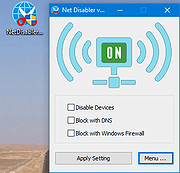 |
| Showing rows 1 to 3 of 3 | Showing Page 1 of 1 | 1 |
OlderGeeks.com Copyright (c) 2026
