|

|
Processed through Paypal No account required. |








Buy our over-priced crap to help pay the bills.



|
|
Processed through Paypal No account required. |
| Files | ||||
| File Name | Rating | Downloads | ||
 |
Audionaut v1.6.4 Audionaut v1.6.4 👉 A free, open-source audio editor for recording, cutting, arranging, and exporting multitrack audio. Audionaut is a free, open-source desktop audio editor and recorder for music, podcasts, and multitrack recordings. It combines a waveform timeline with reusable audio regions and individual track playlists, giving you several ways to build and rearrange a project. A region is a named section of source audio, while a clip places that region into your arrangement. You can create sections such as an introduction, verse, chorus, or ending, then reuse them wherever needed. Each track's playlist stays synchronized with its timeline, making it easier to rearrange sections without repeatedly cutting the original recording. Tracks can contain multiple audio channels. When you split a multichannel clip, its channels stay together in the resulting regions. This is useful when working with related microphone recordings or stems that need to remain aligned. Audionaut also includes audio analysis, automatic segmentation, pitch-preserving time stretching, and local stem separation. Its optional MCP integration allows compatible AI assistants to edit projects, while its command-line tools support scripted workflows. Features: • Multitrack arrangements: Layer recordings across multiple tracks, each with its own synchronized playlist. • Reusable regions: Name sections of audio and place them into the arrangement repeatedly without recreating each section. • Multichannel editing: Keep the channels of a recording together when cutting and rearranging clips. • Precise splitting: Cut at the playhead or split around a selected time range. • Drag-and-drop arranging: Move clips along the timeline, duplicate them, or drag saved regions into new positions. • Per-clip volume: Adjust the gain of individual channels within a clip. • Adjustable fades: Drag fade handles to create fade-ins, fade-outs, and crossfades with adjustable curves. • Pitch-preserving time stretching: Change ... |
 |
9 | Oct 09, 2026 Klaus Voltmer 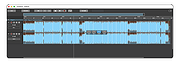 |
| Showing rows 1 to 1 of 1 | Showing Page 1 of 1 | 1 |
OlderGeeks.com Copyright (c) 2026
