|

|
Processed through Paypal No account required. |








Buy our over-priced crap to help pay the bills.



|
|
Processed through Paypal No account required. |
| Files | ||||
| File Name | Rating | Downloads | ||
 |
Eagle Mode v0.96.3 Eagle Mode v0.96.3 A free, zoomable user interface (ZUI) with file manager, file viewers, games, and more. This project is about a futuristic style of human-computer interaction, where the user can visit almost everything simply by zooming in. It features a portable C++ programming interface for developing such ZUIs, and it features the Eagle Mode application, which provides a virtual cosmos with plugin applications. The most important one is the professional file manager with its rich, scriptable command set. It integrates file viewers for most of the common file types, as well as an audio/video player. Furthermore, the virtual cosmos contains a chess game, a netwalk game, a 3D mines game, a multi-function clock, a stock watchlist, some fractals, and a Linux kernel configurator in form of a kernel patch. An autoplay function allows to show or play things one ofter the other (e.g. slideshow of picture files or document pages, playing of multiple audio or video files). The core of Eagle Mode supports fast anti-aliased graphics, virtually unlimited depth of zooming, extensive mouse and keyboard control, animated navigation with kinetic effects (inertia, friction, and magnetism), popup-zoomed control views, editable bookmarks, in-place help texts, and working with multiple windows. Eagle Mode is distributed under the GNU General Public License version 3. View Documentation. Screenshots File Manager and File Viewers Games Fractals Clock Linux Kernel Configurator (emLKC) Stock Watchlist (emStocks) This download is for the Windows 64 bit version (very bottom of page). All other download assets are below: Binary package for installation on x86_64 compilations of Debian ≥ 9.0, Ubuntu ≥ 18.04, Mint ≥ 19, and other up-to-date Debian-based systems. After downloading you can install the package by running the following command as root user in the download directory (the "./" in front of the file name is required): apt-get install ./eaglemode_0.96.3-1_amd64.deb eaglemode_0.96.3-1_amd64.deb Binary package for installation on x86_64 compilations of openSUSE Leap ≥ ... |
 |
1,554 | Mar 13, 2025 Oliver Hamann 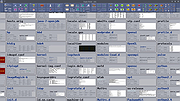 |
 |
Notepad3 v7.26.602.1 Notepad3 v7.26.602.1 👉 A fast, lightweight, Scintilla-based text editor for Windows with syntax highlighting. Notepad3 is a free, open-source text editor built as a smarter, more capable replacement for Windows Notepad. It is based on the Scintilla editing component and Lexilla lexer library, giving it powerful syntax highlighting, fast performance, a small memory footprint, and practical tools for everyday text editing, coding, scripting, configuration files, logs, and more. Features: • Fast and lightweight Windows text editor • Syntax highlighting for over 55 programming, scripting, markup, and configuration languages • Code folding with toggle-all support • Bookmarks for quick navigation • Word auto-completion • Find and Replace with PCRE2 regular expression support • grepWin integration for searching across files • Encoding detection and character encoding support • File change monitoring • AES-256 Rijndael encryption and decryption • Dark mode support with customizable colors • High-DPI aware interface with high-definition toolbar icons • Customizable status bar and toolbar labels • Portable edition available • Includes MiniPath file browser plugin Supported operating systems: • Windows 8.1, Windows 10, Windows 11 Supported languages: Afrikaans, Belarusian, Chinese Simplified, Chinese Traditional, Dutch, English US, English UK, Finnish, French, German, Greek, Hindi, Hungarian, Indonesian, Italian, Japanese, Korean, Polish, Portuguese Brazil, Portuguese Portugal, Russian, Slovak, Spanish, Swedish, Turkish, Vietnamese Supported Programming Languages Apache, ASP, Assembly, AutoHotkey, AutoIt3, AviSynth, Awk, Bash, BAT, C, C++, C#, CGI, CMake, CoffeeScript, CSS, CSV, D, Dart, DIFF, Fortran, Go, HTML, INF, INI, Inno Setup, Java, JavaScript, JSON, Julia, KiXtart, Kotlin, LaTeX, Lua, Makefiles, Markdown, MATLAB, Nim, NSIS, Pascal, Perl, PHP, PowerShell, Python, REG, Resource, R-S-SPlus Statistics, Ruby, Rust, Shell, SQL, Tcl, TOML, VB, VBScript, Verilog, VHDL, XHTML, XML, YAML and improved support for NFO ANSI. Changes: v7.26.426.1 04-26-26 • Paste-board minimization (/B /I) escape hatch if Ctrl-key held down. • PasteBoard: defer minimize on /B + /I startup so auto-pasted clipboard is visible briefly. • PasteBoard: opt-out ‘Don’t ask again’ on closing modified untitled documents. • Feat: /B auto-pastes current clipboard ... |
|
5,116 | Jun 10, 2026 Rizonetech Pty Ltd. 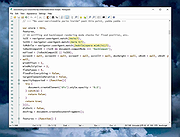 |
|
Open UWP Apps in Full Screen Mode Open UWP Apps in Full Screen Mode Small script to easily open UWP apps like Microsoft Edge in full screen (kiosk) mode. Starts an UWP app and sends Windows key, Left Shift, Return keystroke to the active window to open in in Full Screen Mode. |
|
5,991 | May 30, 2017 _Ruud 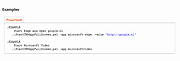 |
|
Revo Uninstaller Free Portable v2.7.2 Revo Uninstaller Free Portable v2.7.2 👉 Uninstall programs, Windows apps, and leftover traces from a portable utility. Revo Uninstaller Free Portable helps you remove unwanted programs from Windows without installing the uninstaller itself. It runs the selected program’s built-in uninstaller first, then scans for leftover files, folders, and Windows Registry entries that may remain behind after a normal uninstall. Features: • Portable version requires no installation • Uninstall regular desktop programs • Remove Windows Apps • Scan for leftover files, folders, and Registry entries • Hunter Mode for managing visible programs, shortcuts, tray icons, and startup items • Autorun Manager to control Windows startup items • Junk Files Cleaner • Windows Tools shortcut panel • Browsers Cleaner • MS Office Cleaner • Windows Cleaner • Evidence Remover • Unrecoverable Delete for permanently erasing files and folders Supported operating systems: • Windows 7, Windows 8, Windows 8.1, Windows 10, Windows 11, Windows Server Editions Supported languages: English, German, French, Italian, Portuguese, Brazilian Portuguese, Russian, Polish, Spanish, Dutch, Norwegian, Swedish, Hindi, Japanese, Chinese, Korean Changes: v2.7.2 10-06-26 Improved – Scanning and safety algorithms for leftovers Fixed minor bugs Updated language files Note: This file has one hit on VirusTotal. We have confirmed this to be a false positive. The file is safe. Click here to visit the author's website. |
|
10,330 | Oct 09, 2026 VS Revo Group 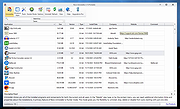 |
| Showing rows 1 to 4 of 4 | Showing Page 1 of 1 | 1 |
OlderGeeks.com Copyright (c) 2026
