|

|
Processed through Paypal No account required. |








Buy our over-priced crap to help pay the bills.



|
|
Processed through Paypal No account required. |
| Files | ||||
| File Name | Rating | Downloads | ||
 |
EarTrumpet v2.3.0.0 EarTrumpet v2.3.0.0 👉 A free, powerful per-app volume mixer and audio device controller for Windows. Features • Visualize audio with multi-channel aware peaking • Standalone volume mixer • Move apps between playback devices • Default playback device management • Automatic updates via the Microsoft Store • Support for light/dark mode and all accent colors • Configurable hotkeys • Modern context menus • Growing multilingual support Supported operating systems: Windows 10/11 Supported languages: Chinese (Simplified), Chinese (Traditional), Chinese (Traditional, Hong Kong SAR), English (United States), French, German, Spanish, Italian, Portuguese, Dutch, Afrikaans, Amharic, Arabic, Norwegian, Czech, Polish, Swedish, Romanian, Turkish, Japanese, Korean, Russian, Thai, Vietnamese Changes: v2.3.0.0 06-11-25 Added setting to turn on/off ability to change volume with the scroll wheel anywhere (thanks @Tester798!) Added setting to turn on/off ability to change volume with the scroll wheel when hovering over the EarTrumpet icon (thanks @Tester798!) Added new community settings area Added new community setting to turn on/off use of a logarithmic volume scale (thanks @yonatan-mitmit!) Added legacy shortcuts to the context menu pointing to [App volume and device preferences] / [Volume mixer] Added ability to use the Windows key in shortcuts (thanks @iamevn!) Added linguistic display name sorting for audio devices (thanks @Tester798!) Added a workaround for Windows Search (CortanaUI) showing a default asset (X) icon Fixed an issue where installation of EarTrumpet via AppInstaller would fail if the Visual C++ libs package was not installed Fixed an issue where EarTrumpet tooltips were not updating live while scrolling the mouse ... |
 |
1,407 | Jun 02, 2026 File-New-Project 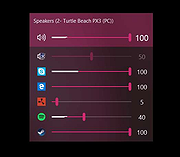 |
|
FineTune v1.9.0 FineTune v1.9.0 👉 Per-app volume control, audio routing, multi-device output and EQ for macOS. FineTune is a free and open-source macOS menu bar app that lets you control the volume of individual apps, boost quiet apps up to 4x, route apps to different speakers, use multi-device output, adjust input and output devices, and shape sound with a 10-band EQ and headphone correction. Features: • Per-app volume sliders and mute controls • Per-app volume boost with 2x, 3x and 4x gain presets • Global hotkeys for app volume up, app volume down, app mute and popup toggle • Configurable volume step size • Keyboard navigation for the menu bar popup • Multi-device output support • Route apps to different audio outputs • Auto-restore app volume, routing and EQ when devices reconnect • 10-band EQ with presets • Custom user EQ presets • AutoEQ headphone correction support • Loudness compensation using ISO 226:2023 equal-loudness contours • Input device and microphone level control • macOS alert volume control • Bluetooth device management from the menu bar • External monitor speaker control via DDC • Dynamic menu bar icon styles • Light and Dark theme support • Adjustable popup size: Compact, Comfortable or Spacious • URL schemes for automation Supported operating systems: • macOS 15.0 Sequoia or later Supported languages: English, Simplified Chinese Changes: v1.9.0 07-09-26 Pick your own icon for any device, and the menu bar icon stops nudging its neighbors. Two DDC fixes land alongside, including the crash on external-monitor volume changes that shipped in v1.8.0. New Features Choose Any Device's Icon Open edit mode in the popup and click a device's icon to pick a new one from a catalog of 85 symbols across five categories — Headphones & Earbuds, Speakers, Computers & Displays, Microphones, and Connectors & Other — or search by keyword ("soundbar", "projector", "aux"). A Suggested section leads with FineTune's automatic guess from the device's name and connection type, so the right ... |
|
824 | Oct 07, 2026 Ronit Singh 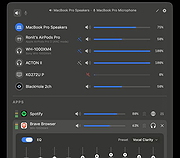 |
|
OBS Studio v32.2.2 OBS Studio v32.2.2 👉 Free and open source live streaming and screen recording software. OBS Studio is software designed for capturing, compositing, encoding, recording, and streaming video content efficiently. It provides a powerful real-time video and audio production environment that allows users to capture gameplay, desktop activity, webcams, and multiple input sources while combining them into professional-looking broadcasts or recordings. OBS Studio uses a scene-based workflow that lets users build complex layouts using sources such as game capture, display capture, window capture, images, text, media files, browsers, webcams, and capture cards. Scenes can be switched instantly or transitioned smoothly during live broadcasts, making it ideal for livestreaming, tutorials, presentations, gaming streams, and video production. The program includes a full audio mixing system with per-source volume controls, filters such as noise suppression and noise gate, and monitoring options for precise audio management. Studio Mode allows creators to preview scene changes before pushing them live, reducing mistakes during broadcasts. OBS Studio also supports hardware-accelerated encoding, customizable streaming and recording settings, hotkeys for fast control, plugin extensions, and integration with major streaming platforms such as Twitch, YouTube, and others. Because it is open source and highly extensible, OBS Studio has become one of the most widely used broadcasting tools for content creators, educators, and professionals. Features: • Free and open source software for live streaming and screen recording • Scene and source based workflow for arranging games, webcams, windows, images, text, and capture devices • Built-in audio and video filters including noise suppression, noise gate, gain, chroma key, crop/pad, color correction, and sharpen • Studio Mode for preparing scene changes before sending them live • Scene transitions such as Fade, Cut, Swipe, Slide, Fade to Color, and Luma Wipe • Hardware encoder support options depending on available system hardware and platform configuration • New Audio Mixer, new Add Source dialog, WebRTC simulcast support, and expanded ... |
|
7,217 | Aug 19, 2026 OBS Project 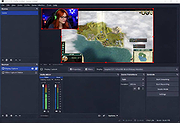 |
| Showing rows 1 to 3 of 3 | Showing Page 1 of 1 | 1 |
OlderGeeks.com Copyright (c) 2026
