|

|
Processed through Paypal No account required. |








Buy our over-priced crap to help pay the bills.



|
|
Processed through Paypal No account required. |
| Files | ||||
| File Name | Rating | Downloads | ||
 |
Account Profile Fixer v1.9.0.0 Account Profile Fixer v1.9.0.0 👉 Repair broken Windows user profiles without reinstalling or resetting Windows. Account Profile Fixer helps repair severe Windows account profile problems by replacing a damaged user account with a new working one while keeping the same user name, profile folder, privileges and user data. It can be useful when Microsoft Edge will not work, Windows Store apps are broken, Windows Explorer is not showing the Start screen or notification area, or a user cannot log in properly. APF automates the normally tedious process of creating a new user account, moving data from the old profile, deleting the broken account and logging back into the repaired profile. Features: • Repairs severe user profile problems without a full Windows reinstall • Creates a new user account with the same name, profile directory and privileges • Moves user data from the broken profile to the repaired profile • Automatically deletes the old broken user account • Uses a temporary admin account during the repair process • Automatically reboots and logs into the repaired account when finished • Optional preservation of Windows Store app package data • Optional preservation of Windows system AppData settings • Displays a repair operation log when complete • Free software supported by donations Supported operating systems: • Windows 7, Windows 8, Windows 8.1, Windows 10, Windows 11 • 32-bit and 64-bit Supported languages: English Changes: v1.9.0.0 09-14-24 Not provided. Click here to visit the author's website. |
 |
7,017 | Jun 14, 2026 Carifred  |
|
Classic Auto Login v1.0.0.1 Classic Auto Login v1.0.0.1 Bring back the Auto Login feature in Windows 10 and 11. Microsoft changed the setup option of automatic login from version 2004 of Windows 10, for security reasons. The operating system can still log in automatically, but the setup interface is usually not available. Classic Auto Login offers an alternative means of setting up auto login. Classic Auto Login is the software implementation of a method recommended and documented by Microsoft. The documentation mentioned on this page is available in several languages. There is only one advantage of operating system level auto login, namely convenience. In all other respects, it raises serious issues due to security reasons. The issues can be divided into two groups: 1) All the data and software that are available on the computer can be accessed, run, edited, deleted by practically anyone who has physical access to the computer. 2) The password of auto login is stored in the Registry in an unencrypted text format, so you can obtain the password knowing the required method. Microsoft has officially made available a similar software (Autologon), which stores the password in an encrypted format at another place in the Registry. Despite the encryption, this method unfortunately provides no additional security compared to Classic Auto Login, as point one above is also fulfilled by this software. So the current user of the computer can find out the password if he/she uses the appropriate method. The issues described so far are also present during the configuration by netplwiz, which is available as part of the operating system. The password stored by netplwiz can be retrieved in the same way as in case of Autologon. So using auto login is not recommended in most cases. Its use is only justified in case of computers exclusively used for gaming and/or media consumption. There are some ... |
|
4,670 | Apr 22, 2024 WinTools 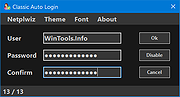 |
|
Password Safe v3.72.2 Password Safe v3.72.2 👉 Secure, open-source password manager for storing logins in an encrypted database. Password Safe helps you securely store usernames, passwords, and other login details in an encrypted database protected by a single master password. Designed by Bruce Schneier, it focuses on simple, local password management while offering tools such as AutoType, password policies, import and export options, database compare and merge functions, filters, reports, and multiple viewing modes for organizing entries. Features: • Stores usernames, passwords, and related notes in an encrypted database • Uses one master password to unlock and access all stored entries • Copies passwords, usernames, notes, and authentication codes from the toolbar • Supports AutoType for entering credentials into other windows • Can browse to a stored URL and execute AutoType • Includes password policy management and password generation options • Supports password history • Lets you organize entries in nested tree or flattened list views • Supports filters, subviews, reports, and search tools • Can import from text, XML, and KeePass V1 databases • Can export to text, XML, and older Password Safe database formats • Includes compare, merge, and synchronize tools for safes • Supports keyboard shortcuts and drag-and-drop style Dragbar entry actions • Open source and designed for straightforward local password management Supported operating systems: • Windows 7 and later • macOS 10.14 Mojave and later • Linux distributions with available packages • FreeBSD Supported languages: Arabic, Czech, Chinese, Danish, Dutch, French, German, Hungarian, Italian, Korean, Polish, Portuguese (Brazilian), Russian, Slovak, Slovenian, Spanish, Swedish, Turkish Changes: v3.72.2 09-06-26 Bugs Fixed GH1898 Arrow keys can now be used to navigate between Custom Value rows. GH1892 Regression: In the Add/Edit dialog's Basic tab, Alt-N (or the equivalent for non-English langauges) set the keyboard focus to the Notes field. SF1636 Minor UI issues in Custom Values display (column width) and edit (use correct font). ... |
|
8,498 | Sep 15, 2026 Bruce Schneier 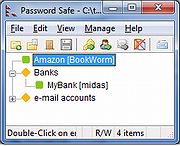 |
| Showing rows 1 to 3 of 3 | Showing Page 1 of 1 | 1 |
OlderGeeks.com Copyright (c) 2026
