|

|
Processed through Paypal No account required. |








Buy our over-priced crap to help pay the bills.



|
|
Processed through Paypal No account required. |
| Files | ||||
| File Name | Rating | Downloads | ||
 |
Bean Network Tester v0.8.0 Bean Network Tester v0.8.0 👉 Simulate slow, unreliable, or broken network conditions on Windows to test how applications respond. Bean Network Tester is a free and open-source network testing and emulation tool for Windows designed for software testers, developers, QA professionals, and power users. It deliberately introduces poor network conditions such as latency, jitter, packet loss, bandwidth restrictions, connection resets, outages, and other problems so you can see how an application behaves when its connection is less than perfect. Traffic can be targeted by process name, PID, IP address, port, or address family, allowing one application to be tested without necessarily disrupting the rest of the computer. The program uses the WinDivert driver to intercept and manipulate network traffic and provides both a graphical interface and a command-line interface suitable for scripts and CI/CD testing. Along with network impairment, it includes live statistics, throughput monitoring, a searchable connections table, event logging, configurable profiles and presets, reproducible seeded tests, CSV exports, and reproduction reports. Bean Network Tester is portable, requires administrator privileges to manipulate network traffic, and contains no telemetry or update-checking network client. It is released under the GNU General Public License v3.0. Features: • Add fixed or random network latency and jitter • Introduce latency spikes to simulate unstable connections and packet reordering • Drop packets randomly or in bursts to reproduce real-world wireless network failures • Corrupt or duplicate packets • Limit download and upload bandwidth in KB/s • Simulate network buffering and queuing delays • Tear down existing TCP connections using TCP resets • Prevent new connections from being established • Simulate a completely dead network link • Flap the connection on and off to reproduce intermittent outages • Simulate MTU black holes and NAT-style idle timeouts • Block selected IP addresses or ports with the built-in firewall controls • LAN mode allows local network traffic while blocking Internet access • Internet-only mode blocks ... |
 |
131 | Oct 08, 2026 DonislawDev  |
|
BoostPing v1.7.2 BoostPing v1.7.2 👉 Makes your online games feel snappier. BoostPing analyzes your active network and applies gaming-focused network tweaks, including changing the network throttling index and disabling the Nagle algorithm. Features: • Analyzes and configures the active network • Changes the network throttling index • Disables the Nagle algorithm • Portable, no installation required • Freeware for office, home, government office and school use Supported operating systems: • Windows 10, Windows 11 Supported languages: English, German, Esperanto, French, Italian, Japanese, Polish, Portuguese, Russian, Slovak, Swedish, Thai, Turkish, Vietnamese, Chinese Changes: v1.7.2 09-16-26 Fixed an issue where some users could lose their previous settings after stopping optimization Improved restoration to keep unselected settings unchanged Improved reliability so remaining changes can be reverted after an unsuccessful setup Improved compatibility for safely stopping optimization started in previous versions Note: This file has one hit on VirusTotal. We have confirmed this to be a false positive. The file is safe. Click here to visit the author's website. |
|
1,265 | Oct 05, 2026 kilho.net 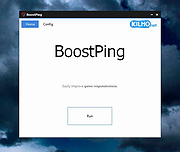 |
 |
Wagnardsoft Tools (WTools) v1.0.9.5 Wagnardsoft Tools (WTools) v1.0.9.5 👉 Clean temporary files, repair Windows, and manage system settings from one utility. Wagnardsoft Tools (WTools) combines Windows cleanup, repair, monitoring, and maintenance features in one application. It finds unused Registry entries, removes temporary files from Windows and browsers, and helps repair corrupted system files. Its Home screen shows hardware, storage, and the status of selected performance settings. Beyond cleanup, WTools offers SSD TRIM, DPC latency monitoring, a performance overlay, Windows Update controls, and management of Microsoft Store apps. Advanced users can open Command Prompt and Registry Editor with SYSTEM privileges. Review the selected items before cleaning or changing Windows settings. Features: • Scan for unused Registry entries, including interface, class, and installer issues. • Select additional Registry categories for privacy traces and orphaned firewall rules. • Remove temporary files from Windows, the current user, and browsers. • Repair corrupted Windows system files. • View CPU, RAM, GPU, motherboard, operating system, and storage information. • Monitor DPC latency and view a chart covering the last 1, 5, or 15 minutes. • Display performance information in an overlay. • Run SSD TRIM with an adjustable optimization threshold. • Enable or disable Message Signaled Interrupts for supported NVIDIA cards before the RTX 3000 series. • Open Command Prompt and Registry Editor with SYSTEM privileges. • Manage Microsoft Store apps and hidden Windows updates. • Clean superseded components from the Windows WinSxS folder. • Adjust interface size from 100% to 150%. Supported operating systems: • Windows 7 SP1 with Extended Security Updates, Windows 8, Windows 8.1, Windows 10, Windows 11 Some features, including DPC latency monitoring, do not work on Windows 7. Supported languages: English, French, Spanish, German, ... |
|
4,111 | Sep 28, 2026 Wagnardsoft 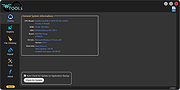 |
| Showing rows 1 to 3 of 3 | Showing Page 1 of 1 | 1 |
OlderGeeks.com Copyright (c) 2026
