|

|
Processed through Paypal No account required. |








Buy our over-priced crap to help pay the bills.



|
|
Processed through Paypal No account required. |
| Files | ||||
| File Name | Rating | Downloads | ||
 |
Display Hot Keys v2.0.0 Display Hot Keys v2.0.0 Instantly apply display resolution, bit depth, refresh rate, scaling mode, and DPI scale percentage with user-defined hot keys. About The Project This project was created to circumvent the tedious navigation of the Windows settings menus to change display settings. With Display Hot Keys, the display resolution, bit depth, refresh rate, scaling mode, and DPI scale percentage can be changed for each connected display with user-defined hot keys. Common Use Cases • Switch refresh rates to quickly enable the Black Frame Insertion or Backlight Strobing capabilities of the display. • Quickly switch between resolutions with different aspect ratios. • Immediately apply a resolution without entering the in-game menus for video game benchmarking purposes. • Enlarge or shrink the elements on screen by instantly changing the DPI scale percentage. • Instantly set a display mode while in a video game. (This is useful if a video game does not support changing the resolution or refresh rate while in-game.) Getting Started This application was made only for the Windows platform. Display Hot Keys also uses elevated privileges to set display modes while in video games. Therefore, if you have UAC enabled, you will get a UAC prompt upon launching the application. If you no longer wish to see this prompt, you can disable UAC. The sections that follow will help you get the application up and running on your PC! Prerequisites • Windows 10 x64 or Windows 11 x64 operating system. • If using multiple displays, then the “Multiple displays” setting must be set to “Extend these displays” in the Windows “Display” settings menu! Installation This application will be distributed as a portable package and as an installer. Portable • Download the zip ... |
 |
1,314 | Nov 28, 2025 Jonathan Miller 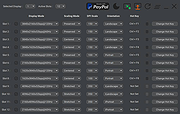 |
 |
Extra Keys Pro v3.0.0 Extra Keys Pro v3.0.0 Type any accented characters for French, German, Spanish, Portuguese, Italian, Scandinavian and many other languages. Also Cyrillic, Greek and many other special symbols. This small Windows only desktop tool enables easy input of letters and symbols that may not appear on your normal keyboard. Simply an alternative to to other methods such as the Windows character map. Many people have found Extra Keys a convenient, easy option and it requires no configuration changes to your system. A mouse click on a letter button types it directly into the selected application, at the current cursor position. The character is also copied to the Clipboard. In some situations, typing directly into another program may not work but the character can still be inserted by simply using Paste. Choice of 'key sets' - characters are grouped into regional and function sets to keep the tool panel small, but with a very large range quickly available. When characters are entered into your application, most will display correctly with common Windows fonts. Some of the more specialised ones may need an appropriate font choice. Safe to use - Extra Keys synthesizes keystrokes, exactly as if entered from the real keyboard. It does nothing else and does not interfere with the system in any other way. It is a portable appliction program with no special requirements. Small, simple and minimal - the on-screen panel of keys is designed to be as compact as possible. A 'more/less' button enables rapid display of an expanded panel with additional punctuation marks and special symbols. The program is self-contained and lightweight. Quick to access - the button panel window minimizes to a system-tray icon, so always available at a single click. The icon may optionally be loaded at Windows startup. This tool has always been included as part of our Plant Base software, ... |
|
3,806 | May 14, 2023 Deeproot Software 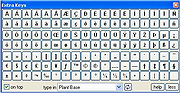 |
|
KeyTweak Portable v2.3.0 KeyTweak Portable v2.3.0 👉 Remap, disable or reassign keyboard keys through a simple visual interface. KeyTweak Portable is a free Windows keyboard-remapping utility that lets you change the function of individual keys without manually editing the Windows Registry. Its visual keyboard displays 126 numbered key positions, allowing you to select a key and assign it a different function or disable it entirely. KeyTweak writes changes to the Windows Scancode Map, making remappings available system-wide after Windows restarts. It can be used to disable unwanted keys, replace the function of a broken key, swap modifier keys or reassign multimedia and specialty buttons. Full Teach Mode and Half Teach Mode help identify keys that may not be easy to locate on the visual keyboard. The program does not need to remain running after changes are applied. Active mappings can be reviewed, undone individually or removed with the Restore All Defaults option. Remapping configurations can also be saved and loaded for later use. Features: • Visual keyboard with 126 numbered key positions • Remap individual keyboard keys • Disable unwanted or troublesome keys • Full Teach Mode for identifying and remapping physical keys • Half Teach Mode for quickly identifying a source key • Support for multimedia and specialty buttons • View currently active remappings • Undo the most recent remapping • Restore all keys to their default functions • Save and load remapping configurations • Applies remappings system-wide through the Windows Scancode Map • Does not require a background service after changes are applied • No install required • Manual included Note: A system restart is required after applying any remap for changes to take effect. Supported operating systems: • Windows 7, Windows 8, Windows 8.1, Windows 10, Windows 11 Supported languages: English Changes: v2.3.0 Not Provided Note: This file has two hits on VirusTotal. We have confirmed these to be false positives. The file is safe. Click here to visit the author's website. |
|
432 | Jul 15, 2026 Travis Krumsick & OlderGeeks.com 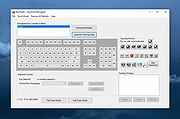 |
| Showing rows 1 to 3 of 3 | Showing Page 1 of 1 | 1 |
OlderGeeks.com Copyright (c) 2026
