|

|
Processed through Paypal No account required. |








Buy our over-priced crap to help pay the bills.



|
|
Processed through Paypal No account required. |
| Files | ||||
| File Name | Rating | Downloads | ||
 |
FluentTaskScheduler v1.9.0 FluentTaskScheduler v1.9.0 👉 A modern, fluent UI-based task scheduler for Windows. FluentTaskScheduler is a Windows task scheduling utility that provides a clean and modern interface for creating, managing, and monitoring scheduled tasks. Built with a fluent design approach, it simplifies interaction with the Windows Task Scheduler by offering an intuitive graphical interface while still exposing advanced configuration options. It is designed for both casual users and advanced users who want more control over automation without navigating the default Windows scheduler. Features: • Create, edit, and delete scheduled tasks with ease • Modern fluent UI design for improved usability • View detailed task information and status • Support for triggers, actions, and conditions • Simplified interface compared to Windows Task Scheduler • Lightweight and easy to use Supported operating systems: • Windows 10, Windows 11 Supported languages: English Changes: v1.9.0 07-26-26 New Features Task Chaining (Completion Actions): Chain tasks together and configure a task to automatically start other tasks when it succeeds or fails, right from a new "Completion Actions" section in the task editor. FluentTaskScheduler watches the Task Scheduler event log in real time (no polling) and includes built-in loop protection so you can't accidentally chain a task into itself. Global & Per-Task Snooze: Need a break? Hit "Snooze All Tasks" to pause task execution app-wide for 30 minutes, 1 hour, 3 hours, until your next reboot, or a custom time. You can also now snooze individual tasks (including a working custom time option). Optionally suspends scheduled triggers at the OS level too, and un-suspends exactly what it suspended when the snooze ends. Dashboard Analytics: The Dashboard got a serious upgrade: a 24-hour execution heatmap, a health-score ring, average/longest run duration, and a live, filterable execution log (Success / Failed / Snoozed). Task Template Library: 17 ready-to-deploy templates (temp cleanup, restore points, ... |
 |
1,091 | Sep 16, 2026 TRGamer-tech 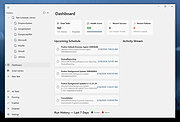 |
 |
FluentTweaker v26.06.02 FluentTweaker v26.06.02 👉 Customize and tweak Windows 10/11 with a modern Fluent-style interface. FluentTweaker is a lightweight Windows customization and tweaking utility designed to give users more control over the look, feel, and behavior of Windows 10 and Windows 11. Developed with a clean Fluent Design-inspired interface, the application provides access to a wide variety of system tweaks, personalization settings, and hidden Windows options from a centralized dashboard. FluentTweaker focuses on making Windows customization easier and more accessible by grouping settings into organized categories. Users can quickly adjust privacy features, taskbar behavior, File Explorer settings, visual effects, system performance options, and interface tweaks without manually editing the registry or searching through scattered Windows menus. The program is portable and designed to be simple to use while still offering advanced customization possibilities for enthusiasts who want a cleaner, more personalized Windows experience. Features: • Modern Fluent Design-inspired user interface • Centralized access to Windows 11 customization options • Privacy and telemetry configuration tools • Taskbar and Start menu customization tweaks • File Explorer behavior and appearance adjustments • System performance and visual effect optimizations • Quick access to hidden Windows settings • Portable application with no installation required • Lightweight and easy-to-use design • Registry-based tweaks presented through a graphical interface • Organized categories for simplified navigation • Designed specifically for modern Windows versions Supported operating systems: • Windows 11 • Windows 10 Supported languages: • English Changes: v26.06.02 06-06-26 Not provided Note for Windows 10 users: Microsoft's Windows App Runtime 2.x package is required and you will be offered the download. Click here to visit the author's website. |
|
837 | Jun 08, 2026 Builtbybel 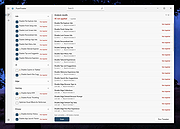 |
|
Open-Shell v4.4.198 Open-Shell v4.4.198 Bring back the classic Windows Start menu and shell experience. Open-Shell is an open-source continuation of the popular Classic Shell project, designed to restore familiar Windows interface elements that many users prefer over the newer default layouts found in modern versions of Windows. It gives users deep control over the Start menu appearance and behavior while adding classic Explorer enhancements that improve usability and workflow efficiency. Open-Shell can replicate the appearance and functionality of classic Start menus from Windows 7, Windows XP and even older Microsoft operating systems while still supporting the latest versions of Windows 10 and Windows 11. Users can customize nearly every aspect of the Start menu, including styles, skins, icons, button graphics, menu behavior, search settings, animations and shortcuts. Beyond the Start menu itself, Open-Shell includes Explorer enhancements such as a customizable toolbar, additional status bar information and improved file management conveniences. The software is lightweight, fast and designed to integrate naturally into Windows without consuming excessive system resources. The project is maintained by the open-source community and continues to receive updates for compatibility with new Windows releases and user-requested improvements. Features: • Restore classic-style Start menus on Windows 10 and Windows 11 • Multiple Start menu layouts inspired by Windows 7, XP and Classic styles • Highly customizable skins, themes and Start button replacements • Drag-and-drop organization for Start menu items • Fast application and file search functionality • Customizable menu behavior, animations and hotkeys • Explorer toolbar with common file operation buttons • Enhanced Explorer status bar information • Optional classic copy and file operation interface • Extensive settings for power users and advanced customization • Lightweight and low system resource usage • Community-maintained open-source project • Supports Windows ARM systems • Backup and restore Start menu configuration settings • Multi-language interface support Supported operating systems: • Windows 7 • Windows 8 • Windows 8.1 • Windows 10 • Windows 11 • Windows on ARM Supported languages: English, German, French, Spanish, ... |
|
7,089 | Jun 05, 2026 Open-Shell 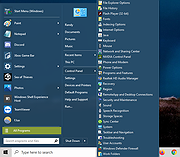 |
| Showing rows 1 to 3 of 3 | Showing Page 1 of 1 | 1 |
OlderGeeks.com Copyright (c) 2026
