|

|
Processed through Paypal No account required. |








Buy our over-priced crap to help pay the bills.



|
|
Processed through Paypal No account required. |
| Files | ||||
| File Name | Rating | Downloads | ||
 |
Everything v1.4.1.1032 Everything v1.4.1.1032 👉 Locate files and folders by name instantly. Everything is a fast Windows search engine that locates files and folders by filename instantly. It quickly indexes file and folder names, updates results in real time, and uses minimal system resources. Features: • Small installation file • Clean and simple user interface • Quick filename indexing • Quick searching • Minimal resource usage • Real-time updating • Content searching with the content: search function • Portable and installer versions available • x86, x64, ARM and ARM64 builds available • Multilingual support Supported operating systems: • Windows XP, Windows Vista, Windows 7, Windows 8, Windows 10, Windows 11 Supported languages: Afrikaans, Bosanski, Čeština, Dansk, Deutsch, English (AU), English (UK), English (US), Español (España), Español (Latinoamérica), Español (Venezuela), Estonia, Français, Hrvatski, Italiano, Kûrdî (Soranî), Kûrdî, Magyar, Nederlands, Norsk bokmål, Oʻzbekcha, Polski, Português (Brasil), Română, Shqip, Slovenčina, Slovenščina, Srpski, Suomi, Svenska, Tiếng Việt, Türkçe, Ελληνικά, Български, Македонски, Русский, Српски, Українська, עברית, عربي, ئۇيغۇرچە, বাংলা, فارسی, தமிழ், ภาษาไทย, བོད་ཡིག, 한국어, 日本語, 简体中文, 繁體中文 Changes: v1.4.1.1032 01-23-26 fixed a security issue with launching files ending with a dot (.) fixed an issue with the msi installer not stopping Everything. This download is for the Windows 64bit installer (very bottom of page). All other download assets are below: Windows Installer 32bit Everything-1.4.1.1032.x86-Setup.exe Windows Portable version: Everything-1.4.1.1032.x64.zip Everything-1.4.1.1032.x86.zip Everything-1.4.1.1032.ARM64.zip Everything-1.4.1.1032.ARM.zip Windows Lite installer version: Everything-1.4.1.1032.x64.Lite-Setup.exe Everything-1.4.1.1032.x86.Lite-Setup.exe Click here to visit the author's website. |
 |
7,616 | May 24, 2026 voidtools 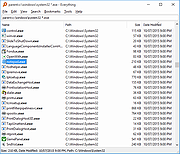 |
 |
Instant Eyedropper v2.0.0 Instant Eyedropper v2.0.0 Instant Eyedropper is a free color detection tool for webmasters that will identify and automatically paste to the clipboard the HTML color code of any pixel on the screen with just a single mouse click. Save your time Identification the color code of an object on the screen is usually an involved, multistep process: You press the Print Screen key to copy a screenshot to the clipboard, load a graphics-editing program, create a new file, paste the screenshot from the clipboard, zoom in on the object, use the "Pick Color" tool, and finally copy the HTML code of the color to the clipboard. Webmasters may repeat this operation many times a day. Just imagine how much time can be saved by using Instant Eyedropper to do the same thing With a Single Click! How it works 1) Move the mouse pointer to the Instant Eyedropper icon in the system tray. 2) Press and hold the left mouse button and move the mouse pointer to the pixel whose color you want to identify. 3) Release the mouse button. That's it. The clipboard now contains the color code - in HTML format (or any other format that you have previously specified). It can be pasted and used in any text or HTML editor or the Color Picker tool of Photoshop. Options Window Screenshot Supported color formats: HTML HEX Delphi Hex Visual Basic Hex RGB RGB Float HSV (HSB) HSL Long OS: WinXP thru Win10 Notice: The file instanteyedropper.exe has 4 false hits from the usual inaccurate detection engines on VirusTotal. The file is safe. Version 2.0.0 (Nov 2, 2020) Project becomes open source! ) multi-monitor fixes |
|
3,979 | Nov 23, 2020 Konstantin Yagola  |
| Showing rows 1 to 2 of 2 | Showing Page 1 of 1 | 1 |
OlderGeeks.com Copyright (c) 2026
