|

|
Processed through Paypal No account required. |








Buy our over-priced crap to help pay the bills.



|
|
Processed through Paypal No account required. |
| Files | ||||
| File Name | Rating | Downloads | ||
 |
HP USB Disk Storage Format Tool v2.2.3.0 HP USB Disk Storage Format Tool v2.2.3.0 A free portable tool to low-level format USB flash drives to Fat, Fat 32 or NTFS file systems. This is our go-to tool for recovering lost space on a USB flash drive. It also allows you to create DOS startup disks. The program must be ran as an administrator so right-click it's icon and choose "Run as Administrator". Click here to visit the author's website. |
 |
2,939 | Dec 29, 2023 HP 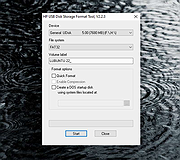 |
 |
ImageConverter v2.0.0 ImageConverter v2.0.0 👉 Change image formats in one click. ImageConverter lets you quickly convert image files by dragging them into the list and clicking Convert. It supports multiple popular formats, resizing by width, high-compression JPG saving with MozJPEG, and can recognize images by file signature even when they do not have an extension. Features: • Change various image formats • Save JPG with higher compression using MozJPEG • Resize images by specifying the width • Supports PDF, SVG, AI, PSD, PNG, JPG, GIF, WEBP, and TGA • Recognizes images with file signature information even without an extension • Simple drag-and-convert workflow Supported operating systems: • Windows 10, Windows 11 Supported languages: English, German, Esperanto, French, Italian, Japanese, Polish, Portuguese, Russian, Slovak, Swedish, Thai, Turkish, Vietnamese, Chinese Changes: v2.0.0 09-22-26 - Redesigned ImageConverter with a more convenient way to start converting - Improved image size selection for easier use - Improved the update experience so you can keep using your existing settings - Improved right-click conversion in Windows - Prepared support for more operating systems Usage: • Drag the image files you want to change into the list. • Click the Convert button below. Click here to visit the author's website. |
|
1,104 | Oct 06, 2026 kilho.net 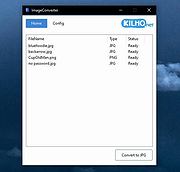 |
|
PortableApps.com Platform v30.5 PortableApps.com Platform v30.5 👉 Tool for packaging apps into the PortableApps.com format for easy distribution and portability. PortableApps.com Installer is a utility designed to create portable application packages that integrate seamlessly with the PortableApps.com Platform. It allows developers to bundle their software into a standardized portable format, enabling users to run applications from USB drives, cloud storage, or local folders without installation. PortableApps.com Installer simplifies the process of building portable apps by handling compression, directory structure, launcher configuration, and metadata. It works alongside the PortableApps.com Format specification to ensure compatibility with the platform, making it easy to distribute apps that can be carried and used anywhere. Features: • Creates PortableApps.com-compatible application packages • Automatically compresses and structures app files • Integrates with the PortableApps.com Platform and app directory • Supports standardized launcher and configuration handling • Uses PortableApps.com Format for consistency and compatibility • Enables easy distribution of portable software • Supports silent and automated packaging processes Supported operating systems: • Windows XP, Windows Vista, Windows 7, Windows 8, Windows 10, Windows 11 Supported languages: Afrikaans, Asturian, Bahasa Indonesia, Belarusian, Bulgarian, Catalan, Chinese Simplified, Chinese Traditional, Croatian, Czech, Danish, Dutch, English, Finnish, French, Galician, German, Greek, Hebrew, Hungarian, Italian, Japanese, Korean, Kurdish, Latvian, Lithuanian, Norwegian, Polish, Portuguese, Portuguese Brazilian, Romanian, Russian, Serbian, Slovak, Slovenian, Spanish, Swedish, Turkish, Ukrainian, Vietnamese, Welsh, Yoruba, Zulu, Ελληνικά Changes: Not Provided Click here to visit the author's website. |
|
9,690 | Oct 06, 2026 PortableApps.com 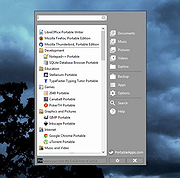 |
|
USB Disk Storage Format Tool v6.0 USB Disk Storage Format Tool v6.0 USB Disk Storage Format Tool utility allows you to quickly and thoroughly format virtually any USB flash drive with your choice of FAT, FAT32, exFAT, or NTFS partition types. FEATURES: Quick format and safe format. Erase all data and delete space on flash drives that cannot be removed in the traditional way. Remove any tracks of malicious software that may have infected it. Correct partition errors if any. Create volume label for USB disk drives. Scan drive for errors before formatting. Create a FAT32 volume larger than 32 GB. Tested with thousands of flash drives (Compact Flash, CF Card II, Memory Stick Duo Pro, SDHC, SDXC, Thumb Drive, Pen Drive) of the following brands, SanDisk, Kingston, Transcend, Corsair, HP, Sony, Lexar, Imation, Toshiba, PNY, ADATA, Verbatim, LaCie, Panda, Seatech, SDKSK9, Silicon Power, IronKey, and HDE. |
|
6,839 | Oct 16, 2019 Authorsoft 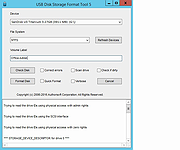 |
| Showing rows 1 to 4 of 4 | Showing Page 1 of 1 | 1 |
OlderGeeks.com Copyright (c) 2026
