|

|
Processed through Paypal No account required. |








Buy our over-priced crap to help pay the bills.



|
|
Processed through Paypal No account required. |
| Files | ||||
| File Name | Rating | Downloads | ||
 |
FluentTaskScheduler v1.8.1 FluentTaskScheduler v1.8.1 👉 A modern, fluent UI-based task scheduler for Windows. FluentTaskScheduler is a Windows task scheduling utility that provides a clean and modern interface for creating, managing, and monitoring scheduled tasks. Built with a fluent design approach, it simplifies interaction with the Windows Task Scheduler by offering an intuitive graphical interface while still exposing advanced configuration options. It is designed for both casual users and advanced users who want more control over automation without navigating the default Windows scheduler. Features: • Create, edit, and delete scheduled tasks with ease • Modern fluent UI design for improved usability • View detailed task information and status • Support for triggers, actions, and conditions • Simplified interface compared to Windows Task Scheduler • Lightweight and easy to use Supported operating systems: • Windows 10, Windows 11 Supported languages: English Changes: v1.8.1 05-05-26 New Features Integrated Script Editor: Introduced a built-in editor for managing and editing task scripts directly within the application, streamlining the task creation workflow. System Maintenance Quick Actions: Added dedicated quick actions to provide easy access to common system maintenance tasks from the dashboard. Fixes & Improvements ARM64 Portable Reliability: Resolved a critical startup crash in the ARM64 portable version by transitioning to a robust folder-based ZIP deployment, ensuring stability across all ARM64 devices (Fixing #5). Elevated Drag-and-Drop: Fixed an unhandled exception that occurred when performing drag-and-drop or file export operations while running the application with administrative privileges (Fixing #16). Localization Chinese Support: Added full Chinese (zh-CN) localization support to expand the applications accessibility. Special thanks to @Chan-Yuu for the contribution! Japanese Support: Added full Japanese (ja-JP) localization support to expand the applications accessibility. German Support: Added full Japanese (de-DE) localization support to expand the applications accessibility. Distribution Package Manager Updates: All distribution ... |
 |
775 | May 06, 2026 TRGamer-tech 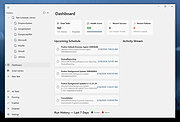 |
 |
FluentTweaker v26.06.02 FluentTweaker v26.06.02 👉 Customize and tweak Windows 10/11 with a modern Fluent-style interface. FluentTweaker is a lightweight Windows customization and tweaking utility designed to give users more control over the look, feel, and behavior of Windows 10 and Windows 11. Developed with a clean Fluent Design-inspired interface, the application provides access to a wide variety of system tweaks, personalization settings, and hidden Windows options from a centralized dashboard. FluentTweaker focuses on making Windows customization easier and more accessible by grouping settings into organized categories. Users can quickly adjust privacy features, taskbar behavior, File Explorer settings, visual effects, system performance options, and interface tweaks without manually editing the registry or searching through scattered Windows menus. The program is portable and designed to be simple to use while still offering advanced customization possibilities for enthusiasts who want a cleaner, more personalized Windows experience. Features: • Modern Fluent Design-inspired user interface • Centralized access to Windows 11 customization options • Privacy and telemetry configuration tools • Taskbar and Start menu customization tweaks • File Explorer behavior and appearance adjustments • System performance and visual effect optimizations • Quick access to hidden Windows settings • Portable application with no installation required • Lightweight and easy-to-use design • Registry-based tweaks presented through a graphical interface • Organized categories for simplified navigation • Designed specifically for modern Windows versions Supported operating systems: • Windows 11 • Windows 10 Supported languages: • English Changes: v26.06.02 06-06-26 Not provided Note for Windows 10 users: Microsoft's Windows App Runtime 2.x package is required and you will be offered the download. Click here to visit the author's website. |
|
452 | Jun 08, 2026 Builtbybel 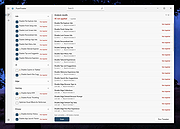 |
| Showing rows 1 to 2 of 2 | Showing Page 1 of 1 | 1 |
OlderGeeks.com Copyright (c) 2026
